
Guide Financial Advisors
Local SEO for Financial Advisors: A Practical Guide
Prospects who search for an advisor near them see a map before they see your website. This guide covers what decides who is on it, and how to get your firm there without breaking the rules that govern advisor marketing.
The short version
- Local results run on three things: relevance, distance and prominence. You control relevance and part of prominence. You do not control distance.
- Check eligibility first. Google requires a real location where clients can visit, or a service that travels to them. Virtual offices and mailboxes do not qualify.
- Your name, address and phone number must match everywhere, including your regulatory records.
- One page per office, with content that is actually about that office. Skip the city-swap pages.
- Reviews need a compliance answer before a process. Google’s rules are clear. Your regulator’s position on a review you asked for is a question for your compliance officer.
Why local matters for an advisory firm
Most advisors serve a region. Clients want to meet in person or at least know the firm is real and nearby, and searches like “financial advisor near me” and “financial planner near me” come with a map. Google Ads data for the US (October 2026) puts “financial advisor near me” at about 49,500 searches a month and “financial planner near me” at about 14,800. A small share of those will ever be yours, but the searchers have already decided they want a local firm.
Local SEO is one part of the wider work in our guide to SEO for financial advisors. It differs in one respect: the map results are driven mostly by your Google Business Profile, not by your website.
How Google decides who appears
Google says local results are mainly based on relevance, distance and prominence (explained by Google):
- Relevance is how well your profile matches the search. A complete, accurate profile helps.
- Distance is how far you are from the person searching, or from the location they named. You cannot change it.
- Prominence is how well known you are. Google lists links from other websites and the number and ratings of your reviews as contributors.
Google also says: “There’s no way to request or pay for a better local ranking on Google.” Anyone who sells you a guaranteed map ranking is promising something Google says is not for sale.
That puts the work in a clear order. Make sure you qualify, make the profile accurate and complete, keep your details consistent across the web, earn real mentions and reviews, and give Google a site page it can match to your office.
Step 1: Check that you qualify for a profile
Google’s Business Profile guidelines are strict about what counts as a business location, and advisors hit the limits more often than most.
- You need a real, staffed location or a service that goes to clients. A business with a location customers visit gets a profile. A business that only travels to customers can be a service-area business, which hides its address.
- Virtual offices are not eligible. P.O. boxes and remote mailboxes are not accepted. A co-working space qualifies only if it has clear signage, receives customers during business hours and is staffed by the business’s own staff.
- Individual advisors can have their own profile if they are public-facing and can be contacted at the verified location during stated hours. Where several advisors share an office, the firm gets the location profile and each advisor’s profile uses only that advisor’s name. A solo practitioner in a branded organization should use the format “brand: practitioner name”.
- Appointment-only offices should not list business hours, according to Google’s guidelines.
- Support staff and lead-generation agents are not eligible for their own profiles.
If your firm is remote and has no office clients can visit, you may not be eligible for a profile at all. That is not a failure. It means your local effort goes into the website, regional pages, directory listings and mentions instead. Do not use an address that does not match how you operate. Google may suspend the profile, and a suspended profile is hard to recover.
Step 2: Build the profile
Name
Use the name on your signage, stationery and website. Google does not allow taglines, trademark symbols, hours, phone numbers, URLs, service descriptions or location details in the name, and says including unneeded information could lead to suspension. “Smith Wealth Management” is fine. “Smith Wealth Management | Retirement Planning Charlotte NC” is not.
Category
Use as few categories as you can and make them as specific as possible. Google’s test is to complete the sentence “This business is a…”. Pick from Google’s category list the one that describes what your firm is, not a list of services it offers.
Address, hours and phone
Use the exact address a client would visit. Make sure the phone number is the one on your website. If you only see clients by appointment, follow Google’s guidance on hours.
Description, services, photos
Write the description in plain language: who you serve, how you are paid and where. Keep it factual and avoid superlatives such as “best” or “top”, for the same reasons these words are risky on your website. Add real photos of the entrance, the office and your team. Photos help clients recognize the place; Google does not say they affect ranking.
A compliance note
Treat your Business Profile like any other public page. The description, posts, Q&A answers and replies are public statements about your firm. Ask your compliance officer how they are reviewed and archived, and who is allowed to edit the profile.
Step 3: Keep your details consistent
Your firm’s name, address and phone number should be written the same way everywhere they appear. Search engines compare these details across your website, your profile and other sites to decide whether they are looking at the same business. Mismatches create doubt.
- Your website, in the footer and on the contact page.
- Your Business Profile.
- Your regulatory records. Check that the address in your firm’s regulatory filings matches. Prospects look you up there, and it is the first place a mismatch shows.
- Professional bodies and directories you belong to: your credential body, your trade association, your chamber of commerce.
- Social profiles where you list a location.
Pick one format and use it every time. “Suite 200” and “Ste. 200” are the same to a person and sometimes different to a system. When you move or change a number, update every one of these in the same week.
Step 4: One strong page per office
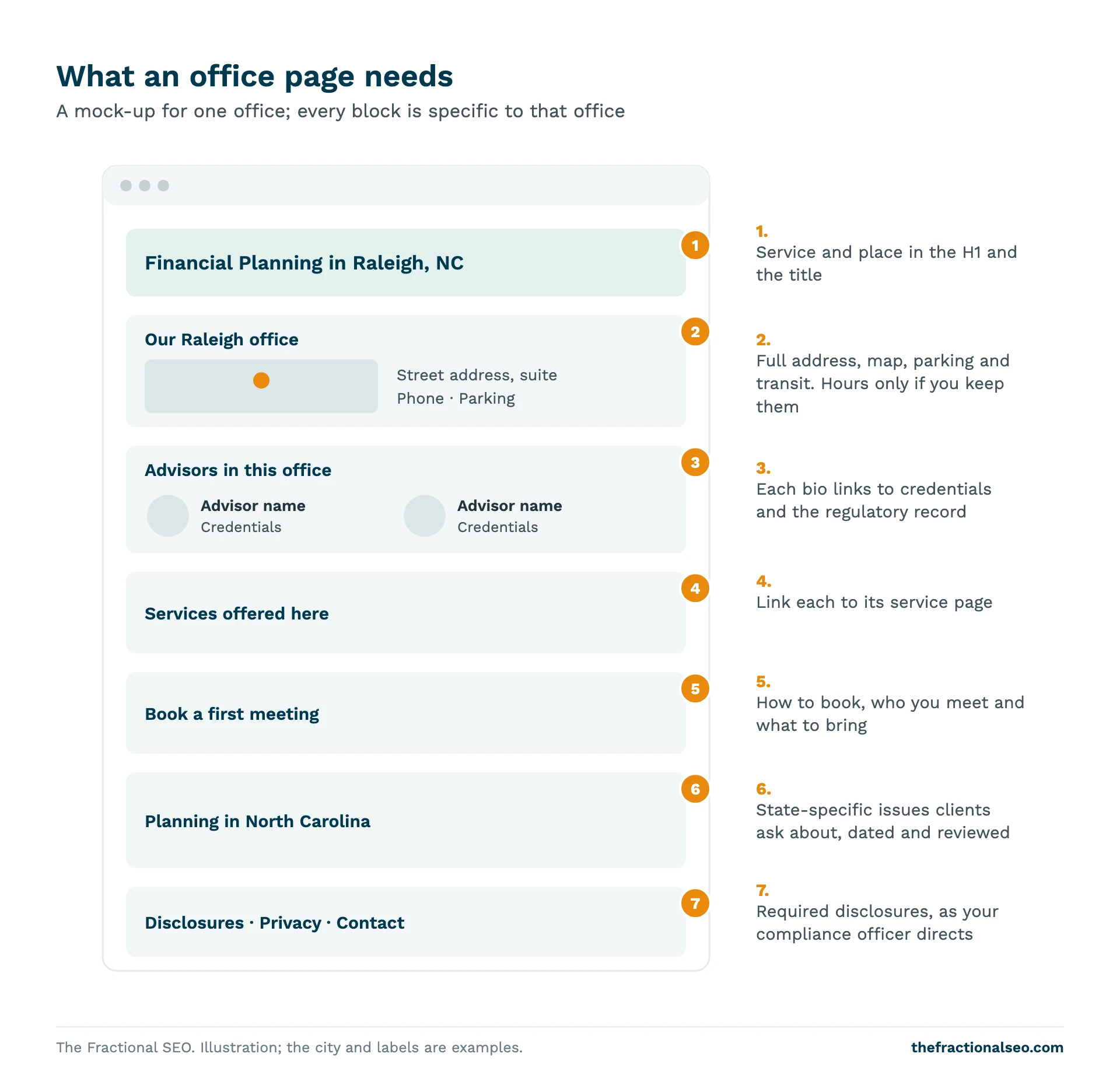
Your website should have a page for each office clients can visit. Each page needs content that is actually about that office:
- the full address, a map, parking and transit details;
- the advisors who work there, linked to their bio pages;
- the services offered at that location and who they are for;
- how to book a first meeting and what to expect;
- one or two local specifics: the region you serve, state-specific planning issues, local organizations you work with.
Do not create dozens of near-identical pages that only swap the city name. Google’s spam policy lists pages aimed at particular cities that funnel users to one page, and substantially similar pages, as doorway abuse. Pages like that also read as thin to prospects. If you serve three nearby towns from one office, mention them on the office page.
Step 5: Add local business markup
Structured data is code that tells Google what your page is about. Google’s local business markup guide lists name and address as required and recommends telephone, URL, opening hours and geographic coordinates. Use the most specific business type available. Schema.org has a FinancialService type, which is a kind of LocalBusiness, so it is a candidate for the most specific type. Your site developer should confirm it suits your firm.
Be clear about what this does. Google describes the markup as a way to tell it about your business details, and says it does not guarantee any feature will appear. It is not a ranking switch. Check the result with Google’s Rich Results Test, and make sure the markup matches what is visible on the page.
Step 6: Reviews, and the compliance question
Reviews feed prominence. In BrightLocal’s 2026 Local Consumer Review Survey of 1,002 US adults, 97% said they read reviews for local businesses and 41% said they always do. That is about local businesses in general, not advisors. Advisors have a second audience in mind: the prospect who has been referred and is double-checking.
Google’s rules on reviews apply to everyone. You may ask customers for reviews that reflect a real experience. You may not offer payment, discounts or free services for a review. You may not selectively solicit positive reviews or discourage negative ones. You should not pressure people to leave reviews at your office or ask them to include specific content.
For an advisor there is a separate layer, and we cannot answer it for you. The SEC Marketing Rule defines a testimonial as a statement by a current client about their experience with the adviser. It has disclosure and oversight conditions for testimonials, and its general prohibitions cover misleading or unbalanced advertising. Whether a review a client posts on Google at your request is a testimonial, and what you may do with it afterwards, is a question for your chief compliance officer. If you are a broker-dealer representative, FINRA Rule 2210 has its own testimonial disclosure requirements. Get the answer in writing before you start asking.
Before you reply to any review, ask the same person. A reply can confirm that someone is a client, and what you say becomes a public statement by the firm.
- Do not offer anything in return for a review.
- Do not choose whom to ask based on who is likely to be positive.
- Do not repost reviews on your website until compliance has said how.
- Do write down the policy you were given and follow it.
Third-party directories that collect reviews of advisors raise the same questions. A profile on one is not a substitute for compliance review.
Step 7: Links and mentions from local sources
Google lists links from other websites as part of prominence. Real mentions from real organizations are the safe way to get them:
- credential bodies and associations you belong to, with a profile that links to your site;
- your chamber of commerce and local business groups;
- local events, seminars and charities you take part in;
- local press and professional publications, when you have something useful to say;
- the pages of other professionals you work with, such as CPAs and estate attorneys, if they choose to link to you.
Avoid bought links, link networks and pay-to-be-listed directories that sell placement. Google can penalize them, and they work against the trust you are trying to show.
Step 8: Content with a local angle
Local content works when it answers questions people in your area actually have. State and local differences are the obvious source: how your state taxes retirement income, what happens to a home or business in your state at death, which local employers have pension or stock plans clients ask about. Write it for a person, date it, and send it through your usual review. Do not invent a “local” page for places you do not serve.
How to measure local results
- Business Profile performance. Calls, direction requests and website clicks from your profile are in Google’s performance reports.
- Search Console. Look at which local queries bring impressions and clicks to your office pages.
- Consultation requests. The number that matters. Ask each new inquiry how they first found you, and record the answer.
- Map pack checks. Search your main terms in a private window from a few places near your office. Results differ by location, so one check proves little.
Do not put client names or financial details into any tracking tool. Keep your privacy policy in step with whatever you track.
Common mistakes
- Adding keywords or a city to the business name.
- Using a virtual office or mailbox address.
- Letting your address or phone number differ between your website, profile and regulatory records.
- Creating a profile for every advisor, including support staff.
- Asking for reviews before getting a compliance answer.
- Copying the same page for every town.
- Paying anyone for a guaranteed map ranking. Google says rank is not for sale.
Frequently asked questions
Do I need a Google Business Profile?
If you have an office clients visit, yes. It is the main driver of map results. If you do not qualify, focus on your website, regional pages and mentions.
Can I list my home address?
Only if you actually work there and meet Google’s rules for the kind of business you are. Google’s guidelines also say a service-area business can hide its address. Check the guidelines and your firm’s own policies, and do not list an address that does not match how you operate.
How many reviews do I need?
There is no number to hit. Google says review count and ratings contribute to prominence, and it does not say how much. A steady flow of genuine reviews matters more than a total, and for advisors the first question is whether your compliance officer allows you to ask for them.
How long does local SEO take?
A new or corrected profile can show changes within weeks. Rankings that depend on links and reviews build over months. Nobody can promise a date.
Does structured data help me rank?
Google does not say it does. It helps Google understand your business details and is worth adding, but it is not a ranking switch.
Method and sources
This guide draws on Google’s Business Profile guidelines and ranking explanation, Google’s local business markup documentation, Google’s review policy, BrightLocal’s 2026 Local Consumer Review Survey, the text of the SEC Marketing Rule and FINRA Rule 2210, and Google Ads keyword data for the US, October 2026. We checked each figure against its source page in October 2026. It is general information, not legal or compliance advice.
If you would like senior SEO help that treats compliance as a design constraint, see how fractional SEO works for financial advisors.
More guides
The whole Financial Advisors library- Keyword Research for Financial Advisors: How to Choose the Right Keywords How an advisory firm chooses keywords: start from client questions, sort by intent, add data and…
- Financial Advisor Marketing Plan: A Compliance-First Guide A nine-step marketing plan for an advisory firm, built around the review process regulators expect, with…
- SEO for Financial Advisors: A Compliance-First Guide How an advisory firm gets found on Google when SEC and FINRA rules limit what its…