
Templates & Resource Financial Advisors
SEO Audit Checklist for Financial Advisors
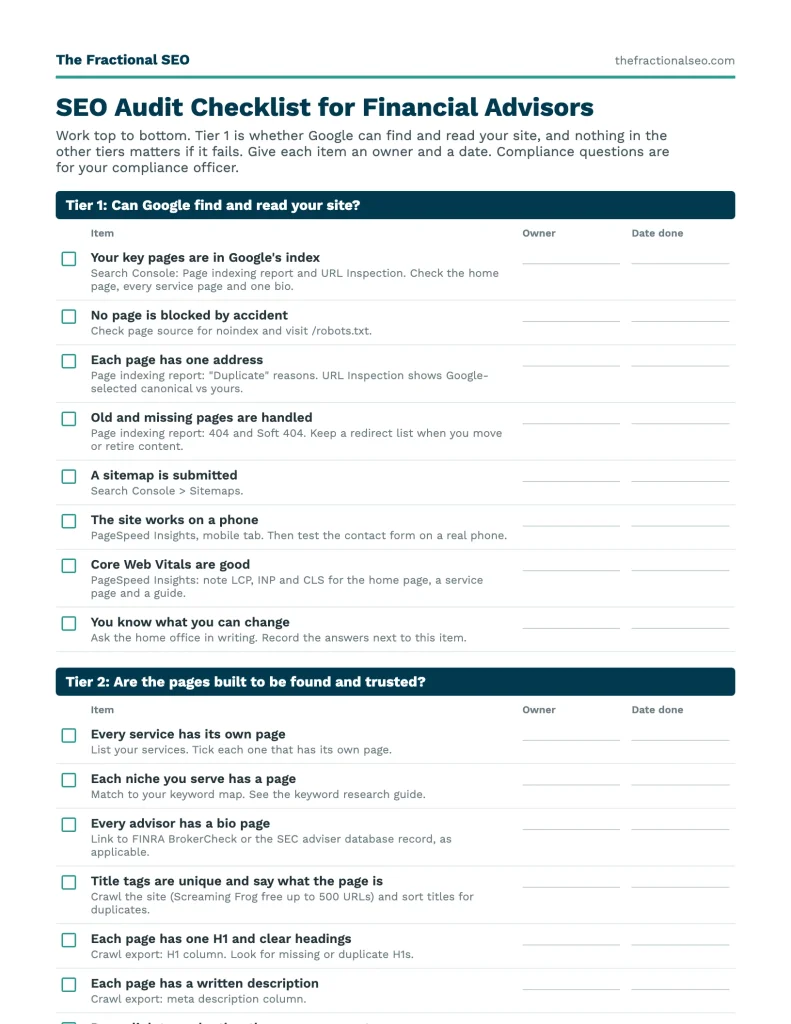
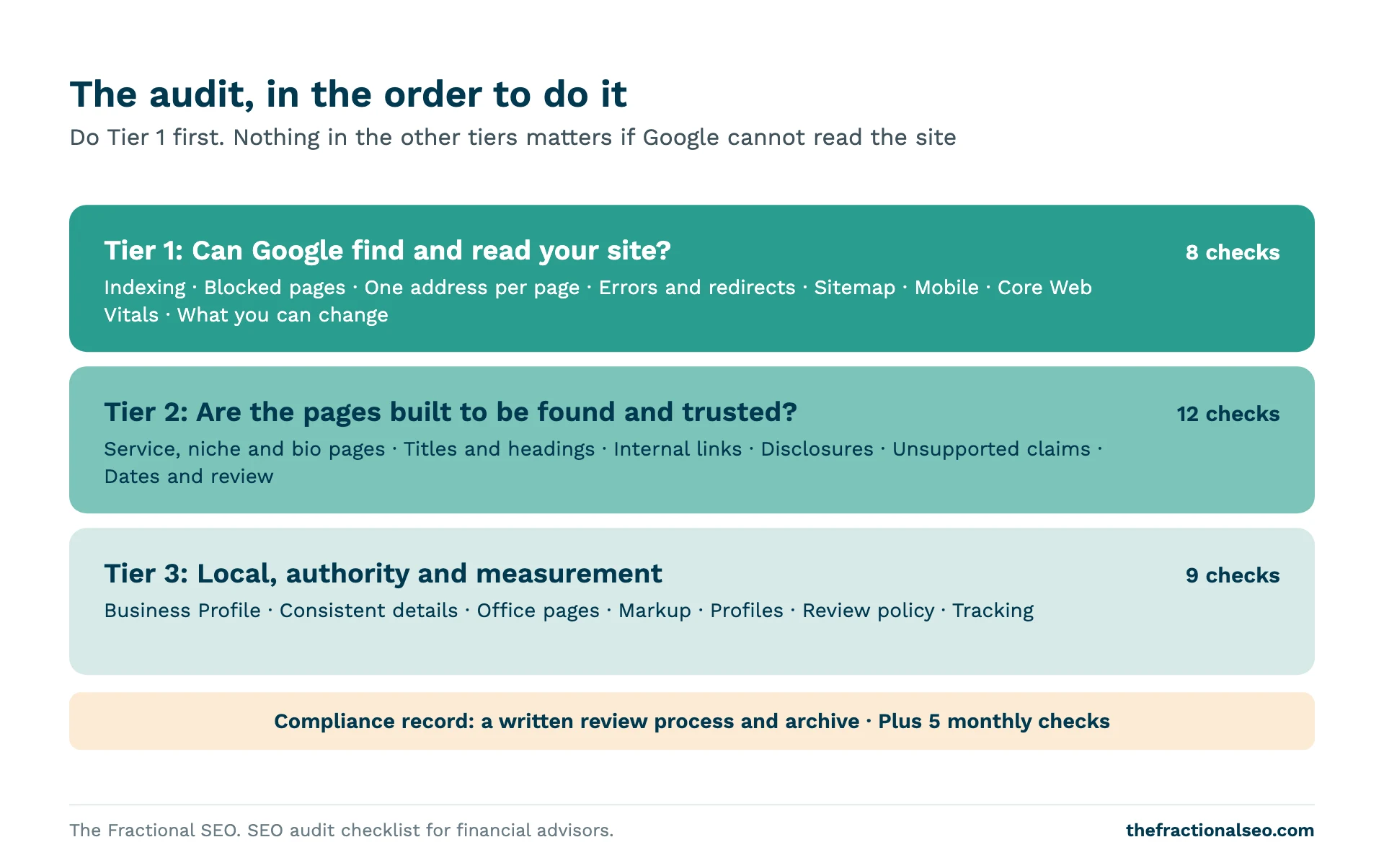
This is the audit we would run first on an advisory firm's website. It starts with whether Google can find and read the site, then moves to the pages, then to local signals and measurement, and it puts the compliance questions next to the technical ones.
Get the template No email required
What's inside
Tier 1: find and read
Indexing, blocked pages, duplicate URLs, errors, mobile and Core Web Vitals.
Tier 2: pages that earn trust
Service, niche and bio pages, titles, headings, links, disclosures and unsupported claims.
Tier 3: local and measurement
Business Profile, consistent details, office pages, markup, reviews policy and tracking.
Monthly tasks
Five checks to repeat each month, with a column for owner and date done.
How to use it
-
Download the PDF or copy the Sheet
Print it, or make your own copy of the Google Sheet.
-
Work top to bottom
Start with Tier 1. Give each item an owner and a date.
-
Repeat the monthly checks
Check Search Console, test your forms and send one page for review each month.
This checklist is the audit we would run first on an advisory website. It has 29 checks in three tiers, a compliance record and five monthly tasks. It is built for registered investment advisers and broker-dealer representatives, so the compliance items come with the technical ones. Download it as a PDF or a Google Sheet at the bottom of the page, or work through it here. It follows the order of our SEO guide for financial advisors.
How to use it
- Work top to bottom. Tier 1 is whether Google can find and read your site. Nothing in the other tiers matters if it fails.
- Give each item an owner and a date. The download has columns for status, owner and date done.
- You do not need paid tools. Everything here can be checked with free Google tools and a free crawl of up to 500 pages.
- Compliance is built in. Where an item raises a regulatory question, it is for your compliance officer to answer, not for us.
Tier 1: Can Google find and read your site?
These checks decide whether your pages can appear at all. Do them first.
- Your key pages are in Google’s index. Open Search Console and look at the Page indexing report. Then paste your home page, each service page and your main bio into the URL Inspection tool. If a page you want found is “not indexed”, the report says why. “Not indexed” is not always a fault: a page you meant to keep out is working as intended.
- No page is blocked by accident. Look for a noindex directive on pages you want found and for robots.txt rules that block them. Google notes that a page blocked in robots.txt can still sometimes be indexed from other information, and that noindex, not robots.txt, is the way to keep a page out of the index.
- Each page has one address. Check that the www and non-www versions, the http and https versions and versions with and without a trailing slash all end up at one address. Google can treat near-copies as duplicates and pick its own version. Search Console shows when it disagrees with the version you declared.
- Old and missing pages are handled. Find pages that return errors or “not found” messages with a normal status code, which Google calls soft 404s. Missing pages should return a real 404, and pages you replaced should redirect to the closest new page. This matters most after a redesign or a domain change.
- A sitemap is submitted. Submit an XML sitemap in Search Console and check that it lists the pages you want indexed and none you do not.
- The site works on a phone. Use Lighthouse or PageSpeed Insights on your home page, one service page and one guide. Google retired its standalone Mobile-Friendly Test in December 2023. Open the pages on a real phone too: tap targets, forms and the booking link should all work.
- Core Web Vitals are good. Google defines three: Largest Contentful Paint within 2.5 seconds, Interaction to Next Paint under 200 milliseconds and Cumulative Layout Shift below 0.1. PageSpeed Insights shows real-user results from the previous 28 days when there is enough data, and simulated results from Lighthouse. Google recommends good scores. It does not say how much weight they carry, so treat them as a floor, not a lever.
- You know what you can change. If a broker-dealer home office hosts your site, find out whether you can edit titles, URLs, headings and schema, add pages and posts, and use your own domain. The answer decides how much of the rest of this list you can do.
Tier 2: Are the pages built to be found and trusted?
Once Google can read the site, check that each page does its job for a prospect and stays inside the rules.
- Every service has its own page. One page per service, covering who it is for, how you work, how you are paid and how a first meeting goes. See the SEO guide for financial advisors.
- Each niche you serve has a page. A page written for one kind of client, such as physicians or business owners, answers that client’s search better than a general page.
- Every advisor has a bio page. Name, credentials, background, how to verify registration and a link to the regulatory record. Prospects check, so make it easy.
- Title tags are unique and say what the page is. Every page needs its own title that names the service and, if it fits, the place. Google sets no length limit on title elements and shortens them to fit the screen, so put the important words first. About 60 characters is a common rule of thumb, not a Google rule.
- Each page has one H1 and clear headings. One H1 that matches the page. Section headings phrased the way a prospect would ask the question.
- Each page has a written description. Write a short, plain description of each page. Google says it uses the description only when it summarizes the page better than the page text does, so it may show other text (its snippet guidance). Check how your pages appear.
- Pages link to each other the way a prospect moves. Guide to service, service to the advisor’s bio, bio to the consultation page. Find pages nothing links to.
- Images are real and described. Use photos of your team and office where possible. Write alt text that describes the image.
- Each page has one clear next step. An invitation to talk, written as an invitation, not a promise of results.
- Required disclosures are in place. Footer or dedicated page, as your compliance officer directs.
- No unsupported claims. Read each page for superlatives (“best”, “top”), performance figures, outcome promises and client stories. These need substantiation or should come out. The SEC Marketing Rule restricts them for registered advisers, and FINRA Rule 2210 sets standards for broker-dealer communications. See the compliance sections of our guides.
- Pages show a date and a review date. Tax rules, limits and thresholds change. Date each guide and send updates back through review.
Tier 3: Local, authority and measurement
These items build on the pages above. Do them once Tiers 1 and 2 are in good shape.
- Your Business Profile is eligible and accurate. You need a real location clients can visit, or a service that goes to them. Virtual offices and mailboxes do not qualify. Check name, address, categories and hours against Google’s guidelines. See the local SEO guide.
- Name, address and phone match everywhere. Compare your website, profile, directories, professional bodies and your regulatory records. Fix mismatches in the same week.
- Each office has its own page. Address, map, advisors, services and how to book. No copied pages with the city name swapped.
- Local business markup is valid. Google requires name and address and recommends telephone, URL, opening hours and coordinates (its markup guide). Test with the Rich Results Test. It is not a ranking switch.
- Professional and directory profiles are current. Credential bodies, trade associations, chamber of commerce. Each should link to your site.
- There is a written review policy. Your compliance officer decides whether and how you ask for reviews, and what you do with them. Google allows asking for genuine reviews without incentives or selective solicitation.
- Conversions are tracked. Track consultation form submissions, calls and bookings in your analytics. Keep client names and financial details out of analytics and marketing tools.
- Search Console and analytics access is yours. The accounts should be in the firm’s name, with your agency or webmaster added as a user.
- You log how each new inquiry found you. Ask on the first call and write it down. It will not match your analytics exactly, and the gap is useful.
Compliance record
- The review process for new pages and changes is written down. Who drafts, who approves, how long it takes, where the approved version is archived and who may publish. Registered advisers must keep a copy of each advertisement they disseminate; the record-keeping rule (17 CFR 275.204-2(a)(11)) sets the retention period at not less than five years from the end of the fiscal year in which it was last published. Ask your compliance officer how your website is treated.
Every month
- Check Search Console for new indexing problems, errors and sudden drops.
- Review the queries and positions for your target pages.
- Submit a test inquiry through every form and confirm it arrives.
- Check that bios, credentials and regulatory records are current.
- Send one page or guide for review and update.
Tools you need for this audit
You can run this audit with the tools below. The Google tools are the ones that tell you what Google sees.
| Tool | What it is for in this audit | Notes |
|---|---|---|
| Google Search Console | Page indexing report, URL inspection, sitemaps, queries and positions | Needs the site verified. Default view shows the past three months of queries. |
| Google Analytics (GA4) | Tracking consultation requests, calls and bookings | Keep client names and financial details out of it. |
| PageSpeed Insights | Real-user Core Web Vitals (28 days) and Lighthouse lab results | See Google documentation. |
| Lighthouse | Lab tests for performance, accessibility, best practices and SEO | Replaced Google’s Mobile-Friendly Test, retired in December 2023. |
| Rich Results Test | Validates local business markup | Part of Google’s documentation for structured data. |
| Screaming Frog SEO Spider | Crawls the site: titles, headings, descriptions, images, links, redirects, errors | Free up to 500 URLs; a paid licence was $279 a year when we checked in October 2026 (pricing page). |
| Google Keyword Planner | Estimated searches and cost per click | Needs Google Ads account setup with billing details (Google help page). |
| A paid SEO suite, such as Semrush | Keyword, competitor and backlink data; scheduled site audits | Prices vary by plan. Not needed to start; check the vendor’s page before you buy. |
For the keyword work behind Tier 2, see the keyword research guide. For the plan these checks feed into, see the financial advisor marketing plan guide.
Download the checklist
Free download
- A printable PDF with checkboxes, and a Google Sheet you can copy (you will need to sign in to a Google account to make your copy).
- The same checks, with columns for status, owner, date done and a note on how to check each one.
- No email address required.
What the checklist does not cover
This is a technical and on-page audit of the website. It is not a legal review. It does not tell you whether a page meets the SEC Marketing Rule or FINRA Rule 2210. Your compliance officer decides that. It does not score backlinks, rankings or competitors, and it cannot tell you how long results will take. Technical fixes can show within weeks. Service and niche pages typically take three to six months to rank.
If you want senior SEO help with an audit like this, see how fractional SEO works for financial advisors.