
Collection Construction
Best Construction Project Management Software: A Comparison
Most comparisons of construction project management software are written by vendors or by review sites that list hundreds of products. We don't sell software, so we sorted the main tools by the kind of firm each one fits best: commercial GCs, residential builders and remodelers, specialty contractors and field teams, and firms on a tight budget. Prices and features come from each vendor's own site.
How we judged them
Every product was checked on the vendor's own website on October 19, 2026, and had to meet these tests.
Built for construction
Made for construction work. One generic tool, monday.com, is included and flagged as generic.
Published pricing or pricing model
A public price or a clearly stated pricing model, dated October 2026.
Grouped by firm type
Sorted by best-fit firm: commercial GC, residential builder and remodeler, specialty and field, budget.
Features from the vendor
Feature, mobile and accounting claims taken from the vendor's own pages; anything not stated was left out.
No vendor ties
We don't sell, resell or take referral fees from any of these products.
Reviewed by hand, 20261019. Nobody pays for a place on this list.
The short answer
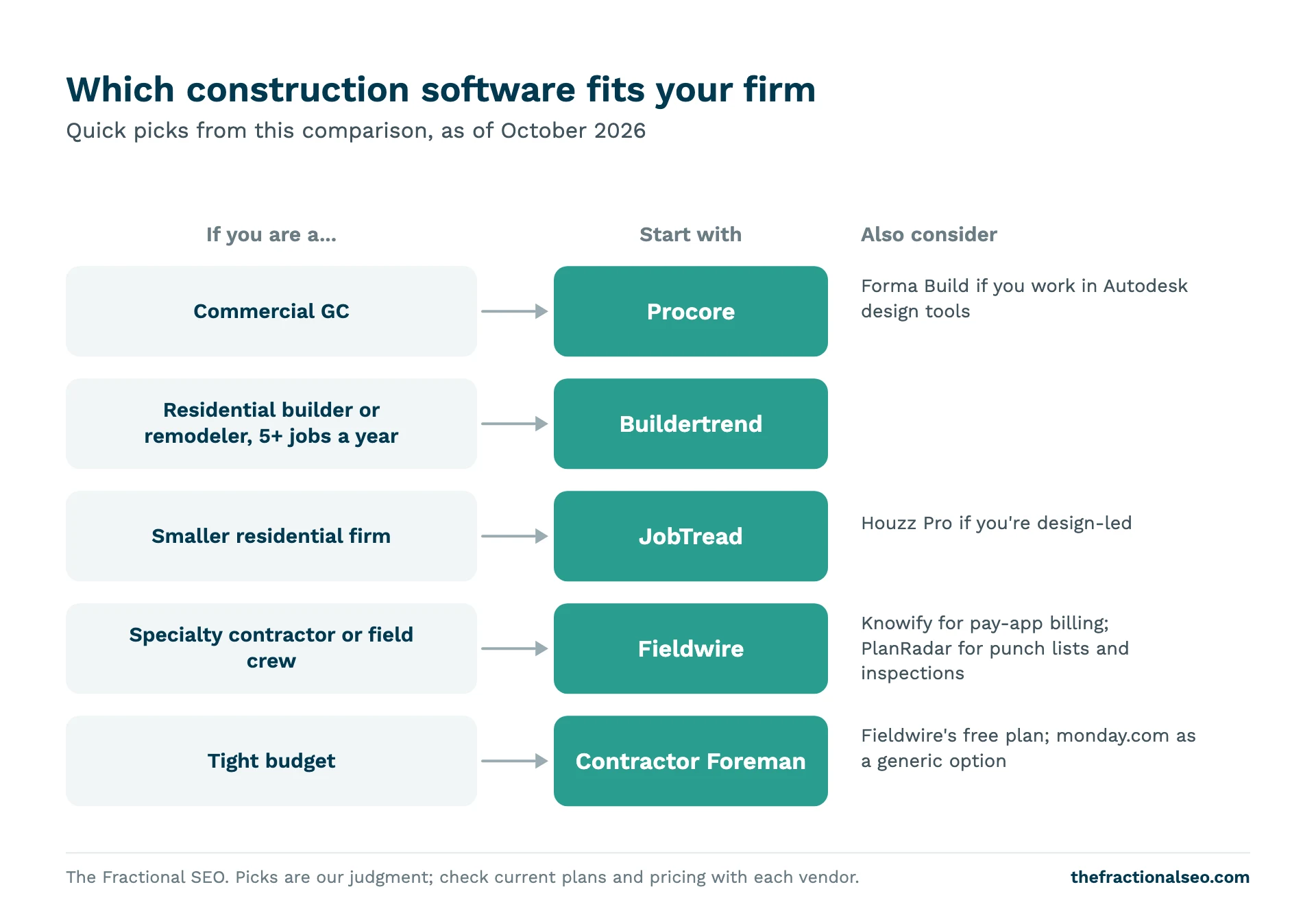
- Commercial GC, mid to large: Procore. Autodesk’s Forma Build (formerly Autodesk Build) if your work runs through Autodesk design models.
- Residential builder or remodeler running 5+ jobs a year: Buildertrend.
- Smaller residential builder or remodeler: JobTread, or Houzz Pro if you also design and sell from 3D plans.
- Field teams and specialty contractors: Fieldwire for plans and tasks, Knowify for trade contractors who bill progress and change orders.
- Tight budget: Contractor Foreman, or Fieldwire’s free plan for a small crew.
Prices and features below are as of October 2026, taken from each vendor’s own website.
Quick picks by firm type
| Software | Best for | Pricing model | Lowest published price (as of October 2026) | Key features | Mobile app | Accounting integrations named |
|---|---|---|---|---|---|---|
| Procore | Commercial GCs, owners, specialty contractors | Annual fee by product and annual construction volume; unlimited users | Not published (quote) | RFIs, submittals, drawings, specs, scheduling, daily log, punch list, change orders, budget | iOS, Android | QuickBooks Online and Desktop, Sage, Xero, Viewpoint, others |
| Forma Build (Autodesk) | Commercial GCs and specialty contractors on Autodesk workflows | Per user, paid annually; unlimited plan via sales | $67/month per user (Essentials, paid annually) | Specs, submittals, RFIs, schedule, cost and change orders, inspections, punch lists, model coordination | iOS, Android | Accounting integration module; systems not named |
| Buildertrend | Residential builders and remodelers running 5+ projects a year | One plan, unlimited users, price by construction volume | From $499/month | Client portal, CRM, proposals, selections, schedule, change orders, job costing, daily logs | iOS, Android | QuickBooks, Sage, Xero, Gusto |
| JobTread | Small and mid residential builders, remodelers, specialty trades | Base plan plus per internal user | $199/month with 1 user, then $20/user | Estimating, takeoff, schedule, daily logs, change orders, job costing, customer portal, selections, payments | Web app (installable), not in app stores | QuickBooks Online |
| Houzz Pro | Remodelers and design-build firms | Tiered, per user; trial converts to annual | $99/month (Design, 1 user); free plan available | 3D floor plans, selections, estimates, proposals, takeoffs, schedule, change orders, client dashboard | iOS, Android | QuickBooks Online |
| Fieldwire | Field teams, specialty contractors, GCs | Per user per month | Free (Basic, 5 users); Pro $39/user billed annually | Plans, tasks, checklists, photos; RFIs, submittals, change orders on Business Plus | iOS, Android | None named |
| Knowify | Trade and specialty contractors | Tiered by users | $99/month billed yearly (Core, 1 user) | Estimates, change orders, AIA pay apps, progress billing, job costing on Advanced | Yes (platforms not stated) | QuickBooks Online; Desktop on Enterprise |
| PlanRadar | Punch lists, defects and inspections | Per user per month | $32/user (Basic, 1 user) | Tickets, plans, inspection checklists; RFIs, submittals, change orders, Gantt on Pro | iOS, Android | None named |
| Contractor Foreman | Small contractors on a budget | Per company, tiered by users | $49/month billed annually (Basic, 1 user) | Punch lists, daily logs, schedule, estimates, invoices, change orders, RFIs, submittals, client portal | iOS, Android | QuickBooks Online |
| monday.com (generic) | Teams that want a flexible tracker, not a construction system | Per seat | Free (2 seats); Basic $9/seat billed annually | RFIs, submittals, change orders, Gantt, budgets, documents (on its construction page) | iOS, Android | “Accounting and ERP systems”; none named |
How we compared
We don’t sell or resell construction software, and we don’t take referral fees from any vendor here. We’re an SEO firm that works with contractors, so we see these tools from the outside: in client conversations, and in Google results, where some of them compete with contractors for attention.
Every product had to be built for construction. We include one generic tool, monday.com, and say so. Each had to publish its pricing or at least its pricing model. And we grouped them by the type of firm each one fits, because that’s the decision that matters. A remodeler and a commercial GC need different things. The remodeler needs a client portal, selections and fast proposals. The commercial GC needs RFIs, submittals and document control that an architect and owner will accept.
We checked every price and feature claim on the vendor’s own website on October 19, 2026. Where a vendor didn’t state something, we left it out rather than guess. We tried to add G2 and Capterra ratings, but neither site would load for us that day, so there are no third-party ratings here. Read recent reviews from firms your size before you sign.
A note on pricing: several of these tools have changed how they charge in the last year. Buildertrend now publishes one plan priced by construction volume. Autodesk’s construction product is now sold as Forma Build. Treat every number here as a starting point for a quote, not the final price.
For commercial general contractors
Procore
Procore is built for owners, general contractors and specialty contractors, and its feature set is aimed at commercial work. The project management product covers RFIs, submittals, drawings, specifications, scheduling with look-aheads, daily logs, punch lists, meetings, correspondence, change orders and budget tracking. Mobile apps are on iOS and Android.
Pricing is the big difference from most tools here. Procore says it charges “an upfront annual fee by product and based upon your Annual Construction Volume,” with unlimited users included. It doesn’t publish a number; you get a quote. Unlimited users is what makes it work for commercial jobs: you can bring in architects, owners and every sub without paying per seat.
Its accounting integrations list is the longest of any tool here, including QuickBooks Online and Desktop, Sage 100 Contractor, Sage 300 CRE, Sage Intacct, Viewpoint Spectrum and Vista, Xero, CMiC and NetSuite. The page doesn’t say which are built by Procore and which by partners, so ask about yours.
One thing contractors miss: Procore is also a directory. Its Construction Network calls itself one of the largest free and public construction networks and says it has over 215,000 business pages. In our study of local construction searches, procore.com showed up 12 times and network.procore.com 6 times among the directory results on page one. We analyzed 100 local searches across 25 US metros and four contractor types, 1,034 contractor websites (965 crawled) and 457 Google Business Profiles, October 2026. If you’re a commercial contractor, a complete Procore network page is a free listing in a place your buyers already search. Our guide to Houzz, Yelp, BBB and other directories covers how to treat those listings.
Best for: commercial GCs doing enough volume that a per-user tool would get expensive, and firms that need owners and architects inside the same system. Watch for: an upfront annual commitment, and a price you won’t know until you talk to sales.
Forma Build (formerly Autodesk Build)
Autodesk’s construction management product now goes by Forma Build; the old Autodesk Build pricing page redirects there. It’s aimed at general and specialty contractors, owners and designers. The office side covers specifications, submittals, RFIs, meeting minutes, correspondence, schedules, weekly work plans and closeout. The cost side covers budgets, contracts, change orders and payment applications. In the field it handles inspections, punch lists, issues, sheets, forms, photos and daily reports, and Autodesk lists model coordination for BIM work. Takeoff is a separate product.
Unlike Procore, it publishes per-user prices: Forma Build Essentials is $67 a month per user and full Forma Build is $117 a month per user, both paid annually (as of October 2026). Unlimited users and projects goes through sales. Autodesk lists an accounting integration module but doesn’t name the systems on that page.
Best for: commercial firms already working in Autodesk design tools, or with design partners who do, where keeping models and field data in one ecosystem saves rework. Watch for: per-user pricing adds up once subs and owners need seats.
For residential builders and remodelers
Residential work turns on the client. Homeowners want to see progress, pick finishes, approve change orders and pay online. The tools in this group are built around that: a client portal, selections, proposals and payments, with scheduling and job costing behind them.
Buildertrend
Buildertrend says it’s built for builders who run five or more projects a year or manage complex, multi-phase builds, and it serves home builders, remodelers, commercial contractors and specialty contractors. Its feature set leans residential: client portal, CRM, proposals, bids, estimates, plans and specs, schedule, change orders, budgets, job costing, daily logs, client updates and a sub portal, plus invoicing and online payments. Its help center covers selections and RFIs. Apps are on iOS and Android.
Pricing changed. Buildertrend now publishes a single plan “starting at $499 per month” with unlimited users and no feature tiers; the final price depends on your annual construction volume and onboarding package, and paying annually saves 10% (as of October 2026). It syncs with QuickBooks, Sage, Xero and Gusto.
Best for: established home builders and remodelers with several jobs running at once and a team that will use the client side. Watch for: at $499 a month and up, it’s more than a two-job-a-year remodeler needs.
JobTread
JobTread targets home builders, remodelers, specialty and commercial contractors, and trades such as pool and outdoor living builders and roofers. Every feature is in one plan: estimating, takeoff, tasks and scheduling, daily logs, change orders, budgets and job costing, contracts with e-signatures, customer portals, selections and allowances, invoices, online payments, bid requests and forms.
It costs $199 a month with one internal user included, then $20 a month for each additional user up to ten, with lower per-user rates above that and a 20% saving for annual billing. Customer, vendor and sub portal users are free (as of October 2026). JobTread doesn’t offer a free trial; it offers a 30-day money-back guarantee on monthly plans. Two things to know: it isn’t in the Apple or Google Play stores because it’s a progressive web app you install from the browser, and the only accounting integration it names is QuickBooks Online.
Best for: small and mid-size residential builders and remodelers who want estimating, job costing and a client portal without Buildertrend’s price. Watch for: if your bookkeeper runs QuickBooks Desktop or Xero, check before you switch.
Houzz Pro
Houzz Pro is built for the home remodeling and design trade. The Design plan covers 3D floor plans, selections, mood boards, CRM, estimates, proposals, invoices and online payments. Pro adds takeoffs, bid management, change orders, budgets, contracts, schedules and daily logs.
Design is $99 a month for one user, Pro is $199 a month for one user, and Teams starts at $399 a month with unlimited users; extra users on Design and Pro are $50 a month each (as of October 2026). There’s a 30-day free trial, which Houzz says converts to an annual subscription, and a free plan with the 3D floor planner, estimates and invoicing. It integrates with QuickBooks Online.
Houzz Pro is also tied to a lead source. Houzz sells an advertising package starting at $499 a month on the same page, and houzz.com was the directory contractors met most often on page one in our study: it appeared 66 times. That doesn’t mean you need the software to be on Houzz. A free Houzz profile is a listing; the software is a separate decision. Our directories guide covers the listing side.
Best for: small remodelers and design-build firms who sell from drawings and want design, proposals and billing in one place. Watch for: the trial rolling into an annual commitment.
For specialty contractors and field teams
Fieldwire
Fieldwire, from Hilti, is for the people on site: specialty contractors, general contractors and owners. Every plan includes plan viewing, tasks, specifications, files, photos and checklists. Pro adds reports, exports and sheet compare; Business adds custom forms, a BIM viewer and integrations; Business Plus adds RFIs, submittals, change orders and budgets. Apps run on iPhone, iPad and Android.
The free Basic plan covers five users, three projects and 100 sheets. Paid plans are per user per month: Pro $39, Business $64 and Business Plus $89 billed annually, or $54, $79 and $104 billed monthly (as of October 2026). The pricing page doesn’t name any accounting integrations.
Best for: electrical, mechanical and other trade crews who need current drawings and task lists on a tablet, and small teams who can live inside the free plan. Watch for: RFIs and submittals only arrive on the top published tier.
Knowify
Knowify is built for trade contractors: electrical, plumbing, HVAC, painting, concrete, excavation and remodelers. Its strength is the money side of contract work. Every plan includes estimates and proposals, change orders, scheduling, time tracking, AIA pay applications, progress billing and payment processing. Advanced adds job costing, budgets, daily logs and a client portal; Enterprise adds RFIs, submittals and document markup.
Core is $99 a month billed yearly or $149 monthly for one user; Advanced is $329 yearly or $399 monthly for up to ten users; Enterprise is quoted; extra users are $29 a month (as of October 2026). It offers a free trial. It integrates with QuickBooks Online, QuickBooks Time and QuickBooks Payments on every plan, and QuickBooks Desktop on Enterprise only.
Best for: subs who bill a GC through pay apps and need change orders and progress billing tracked cleanly. Watch for: job costing isn’t on the entry plan.
PlanRadar
PlanRadar is built around tickets pinned to plans: defects, issues, punch items and inspection checklists. It’s aimed at general and specialty contractors, developers, owners, architects and facility managers. Pro adds approval workflows for RFIs, submittals and change orders, Gantt scheduling and BIM models. Apps are on iOS and Android.
Basic is $32 per user per month for one user, Starter $107 and Pro $159 per user per month for up to ten users, with Enterprise quoted (as of October 2026). The page offers monthly or annual billing but doesn’t say which the listed prices are, so confirm. There’s a 30-day free trial with no card, and subcontractors join free.
Best for: firms whose pain is closeout: punch lists, defects and inspections with photo evidence. Watch for: per-user pricing on the upper tiers is high for a full-team system.
Budget and generic options
Contractor Foreman
Contractor Foreman prices by company, not per user. Basic is $49 a month billed annually for one user; Standard is $105 for up to three users, and Unlimited is $332 billed annually or $399 monthly (as of October 2026). Its feature list is long for the price: punch lists, daily logs, inspections, scheduling, a client portal, estimates, invoices, online payments, bids, change orders, AIA-style billing, takeoffs, drawing markup, RFIs, submittals and job costing reports. Which plan includes which feature is shown with icons, so check that the one you need is on your tier. There’s a 30-day free trial on annual plans. It names QuickBooks Online; its page says Xero is coming “mid-2026”, so ask whether it has arrived.
Best for: small contractors who want one system for the office and the field without paying per head.
monday.com (generic)
monday.com isn’t construction software. It’s a general work management tool with a construction page that shows boards for RFIs, submittals, change orders, Gantt schedules with dependencies, budgets and documents. The free plan covers two seats; Basic is $9, Standard $12 and Pro $19 per seat per month billed annually, from three seats, with a 14-day Pro trial (as of October 2026). It says it integrates with accounting and ERP systems but doesn’t name them.
Best for: a firm that wants a cheap, flexible tracker and is willing to build its own workflows. Watch for: you build what the construction tools give you on day one, and there’s no drawing management.
How to choose
Start with your firm type and the table above, then answer five questions before any demo:
- Who needs a login? Count office staff, supers, subs, clients, architects and owners. If it’s a long list, unlimited-user pricing (Procore, Buildertrend, Contractor Foreman’s Unlimited plan) can beat per-user pricing quickly.
- Is the pain in the field or the office? Field problems (wrong drawings, lost punch items) point to Fieldwire or PlanRadar. Office problems (estimates, change orders, billing) point to JobTread, Knowify or Buildertrend.
- What does your accountant use? Check the exact integration. “QuickBooks” on a vendor page often means QuickBooks Online only.
- Do clients need a portal? If you build homes or remodel, yes, and selections matter. If you build for owners with their own project managers, RFIs and submittals matter more.
- What’s the contract? Several of these tools bill annually or convert a trial into an annual plan. Ask about the term, the notice period and how you export your data if you leave.
Then get two or three quotes, ask each vendor for a reference customer your size, and run one real job through the trial before you move everything over.
FAQs
What is the best construction project management software?
It depends on your firm. Procore fits commercial GCs, Buildertrend fits residential builders and remodelers running several jobs, JobTread fits smaller residential firms, and Fieldwire fits field teams and trades. There’s no single best tool across all four.
What do most general contractors use?
We haven’t found independent market-share data we’d trust enough to quote. Procore, Forma Build and Fieldwire all name general contractors as a core audience, and Buildertrend and JobTread serve residential GCs. Ask the GCs and subs you work with most what they use; matching them saves everyone double entry.
Is there free construction project management software?
Yes, with limits. Fieldwire’s Basic plan is free for five users, three projects and 100 sheets. Houzz Pro has a free plan with its 3D floor planner, estimates and invoicing. monday.com is free for two seats. Free trials run 14 to 30 days on several others (as of October 2026).
Procore vs Buildertrend: which is better?
They’re built for different firms. Procore is aimed at commercial work, with RFIs, submittals and document control and pricing by construction volume. Buildertrend is aimed at residential builders and remodelers, with a client portal, selections and proposals, from $499 a month. If you do both, pick the one that matches most of your revenue.
Software runs the job. SEO wins it.
Once your projects run smoothly, the next constraint is usually the pipeline. See how The Fractional SEO helps construction firms get found, or start with our local SEO tools roundup and our study of 965 construction websites.
More collections
The whole Construction library- Best SEO Tools for Local Service Businesses The local SEO tools worth using, sorted by job, with a free option and a paid…
- 6 Construction Website Examples Built to Convert Six real contractor websites that pass every conversion basic we measured, picked from a crawl of…
- Essential WordPress Themes for Construction Companies The WordPress themes real contractor sites run, from our crawl of contractor websites, with prices, builders…