
Templates & Resource Real Estate
Google Business Profile Checklist for Real Estate Agents and Brokerages
Most Google Business Profile advice for agents is the same list: claim it, pick a category, add a headshot, post, get reviews. None of the guides we read show what real estate profiles in the map pack actually look like, and few get Google's rules for agents right. We looked at 412 real estate profiles. The surprise: no profile figure clearly separates the map pack. So this checklist starts with what Google's rules decide, who holds the profile and what it is called, then treats reviews as a floor, and ends with a download you can work through.
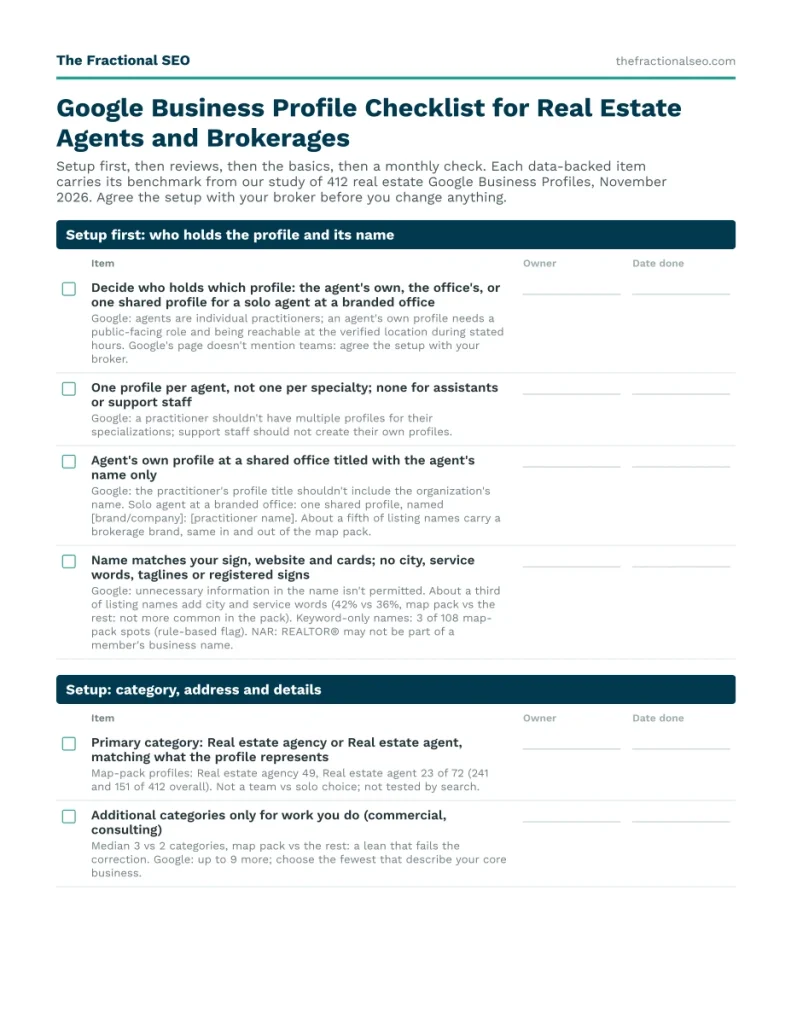
Get the template No email required
What's inside
Who holds the profile
Agent, office or brokerage, and how Google says each one is named.
Name and category
Brand and city words in names, and Real estate agency vs Real estate agent.
Reviews as a floor
How many reviews map-pack agents have, and how to ask within Google's rules.
Benchmarks
Each data-backed item carries its figure from our study of 412 real estate profiles.
How to use it
-
Download the checklist
Print the PDF or copy the Google Sheet.
-
Settle who holds each profile
Agree it with your broker and team before changing names.
-
Ask every client at closing
A review link or QR code in the closing message, buyers and sellers both.
We analyzed 36 local searches across 12 US metros and three real estate search types, 461 agent and brokerage websites (261 crawled) and 412 Google Business Profiles, November 2026. For this checklist we compared the profiles of agents and brokerages that reached a map pack (the top 3 of the Google Maps list) in any study search with those only seen at Maps positions 4-20, counting each profile once: 72 vs 340 profiles. For reviews and rating we also compared listings search by search, positions 1-3 vs 4-7. The website side of the study is in our study of 261 real estate websites.
We collected this data in mid-November 2026, when real estate search interest is near its low point of the year, so a spring snapshot may look somewhat different.
The short version: the basics are near-universal and separate nobody, and nothing we measured on the profile passed the correction for the number of tests. Get the setup right under Google’s rules, keep reviews coming, and don’t expect any single field to move you up.
What our data says about real estate profiles
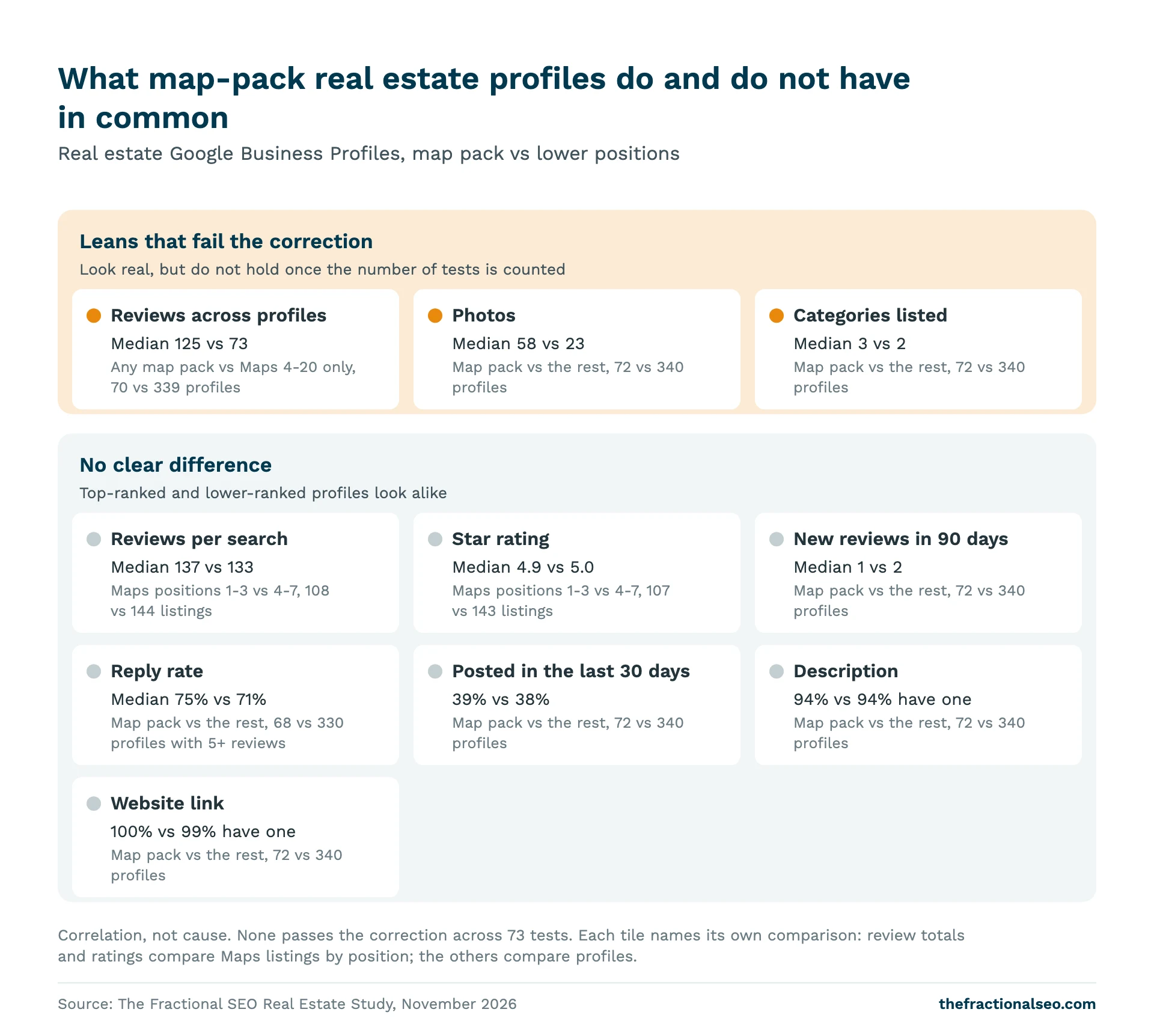
These lean with the map pack, but none survives the correction for the number of tests we ran:
- Reviews across profiles: those that reached a map pack in any study search have a median of 125 reviews vs 73 for those only seen at positions 4-20.
- Photos: a median of 58 vs 23.
- Categories: map-pack profiles list a median of 3 vs 2.
These showed no clear difference:
- Reviews per search: a median of 137 reviews at positions 1-3 vs 133 at positions 4-7. In HVAC the same comparison was 1,576 vs 615.
- Star rating: 4.9 in the map pack and 5.0 at positions 4-7.
- New reviews: in the 90 days before collection, a median of 1 for map-pack profiles vs 2 for the rest.
- Replies: a median of 75% of the newest 20 reviews vs 71%.
- Posting: 39% vs 38% posted in the 30 days before collection.
- Description and website: 94% vs 94% and 100% vs 99%.
Listing names are their own story. About a fifth of real estate Maps listings put a brokerage brand in the name and about a third put a city and a service word in it, and neither is more common in the map pack.
One caution. This is a correlation, and the groups are small, so a small effect could be missed. “No clear difference” doesn’t mean reviews or replies don’t matter to clients. It means they didn’t separate the pack in our data. For the review side in detail, see what 412 real estate profiles show about reviews.
Download the checklist
The free checklist turns this page into 20 items: who holds the profile, name and category, address, reviews, photos, replies, the basics and a monthly check. Each data-backed item carries its figure from our study, on a printable PDF or a Google Sheet you can copy. It covers the profile only. For your website and the rest of local SEO, use the local SEO checklist for real estate agents.
Step 1: Decide who holds the profile
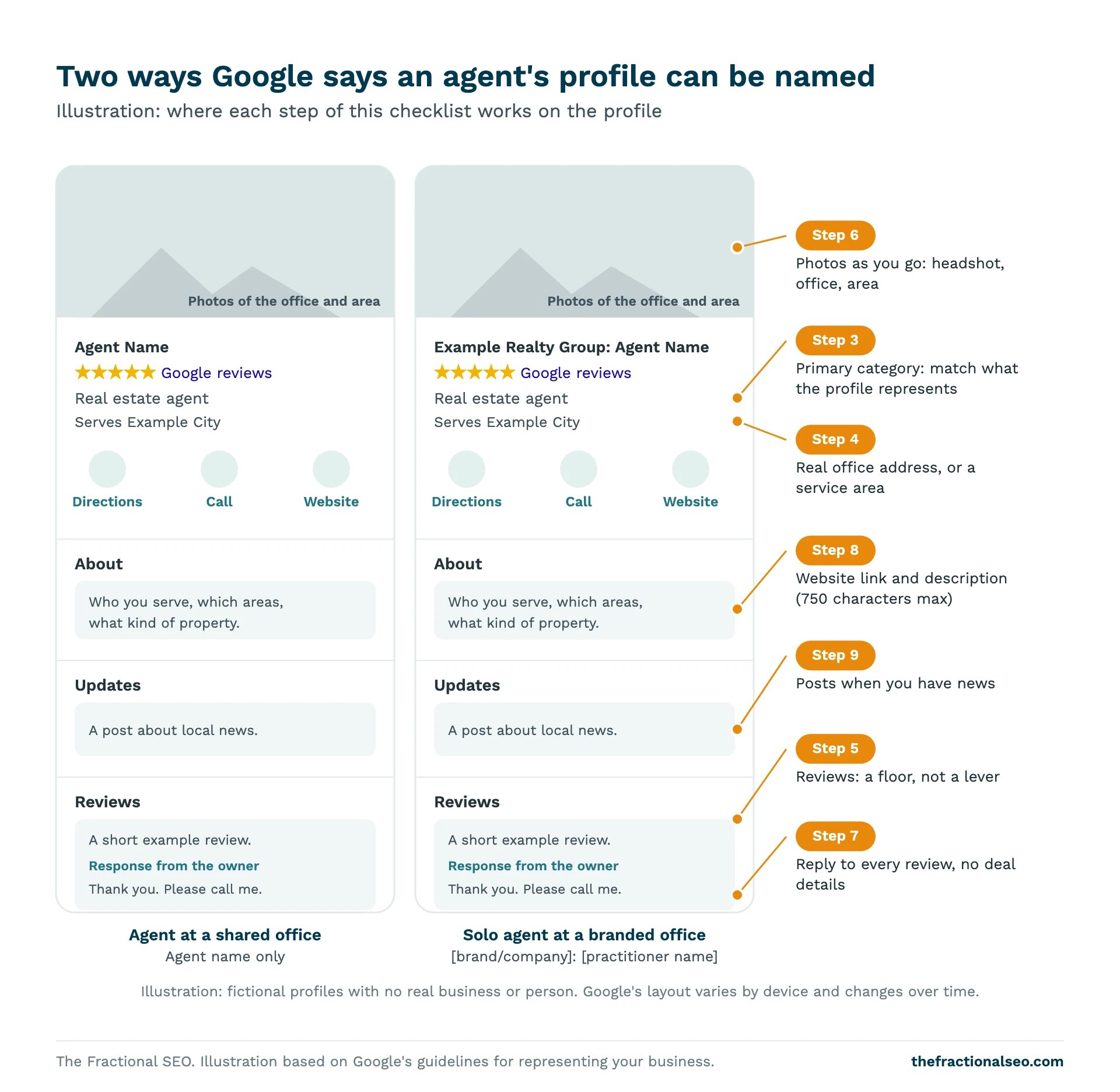
Google treats agents as individual practitioners. Its guidelines for representing your business say an individual practitioner is “a public-facing professional, typically with their own customer base,” and list “insurance or real estate agents” among them. So an agent can have a profile of their own, separate from the brokerage’s. Google sets conditions:
- The agent works in a public-facing role and can be contacted directly at the verified location during stated hours. Support staff should not create their own profiles, so assistants and transaction coordinators don’t get one.
- One profile per agent. Google says a practitioner shouldn’t have multiple profiles to cover all of their specializations, so no separate luxury or relocation profile.
- Google also says sales associates or lead generation agents for corporations aren’t individual practitioners and aren’t eligible.
Then the office decides the setup. If several public-facing agents work from one location, the organization creates its own profile for that location, and each agent’s profile is titled with the agent’s name only, without the organization’s name. If an agent is the only public-facing practitioner at a branded location, Google says it’s best to share one profile with the organization, named in the format “[brand/company]: [practitioner name]”.
Google’s page doesn’t mention teams. A team that works from a brokerage office fits the first case; a team with its own office and brand may be an organization of its own. Brokerages often have a policy on agent profiles and brand use, so agree the setup with your broker before you change anything.
Step 2: Name it the way Google’s rules describe
Google says your name “should reflect your business’s real-world name, as used consistently on your storefront, website, stationery, and as known to customers,” and that “including unnecessary information in your business name isn’t permitted, and could result in the suspension of your Business Profile.” Its examples table lists location information and service or product information under what a name must not include.
Real estate listings often go further than that. In our study, about a fifth of Maps listings put a brokerage brand in the name, most often Compass (22 listings) and Keller Williams (21). About a third add a city and a service word, in the pattern “<name> | Dallas Luxury Real Estate”. Neither is more common in the map pack: 42% vs 36% for city and service words. A brand in the name is usually the brokerage the agent works under, which Google’s rules allow in the shared-profile format and not on an agent’s own profile at a shared office.
Keyword-only Maps names with few reviews (a listing named only “<city> luxury homes”, for example) are uncommon: 9 listings, 11 Maps rows, 3 of 108 map-pack spots. Our flag is rule-based, not proof that any listing breaks the rules.
Two more things to leave out. Google’s examples table also rules out trademark and registered signs, and NAR’s membership marks manual says “Use of the term REALTOR® as part of the corporate name or business name of any member is prohibited.” Your name as it appears on your sign, website and cards is enough. More on the rules agents write against in our study of real estate homepage disclosures.
Step 3: Pick the primary category
Two primary categories cover almost every profile: “Real estate agency” (49 of 72 map-pack profiles, 241 of 412 overall) and “Real estate agent” (23 and 151). A few use “Commercial real estate agency” or “Real estate consultant”.
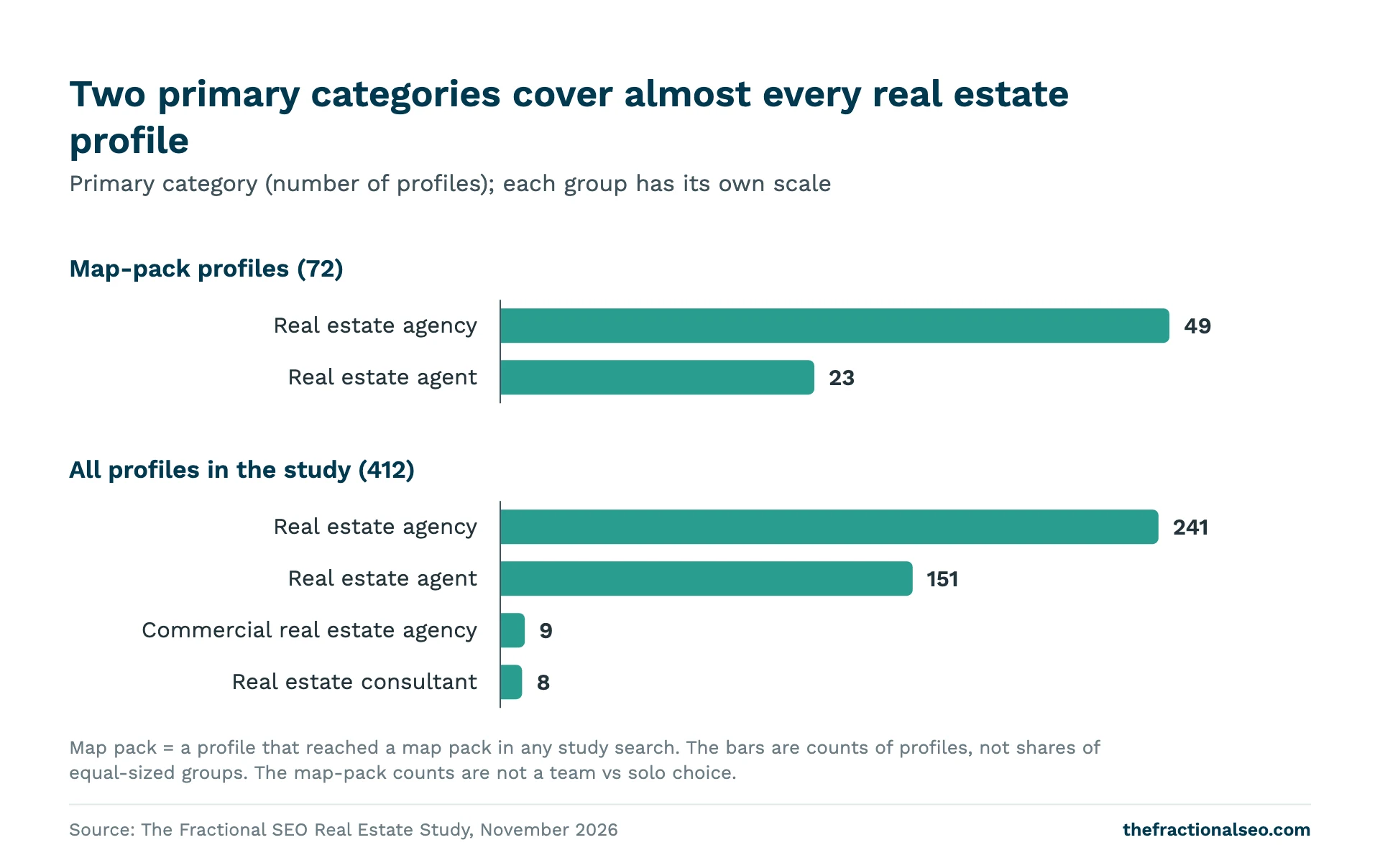
Some guides say solo agents pick “Real estate agent” and teams pick “Real estate agency”. Our data doesn’t show it as a team vs solo choice, and we didn’t test which category wins which search. Pick the category that describes what the profile represents: an office or brokerage profile is an agency; one agent’s own profile is an agent. Add the other only if it’s also true.
Google’s help page on editing your profile says all locations of a business must share a primary category, that you can select up to 9 more, and not to use categories solely as keywords. Its guidelines say to choose the fewest categories it takes to describe your core business. Map-pack profiles list a median of 3 categories vs 2, a lean that fails the correction. Add commercial or property management only if you do that work.
Step 4: Set your address or service area
Use a real office. Google’s guidelines say a virtual office, a rented mailing address you don’t operate from, isn’t eligible. If you work from home and meet clients at their homes and at showings, you’re a service-area business: Google says to hide your address from customers, and that the service area shouldn’t extend farther than about 2 hours of driving time from where you’re based. List the cities and towns you actually sell in. Set hours when you can really be reached, since Google ties an agent’s own profile to being contactable during stated hours.
Step 5: Treat reviews as a floor, not a lever
This is where real estate differs most from other trades we’ve studied. Unlike HVAC and Landscaping, review counts do not separate real estate’s map pack: a median of 137 reviews at positions 1-3 vs 133 at positions 4-7, no clear difference. Across all profiles there is a lean: 125 vs 73, which fails the correction.
What the data does show is a floor. Few agents reach the map pack on a handful of reviews: 4 of 108 map-pack listings have fewer than 10, three-quarters have 64 or more, the median is 137 and 31 (29%) have 500 or more. Luxury agents reach the pack with far fewer reviews than agents on the plain searches. These figures describe the sample; they are not targets. Rating isn’t the gap either: 4.9 in the map pack and 5.0 at positions 4-7.
Expect a slow pace. Agents collect reviews slowly: the median profile got 2 new reviews in the 90 days before collection and the 30-day median is 0. A sale closes a few times a year per agent, so the routine matters more than any one month:
- Get your review link or QR code from the profile. Google’s help page on reviews says you can share either.
- Ask at closing, buyers and sellers both, and again a few weeks later once they’ve settled in.
- Ask every client, not only the happy ones. Google’s content policy says businesses may not “selectively solicit positive reviews from customers,” and should not pressure anyone or ask for specific content.
- Never offer payment, a discount or a gift for a review. The same policy bans incentives.
- No reviews from your team, staff or relatives. The policy rules out content based on a conflict of interest, including current or former employment and family relationships.
For benchmarks by metro size and search wording, see our real estate reviews research.
Step 6: Add photos as you go
Map-pack profiles have more photos (median 58 vs 23), a lean that fails the correction. The counts include customer photos, and established agents collect more of both. Add a current headshot, the team, the office front so clients can find it, sold homes with the seller’s permission, and the neighborhoods you work. Google’s photo guidelines ask for JPG or PNG files between 10 KB and 5 MB, recommend 720 px tall and 720 px wide, and say the image should represent reality. Photos show only after the profile is verified.
Step 7: Reply to reviews
Reply rates are similar in and out of the pack (median 75% of the newest 20 reviews vs 71%). Across all profiles with 5+ reviews, 36% reply to 90% or more and 15% reply to none. Reply anyway, for the next client reading. Google says replying shows customers you value their feedback, replies are checked against its content policies, and the reviewer is notified. Keep it short, thank them for the move, and never mention the price, the address or the other side of the deal.
Step 8: Link your website and write the description
Every real estate listing in the map pack shows a website (0 of 108 without one). Profiles almost always have one in and out of the pack (100% vs 99%), so it won’t set you apart, but it’s how a seller gets from the profile to your listings. Point it at your own site, or your agent page on the brokerage site, with a UTM tag.
A description is near-universal too (94% vs 94%). Google says not to exceed 750 characters, not to include URLs, and not to focus on promotions, prices or sales. Say who you serve, which areas and what kind of property. Then fill in services: buyer representation, listing and selling, relocation, new construction.
Step 9: Post when you have something to say
38% of real estate profiles posted on Google in the 30 days before collection and 21% have no posts at all. Map-pack profiles post about as often as the rest (39% vs 38% in 30 days). So post for clients, not rankings: a new listing, an open house, a market update. Google’s help page on posts lists updates, offers and events, and says posts older than 6 months are archived unless a date range is set.
Step 10: Keep ownership in the right hands
All but 2 of the 412 profiles are claimed. Search for yourself on Google Maps and claim the existing profile rather than making a second one. Add a second owner or manager. If the profile is your own, keep it in an account you control so it moves with you if you change brokerage; if the office holds it, settle who owns it when you join.
Step 11: Check performance monthly
Once a month, note calls, website clicks and direction requests from the profile’s performance view. Compare with the same month last year.
What the profile can’t do on its own
Google’s local ranking page says local results are mainly based on relevance, distance and popularity, and that there’s no way to request or pay for a better local ranking. No profile setting changes how far you are from the person searching.
The profile and the website are also separate races. The map pack and the organic results are almost entirely different businesses: 3 of 108 map-pack listings also rank on page one organically for the same search. Map-pack sites have a median of 124 referring domains vs 101, a lean that fails the correction. See the full local SEO guide for real estate agents for the website side.
Work through the checklist, then talk to us about the rest of your local search: SEO for real estate agents and brokerages.
Questions, answered
Can a real estate agent have a Google Business Profile separate from the brokerage?
Yes. Google lists real estate agents as individual practitioners. An agent who is public-facing and reachable at the verified location can have their own profile. Where several agents share an office, the agent’s profile carries the agent’s name only.
Should my profile say “Real estate agency” or “Real estate agent”?
Whichever describes what the profile represents. In the map pack, “Real estate agency” is the primary category on 49 of 72 profiles and “Real estate agent” on 23. We didn’t test which wins which search.
Can I put my brokerage’s name in my profile name?
Only in Google’s shared format for a solo agent at a branded office, “[brand/company]: [practitioner name]”. At an office with several agents, Google says the agent’s profile shouldn’t include the organization’s name.
How many Google reviews does a real estate agent need?
There’s no set number. Three-quarters of map-pack listings have 64 or more, and only 4 of 108 have fewer than 10. Compare yourself with the map pack in your own market.
Does posting on Google help an agent rank?
Not in a way we could measure: 39% of map-pack profiles posted in the 30 days before collection vs 38% of the rest.