
Templates & Resource Construction
Google Business Profile Optimization Guide for Contractors
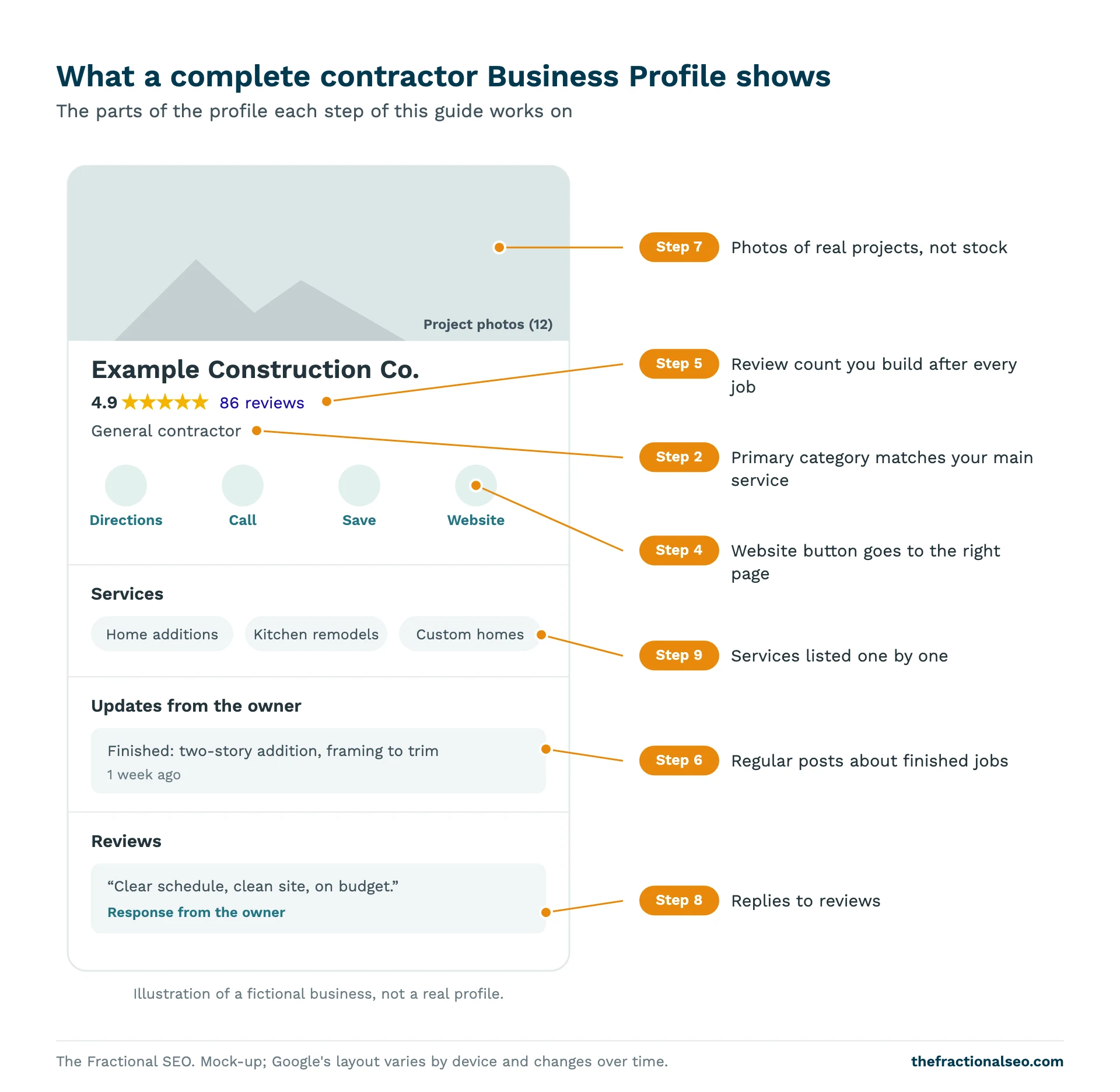
Every Google Business Profile guide gives you the same list: claim it, pick categories, add photos, post weekly, get reviews, answer questions. What none of them tell you is which of those things actually differs between the contractors in the map pack and the ones below it. We looked at 457 contractor profiles to find out. This guide walks through each step in order, tells you which ones line up with the map pack and which are just good housekeeping, and ends with a checklist you can work through in an afternoon.

Get the template No email required
What's inside
Setup
Claim, category, name, service area, hours, website link and description.
Reviews
Your count against the map-pack median, and a review request at every closeout.
Posts and photos
A monthly post schedule and real project photos.
Benchmarks
Each item carries the figure from our study of 457 contractor profiles.
How to use it
-
Download the checklist
Print the PDF or copy the Google Sheet.
-
Work through setup in one sitting
Most setup items take minutes once you're logged in.
-
Set the monthly routine
Posts, review requests, replies and a performance check, once a month.
We analyzed 100 local searches across 25 US metros and four contractor types, 1,034 contractor websites (965 crawled) and 457 Google Business Profiles, October 2026. For this guide we compared profiles of businesses that have been in a map pack with those that only appeared at positions 4-20, counting each business once. The website side of the same study is in our analysis of 965 construction websites.
If you’d rather skip to the to-do list, the checklist is free to download at the end of this page.
What map-pack contractor profiles have in common
Two things stood out.
More reviews. Map-pack businesses have more reviews: a median of 49.5 reviews for positions 1-3 vs 36 for positions 4-7. This was the strongest difference we found on the profile.
More recent posts. Recent Google posts are more common in the map pack: 28% of map-pack businesses posted in the last 30 days vs 19% at positions 4-20. That’s a modest gap, but it held up statistically.
And several things that most guides call essential showed no clear difference:
- Star rating: the median is 4.8 both in the map pack and at positions 4-7.
- Recent review volume: both groups got a median of 1 new review in the last 90 days.
- Photos: map-pack profiles have somewhat more photos (median 67 vs 56), but the difference is not statistically reliable in this sample.
- Review replies: owners of map-pack businesses reply to more reviews (median 60% of their newest 20 vs 40% at positions 4-20), but the gap is not statistically reliable in this sample.
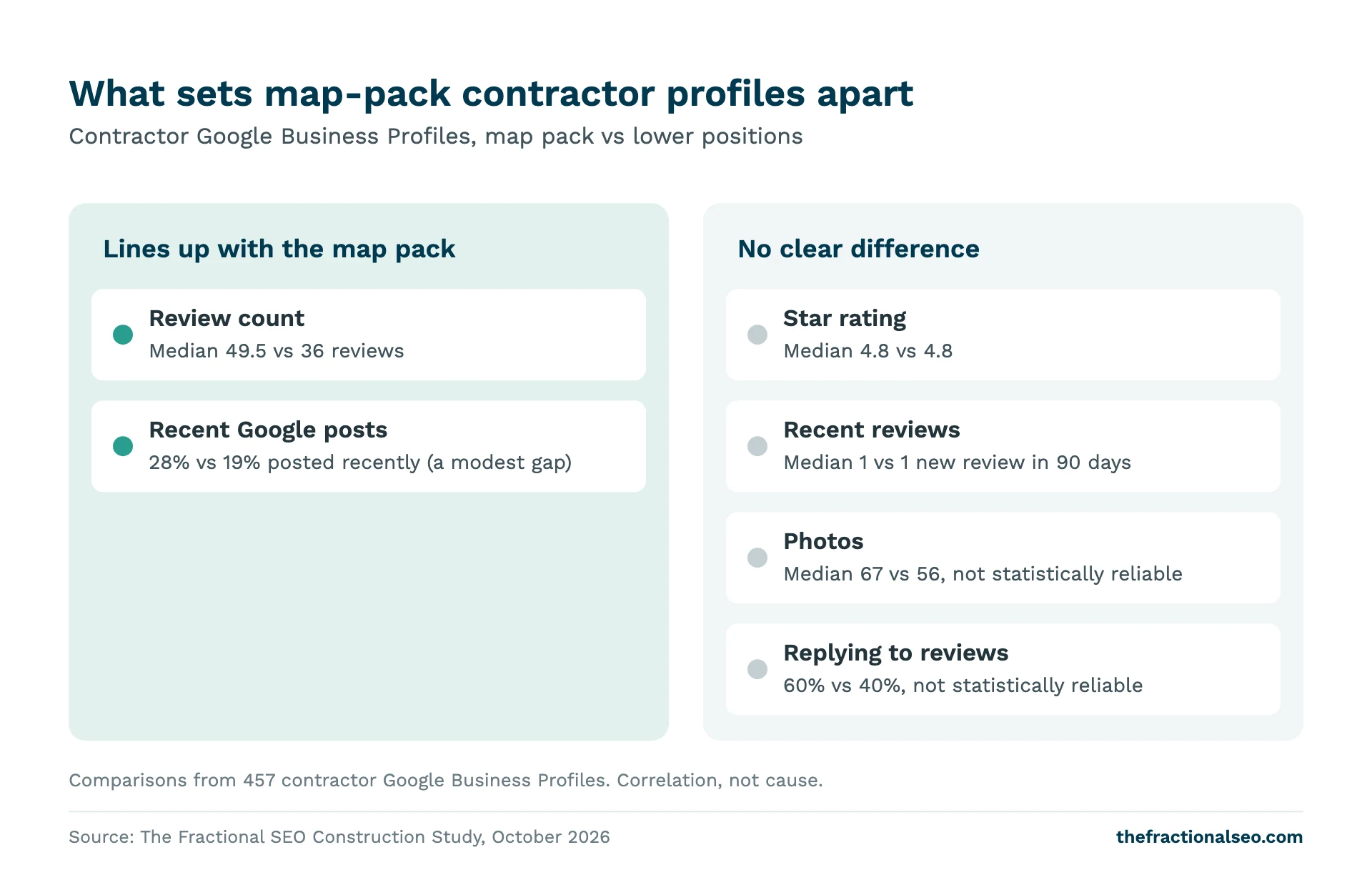
Two cautions. This is a correlation: map-pack firms tend to be more established, with more reviews and other advantages that come with age. And “no clear difference” doesn’t mean “don’t bother”. It means we can’t show it moves rankings. Photos and replies still affect whether a buyer calls you. So the steps below cover everything, and say which is which.
Step 1: Claim and verify
At least 97% of the profiles are verified (claimed) by the owner. Among the contractors that show up in local searches, a claimed profile is close to universal. If yours isn’t claimed, nothing else in this guide is possible, so start here.
Search for your business on Google Maps. If a profile exists, choose the option to claim it; if not, create one at Google Business Profile. Google will then ask you to verify; the method it offers depends on your business. Once verified, add a second owner or manager from your company so the profile isn’t tied to one person’s login. If an agency or web developer manages it, they should be a manager on your profile, not the owner.
Step 2: Pick the right primary category
Your primary category tells Google what kind of business you are. It’s one of the main ways Google decides which searches you’re relevant for.
The most common primary categories among map-pack contractors: general contractor (99), construction company (64), home builder (36), custom home builder (34), remodeler (12), contractor (8).
Pick the category that matches the work you most want, not the one that sounds biggest. If most of your revenue is custom homes, “custom home builder” says so more precisely than “construction company”. If you do commercial and residential general contracting, “general contractor” is the most common choice for a reason. A remodeler who mostly does kitchens can consider “kitchen remodeler”, which is narrower but closer to what buyers type.
Then add secondary categories for other work you do regularly. Google’s guidelines for representing your business say to use as few categories as possible to describe your core business. We’d stop at three or four that are clearly true. Adding every category you can find doesn’t widen your reach; it blurs what you are.
Step 3: Name, address, service area and hours
Name. Use your real business name, exactly as it appears on your signs, trucks and website. Google’s guidelines say that “including unnecessary information in your business name isn’t permitted”, which rules out adding “Best Kitchen Remodeling Denver” to the end.
Address and service area. Most contractors work at customers’ sites, which makes them a service-area business in Google’s terms. Google says a service-area business should hide its address from customers. Set the cities or areas you serve instead. If you have an office or showroom where clients meet you, you can show that address.
Phone. Use the same number that’s on your website, so buyers and Google see one consistent set of details.
Hours. Set real office hours, and add holiday hours before each holiday. A buyer who calls during listed hours and gets no answer may not call twice.
Description. Google allows up to 750 characters (Google Business Profile Help). Use them to say plainly what you build, for whom, and where. Skip the slogans.
Step 4: Link your website (and the right page)
16% of map-pack listings show no website link on the Maps list card. Some of those firms may have a website that Maps didn’t show, but either way a buyer scanning the list sees no link.
Set the website field to your homepage, or, if you have several offices, the location page for the office this profile represents. Add UTM tracking to the link (for example, source google, medium organic, campaign gbp) so you can see in your analytics how many visits came from the profile instead of lumping them in with other search traffic.
Step 5: Build your review count
This is the step that lines up most with the map pack. Map-pack businesses have a median of 49.5 reviews for positions 1-3 vs 36 for positions 4-7. And very few businesses make the map pack on a handful of reviews: only 3% of map-pack listings have fewer than 10 reviews, and three-quarters have 27 or more.
The rating isn’t the gap. Contractor ratings cluster high, and the median was 4.8 in and out of the map pack. Neither is a burst of recent reviews: both groups had a median of 1 new review in the last 90 days. The difference is the total, built over time.
So make asking part of how every job ends:
- Add a review request to your job closeout, next to the final walkthrough and invoice.
- Send the direct link to your review form by text or email the same day. In your profile, look for the option to ask for reviews to get the link.
- Ask every customer, not only the ones you’re sure are happy. Filtering who you ask goes against Google’s review policies.
- Never pay for or trade anything for reviews.
Medians vary a lot by trade. For the numbers by contractor type and market size, see how many Google reviews a contractor needs for the map pack, and for the full review data, the impact of local reviews on construction rankings.
Step 6: Post regularly
Recent Google posts are more common in the map pack: 28% of map-pack businesses posted in the last 30 days vs 19% at positions 4-20. It’s a modest gap. It doesn’t show that posting moves rankings, but it’s the one piece of profile activity, besides reviews, that separates the two groups in our data.
Most contractors don’t post. About 3 in 10 contractor profiles returned no Google posts at all, and only 24% posted in the last 30 days. That makes it an easy way to look more active than the competition.
Keep it simple. Once a month, post a photo of a finished or in-progress project with two or three sentences: what it was, where, and what was involved. Seasonal reminders and offers work too. Set a recurring date so it doesn’t depend on someone remembering. You don’t need weekly posts; we found no evidence for that, and a monthly habit you keep beats a weekly one you drop.
Step 7: Photos of real projects
Map-pack profiles have somewhat more photos (median 67 vs 56), but the difference is not statistically reliable in this sample. So we can’t say photos help you rank. We can say buyers look at them.
For a contractor, photos are the portfolio a buyer sees before they ever visit your website. Upload real project photos: before and after, finished interiors and exteriors, crews on site, your trucks and signage. Add a few every month, ideally with each Google post. Skip stock images and renderings presented as finished work.
Step 8: Reply to reviews
Owners of map-pack businesses reply to more reviews (median 60% of their newest 20 vs 40% at positions 4-20), but the gap is not statistically reliable in this sample. Contractors are split: 26% replied to none of their newest reviews, while 29% replied to 90% or more.
Reply anyway, as customer service rather than SEO. A short, specific thank-you to a good review, mentioning the project, reads well to the next buyer. A calm, factual reply to a bad review, with an offer to talk offline, often counts for more than the review itself. Don’t argue, and don’t share private details about the job.
Step 9: Services, products and customer questions
Fill in the services list with each type of work you do, each with a short description. Use the products section, if it’s available for your category, to show service packages or project types with a photo.
Older guides tell you to seed the Questions and Answers section with your own questions. Google has been removing that public Q&A section from Maps and replacing it with an AI “Ask” feature that answers from your profile details and reviews (PPC Land, December 2025). That makes a complete description, services list and set of reviews more important, because that’s what the answers draw on. Put answers to your most common customer questions on your website too.
Monthly upkeep
Once the profile is set up, it needs about an hour a month:
- Publish a Google post with a recent project photo.
- Send review requests for every job you closed, and reply to new reviews.
- Check profile performance: calls, website clicks and direction requests.
- Check that hours, phone and services are still right.
Download the checklist
The Contractor Google Business Profile Checklist. 18 items in order, each with a benchmark from our study, on two printable pages or a Google Sheet you can copy.
Want a second opinion on your profile? Ask us for a Google Business Profile review. For the website side, see our local SEO checklist for construction companies and the construction local SEO guide.
Questions, answered
What category should a contractor use on Google Business Profile?
The one that matches the work you most want. Among map-pack contractors, the most common primary categories were general contractor (99), construction company (64), home builder (36) and custom home builder (34). Add a few secondary categories for other work you do regularly.
How often should contractors post on Google?
Monthly is a sensible target. 28% of map-pack businesses posted in the last 30 days vs 19% at positions 4-20, and only 24% of all the profiles we checked posted in that window. We found no evidence that weekly posting is needed.
Do photos help my Google Business Profile rank?
Not reliably, in our data. Map-pack profiles had a median of 67 photos vs 56, but the difference is not statistically reliable. Upload real project photos anyway: buyers use them to judge your work.
Should I reply to every review?
Yes, as customer service. Map-pack owners reply to more reviews (a median of 60% vs 40%), but the gap isn’t statistically reliable. 26% of contractors reply to none, and buyers notice.