
Templates & Resource Chiropractors
Google Business Profile Checklist for Chiropractors
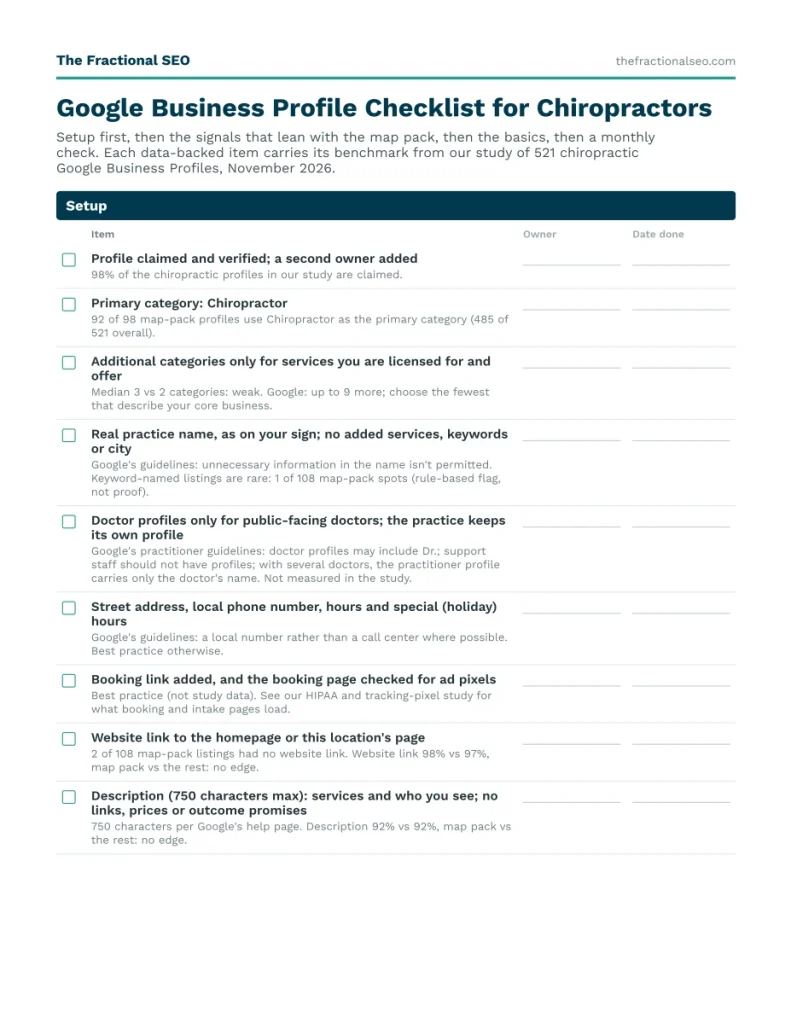
Most Google Business Profile advice for chiropractors is the same list: claim it, pick a category, add photos, post, get reviews. None of the guides we read show which of those things differ between practices in the map pack and the ones below it. We looked at 521 chiropractic profiles to find out. This checklist puts the one item that clearly differs first, then the rules for asking and replying, then setup, with a download at the end.
Get the template No email required
What's inside
Reviews
The review routine, the one profile figure that clearly separates chiropractic practices.
Review rules
Asking within the FTC rule and Google's policy, and replying without disclosing patient information.
Setup
Claim, category, name, doctor profiles, hours, booking link, website and description.
Benchmarks
Each data-backed item carries its figure from our study of 521 chiropractic profiles.
How to use it
-
Download the checklist
Print the PDF or copy the Google Sheet.
-
Set the review routine
A link to every patient after a visit, and reply templates the front desk follows.
-
Fix setup in one sitting
Category, name, hours, links and description take minutes once you're logged in.
We analyzed 36 local searches across 12 US metros and three chiropractic search types, 511 chiropractic practice websites (473 crawled) and 521 Google Business Profiles, November 2026. For this checklist we compared the profiles of practices that reached a map pack (the top three Google Maps results) in any study search with those only seen at Maps positions 4-20, counting each practice once. The website side of the same study is in our study of 473 chiropractic websites.
We collected this data in mid-November 2026, when chiropractic searches are near their low point of the year, so review pace and ad activity may look different in summer.
The short version: the review total is the one profile figure that clearly separates practices. The category is settled, the basics are near-universal, and replies, photos and posts showed no reliable edge.
What separates chiropractic profiles, and what doesn’t
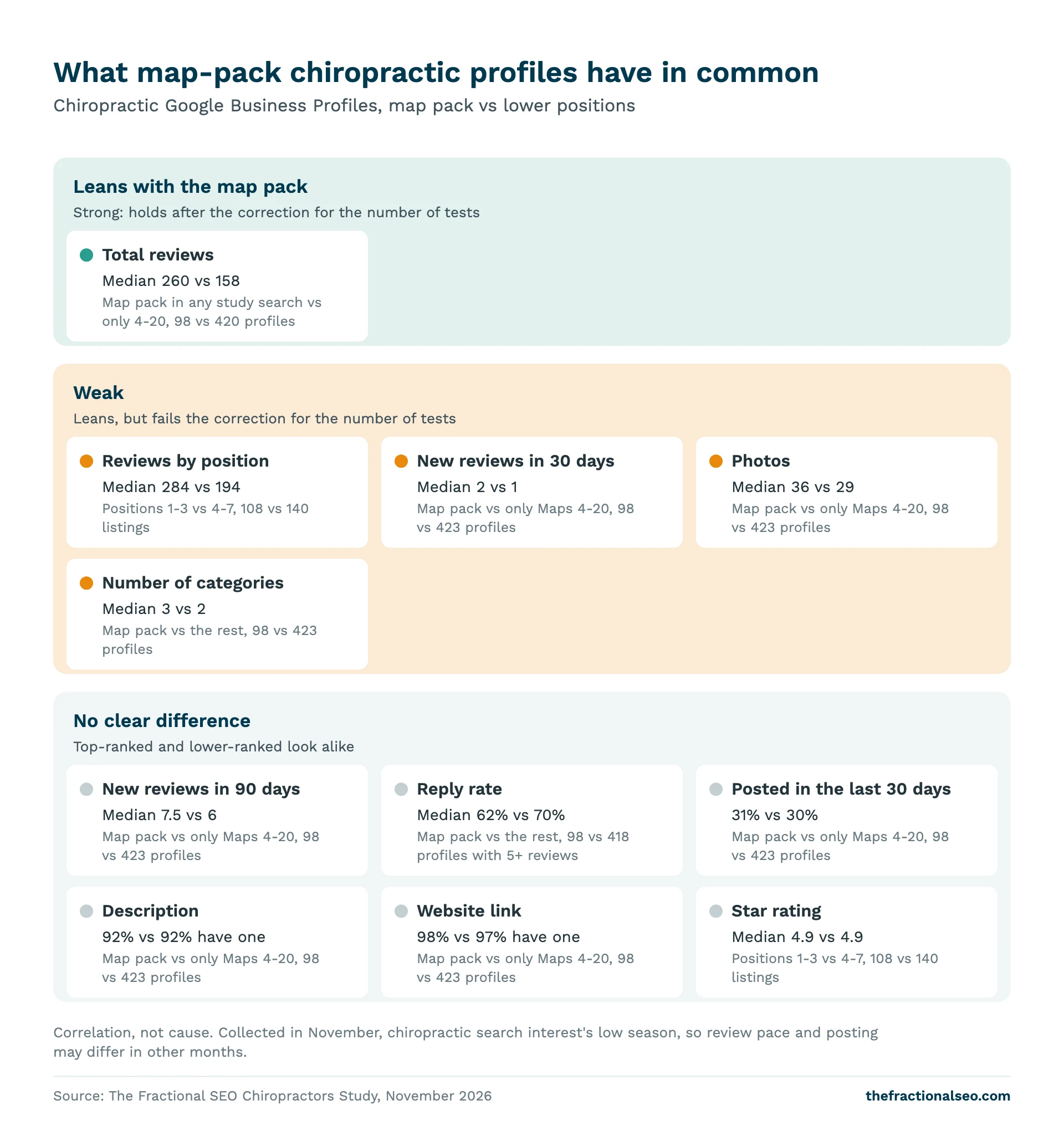
One figure clearly leans with the map pack. Across all 518 chiropractic profiles, practices that reached a map pack in any study search have a median of 260 reviews vs 158 for those only seen at Maps positions 4-20, and that gap survives the correction for the number of tests we ran.
These lean the same way but are weak, meaning the gap does not survive that correction:
- Reviews within one search: a median of 284 reviews at positions 1-3 vs 194 at positions 4-7.
- Reviews in the last 30 days: medians of 2 vs 1.
- Photos: slightly more, a median of 36 vs 29.
- Categories: map-pack profiles list a median of 3 categories vs 2.
These showed no clear difference:
- Reviews in the last 90 days: a median of 7.5 vs 6.
- Replies: a median reply rate of 62% of the newest 20 reviews in the map pack vs 70% for the rest.
- Posts: 31% of map-pack profiles posted in the 30 days before collection vs 30% of the rest.
- Description and website link: 92% vs 92% and 98% vs 97%.
- Star rating: the median is 4.9 in the map pack and 4.9 at positions 4-7.
This is the opposite of what we found for landscapers, where recent reviews, replies and photos all clearly separated the pack. And it is a correlation: practices with more reviews tend to have other advantages too, such as age, links and budget. For the review side in detail, see what 521 chiropractic profiles show about reviews.
Download the checklist
The free checklist turns this page into 20 items: the review routine, the rules for asking and replying, setup, photos, posts and a monthly check. Each data-backed item carries its figure from our study, on two printable pages or a Google Sheet you can copy. It covers the profile only. For your website, links and the rest of local SEO, use the local SEO checklist for chiropractors.
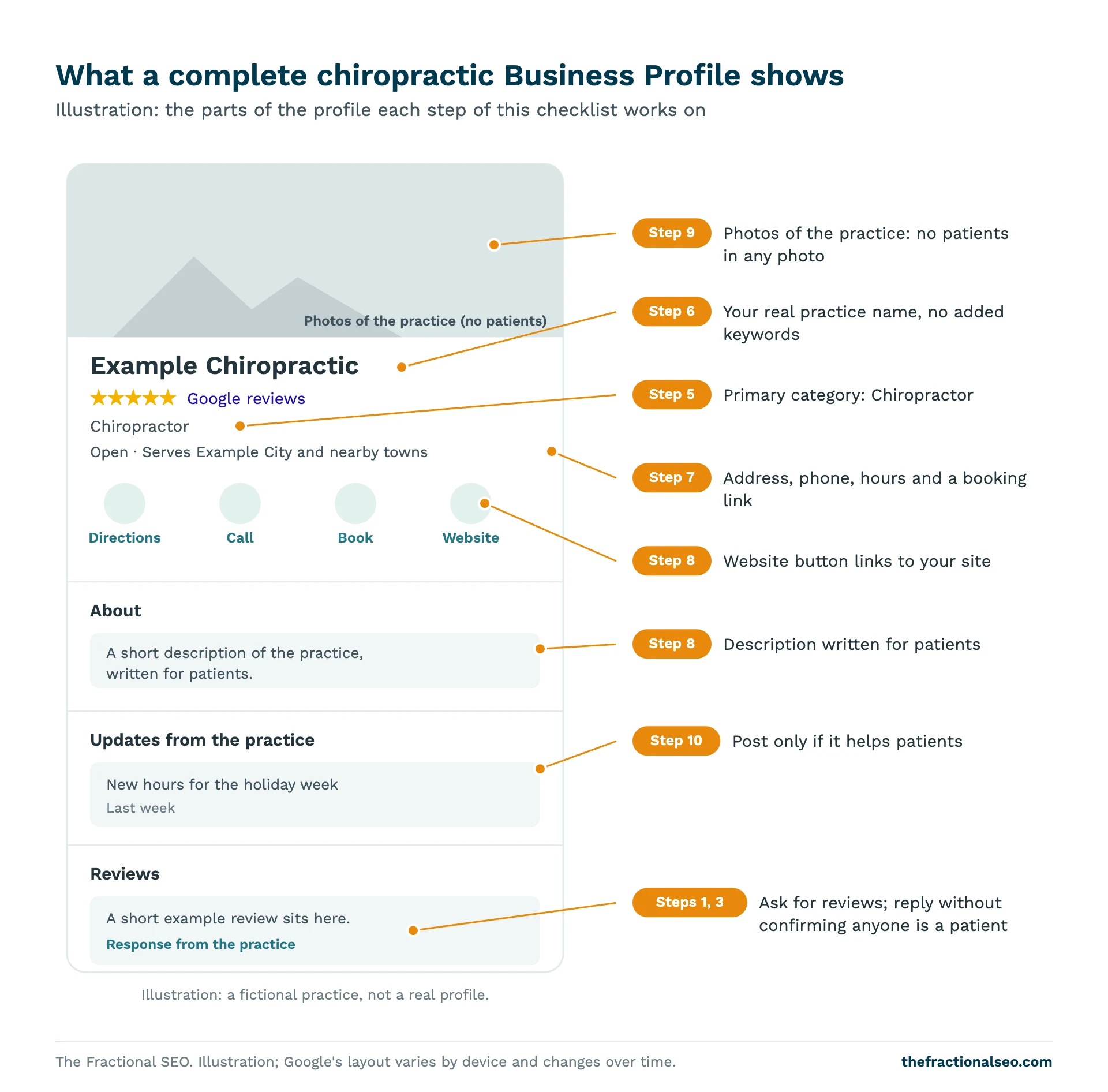
Step 1: Ask every patient for a review
The review total is where practices differ. Within a single search the gap narrows to a lean: 284 vs 194 at positions 1-3 vs 4-7. So a big total goes with practices that reach map packs, more than with sorting the top three from the next four.
Few chiropractors reach the map pack on a handful of reviews: 1 of 108 map-pack listings has fewer than 10 and 13 fewer than 50; three-quarters have 111 or more. The kind of search matters too: the median map-pack listing has 461 reviews on “chiropractor” searches, 251 on spinal decompression and 149 on sports chiropractor. These figures describe the sample; they are not targets. For benchmarks by market size, see our chiropractic reviews research.
Pace showed less: map-pack profiles got a median of 7.5 new reviews in the 90 days before collection vs 6 for the rest, no clear difference. Build the total with a steady routine:
- Get your review link or QR code from the profile. Google’s help page on reviews says you can share either.
- Text or email the link after a visit, from your reminder system if it can, so it reaches every patient.
- Pick one point in care, such as the third visit, and ask everyone there, not only patients who say something nice.
Step 2: Keep your review requests within the rules
Reviews of a health practice draw more rules than a plumber’s. Three sets apply.
Google’s policy. Google’s prohibited content policy bans offering “incentives – such as payment, discounts, free goods and/or services” for a review. Merchants may not “Discourage or prohibit negative reviews, or selectively solicit positive reviews from customers”. It also bars pressuring people to review while on the premises, asking for specific content, and “Merchants requesting that staff solicit a certain number of reviews”. So no front-desk quotas, and no asking patients to mention a doctor or a condition.
The FTC rule. The FTC’s rule on consumer reviews and testimonials took effect on October 21, 2024. It does not ban every incentive for a review. It bans incentives conditioned, expressly or by implication, on a review expressing a particular sentiment, positive or negative (16 CFR 465.4). It also bars an officer or manager from writing a review of the business without clearly disclosing the relationship (16 CFR 465.5). Under the FTC’s Endorsement Guides, a free or discounted service given for a review is a connection that must be disclosed if readers wouldn’t expect it. Google bans incentives outright, so the simple rule is none at all.
Your state. State rules add to these, and they vary. In Florida, for example, false, deceptive or misleading advertising is a ground for disciplining a chiropractic physician (Florida Statutes 460.413), and so is soliciting patients outside the categories the board’s rules allow. Check your own state board’s rules before you reuse a review in an ad.
Step 3: Reply without confirming anyone is a patient
Replying showed no edge in our data: a median reply rate of 62% of the newest 20 reviews in the map pack vs 70% for the rest. Across all profiles, 36% reply to 90% or more and 18% reply to none. Patients read replies, so write them, carefully.
A reply that confirms someone is a patient, or mentions their care, can disclose protected health information. HHS’s Office for Civil Rights has settled cases over exactly this. According to published summaries of the HHS announcements, Elite Dental Associates agreed to pay $10,000 in 2019 after replying to a Yelp review with the patient’s last name and details of her treatment plan and insurance, and Manasa Health Center paid $30,000 in 2023 after replying to Google reviews with comments about patients’ diagnoses and mental health conditions.
Under HIPAA, a health care provider is a covered entity if it transmits health information electronically in connection with a covered transaction, such as an insurance claim (45 CFR 160.103), so a cash-only practice may not be one, though the FTC Act and state health-privacy laws can still apply. The safe reply is the same either way:
- Never confirm the reviewer is a patient, and never mention a visit, a condition, a treatment, a doctor’s notes, billing or insurance.
- Don’t use the reviewer’s name, even when Google shows it.
- Thank a positive review in general terms: “Thank you for taking the time to share this.”
- Answer a negative one without facts about the person: “We take every concern seriously. Please call our office manager so we can talk.” Then talk by phone.
- Write two or three approved replies for the front desk.
Google notifies the reviewer when you reply, and the reply is public. If you’re unsure whether your practice is covered or what counts as a disclosure, talk to a healthcare privacy attorney. The wider privacy picture, including tracking on your website, is in HIPAA and tracking pixels on chiropractic websites.
Step 4: Claim and verify your profile
98% of the chiropractic profiles in our study are claimed, so if yours isn’t, fix that first. Search for your practice on Google Maps and claim the existing profile rather than making a second one. Verify it, then add a second owner so it isn’t tied to one login. An agency should be a manager, not the owner.
Step 5: Use “Chiropractor” as the primary category
This decision is already made for most practices. 92 of 98 map-pack profiles use “Chiropractor” as the primary category (485 of 521 overall). The rest of the pack used “Doctor”, “Sports medicine clinic” or “Physical rehabilitation center”.
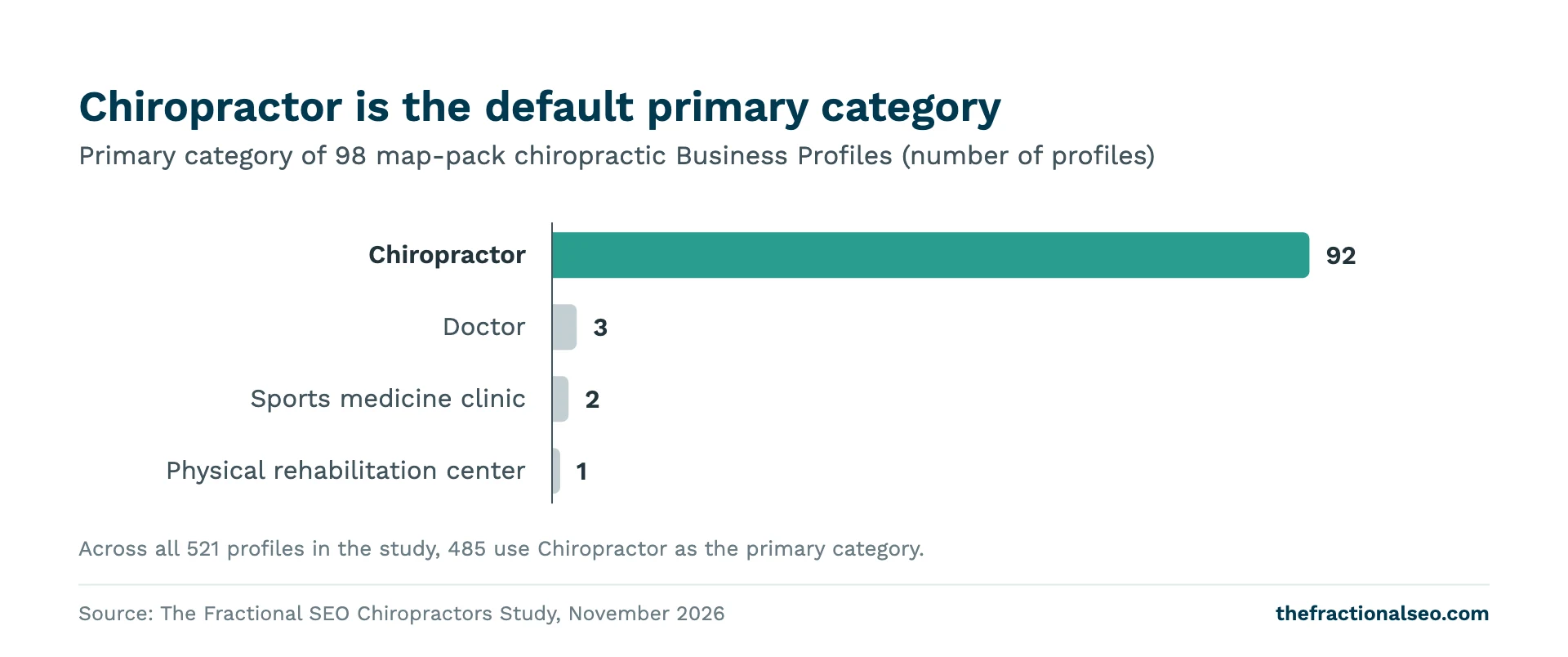
Google’s help page on editing your profile says you can select up to 9 more categories and shouldn’t use categories solely as keywords. Its guidelines say to choose the fewest number it takes to describe your core business. Map-pack profiles list a median of 3 categories vs 2, a weak lean. Add one only for a service you are licensed for and actually offer, such as massage therapy if a licensed therapist works in the practice.
Step 6: Use your real practice name, and know the rules for doctor profiles
Use the name on your sign and your letterhead. Google’s guidelines for representing your business say the name should reflect your real-world name, and that including unnecessary information isn’t permitted and could get the profile suspended, so no service or city tacked on the end. Keyword-named Maps listings with few reviews are rare: 8 listings and 1 of 108 map-pack spots (a rule-based flag, not proof any listing is fake).
Multi-doctor practices have one more choice. Google treats doctors as individual practitioners. A public-facing doctor who can be reached at the practice during its hours may have a profile of their own, and it may include a title such as Dr. Support staff should not, and a doctor shouldn’t have several profiles for different specialties. Where several doctors share a location, the practice keeps its own profile and each doctor’s carries only the doctor’s name. We didn’t measure doctor profiles, so add one only for a doctor patients ask for by name.
Step 7: Set your address, phone, hours and booking link
Use the street address and a local phone number rather than a call center, as Google’s guidelines ask. Set special hours for holidays and other temporary periods. If you take online bookings, add the link, and check what that page loads: our practical advice is to keep ad pixels off booking and intake pages, as our tracking-pixel study explains.
Step 8: Link your website and write the description
Almost every chiropractor in the map pack shows a website: 2 of 108 map-pack listings had no website link. On the profile side it is near-universal (98% vs 97%), with no edge. Point it at your homepage, or this location’s page if you have several, and add UTM tags so your analytics shows visits from the profile.
A description is near-universal too (92% vs 92%, no edge). Google’s edit page says not to exceed 750 characters or include URLs, and its guidelines rule out links of any type and descriptions that focus on promotions, prices or sales. Say what you offer and who you see: adjustments, sports or prenatal care, insurance or cash. Describe services, never results. “We offer spinal decompression” is fine; a promise about what it will do is a claim you would have to support.
Step 9: Add photos of the practice
Map-pack chiropractic profiles have slightly more photos (median 36 vs 29), a lean that fails the correction, and the counts include patients’ photos. Photos still show a new patient what to expect: the entrance, parking, front desk, treatment rooms and team.
Google’s photo guidelines ask for JPG or PNG files between 10 KB and 5 MB, recommend 720 px tall and 720 px wide, and say the image should represent reality. Photos show only after the profile is verified. Keep patients out of the frame: a photo of someone on the table tells the world they are a patient, the same problem as a careless reply.
Step 10: Post if it helps patients, not for rankings
Google posts show no edge: 31% of map-pack profiles posted in the 30 days before collection vs 30% of the rest. 26% of chiropractic profiles have never posted. Post when patients need to know something. Google’s help page on posts lists updates, offers and events, and says posts older than 6 months are archived unless a date range is set. Treat an offer post as an ad. In Florida, for example, an ad for a free or discounted exam or treatment by a chiropractor must carry a required statement (Florida Statutes 456.062).
Step 11: Check performance monthly
Once a month, note calls, website clicks, direction requests and bookings from the profile, against the same month last year.
What the profile can’t do on its own
Google’s local ranking page says local results are mainly based on relevance, distance and popularity, and that there’s no way to request or pay for a better local ranking. No profile setting changes how far you are from the searcher.
The map pack and the organic results are mostly different practices: 34% of map-pack chiropractors with a website also rank on page one organically for the same search. And map-pack chiropractors’ websites have a higher DataForSEO Domain Rank (144 vs 114 on a 0-1000 scale, a strong result). The profile is one part of the job. See the full local SEO guide for chiropractors.
Work through the checklist, then talk to us about the rest of your local SEO: SEO for chiropractors.
Questions, answered
What Google Business Profile category should a chiropractor use?
“Chiropractor”. It is the primary category on 92 of 98 map-pack profiles in our study. Add other categories only for services you are licensed for and offer.
How many Google reviews does a chiropractor need?
There’s no set number. Three-quarters of map-pack listings have 111 or more, and sports chiropractors reach the pack with about a third of the reviews of map-pack listings on plain “chiropractor” searches. Compare yourself with your own local pack.
Can I reply to patient reviews without breaking HIPAA?
Yes, if the reply never confirms the reviewer is a patient or mentions their care. Keep replies general and take anything specific offline.
Can I offer a discount or gift for a Google review?
No. Google’s policy bans incentives for reviews of any kind. The FTC rule bans incentives tied to a positive or negative review, and the FTC’s guides require disclosure of other incentives readers wouldn’t expect.
Do Google posts help a chiropractor rank?
Not in a way we could measure: 31% of map-pack profiles posted in the 30 days before collection vs 30% of the rest. Post for patients when there is news.