
Guide Plumbing
How to Generate Plumbing Leads with SEO
Most plumbing lead advice is a list of channels. This guide treats it as two jobs. First, get in front of the person searching, on a results page where ads and directories take up a lot of the room. Then make it easy for that person to call, book or ask for a quote. We measured what sits on the results page and what plumbing sites offer, and the clearest website signal we found, online booking, turned out to run on one software company's tools on 160 of the 303 sites that have it.
One note on scope. Some people searching for plumbing leads want to buy them, from marketplaces such as Angi or Thumbtack or from lead vendors. This guide is about the other kind: homeowners who find you on Google and contact you directly. If marketplaces outrank you for your own searches, our guide to plumbing directories covers how to work with them.
About the data: We analyzed 100 local searches across 25 US metros and four plumbing search types, 1,048 plumbing company websites (927 crawled) and 1,029 Google Business Profiles, November 2026. We collected this data in mid-November 2026. Plumbing demand runs all year, but frozen-pipe and water-heater searches rise in winter, so review pace, Google posting and ad activity may look different in other months. The study compares what top-ranked and lower-ranked plumbers have, so it shows what tends to go together, not what causes a ranking or a lead.
The short answer
- Start with the map pack: plumbers there have more reviews and keep getting new ones faster.
- Build pages for the jobs that pay, and an emergency page only if someone answers at night.
- Make it easy to call: a tap-to-call number on every page.
- Offer online booking for the customers who want it, not as a ranking trick. Much of its link with rankings is ServiceTitan.
- Put a short form on the homepage for people who won’t call.
- Track every call, booking and form by source, or you won’t know which of this worked.
Where plumbing leads come from on Google
Search “plumber” plus a city and the page isn’t ten plain links. In our 100 searches, Google Local Services Ads appeared above the results on 50% of local plumbing searches, text ads on 19% (at the top on 7%), and an AI Overview on 46%. Every search showed a map pack.
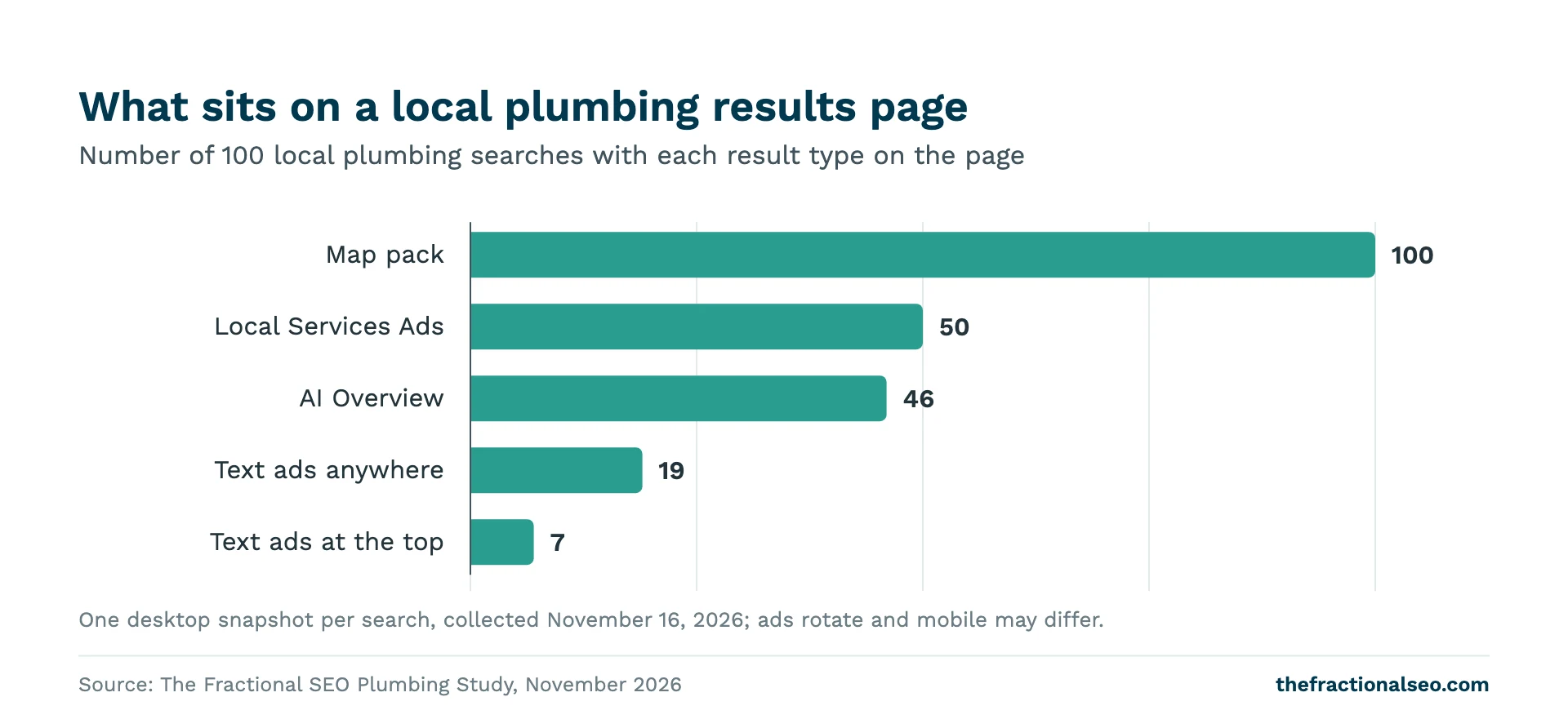
This was one desktop snapshot per search, collected on one day, and ad auctions change by the hour. Read it as what a searcher tends to see, not a fixed layout. Local Services Ads showed on 43% of searches in large metros and 55% in both mid-size and small metros. The groups are small, so that describes what we saw rather than a rule for your market.
The organic results aren’t all yours to win either. Half of page one goes to plumbers: 50% of page-one organic results for local plumbing searches are plumbing companies’ own websites; the other 50% are directories, social sites and a few content and lead-generation sites. And the two free spots are mostly held by different companies: only 13% of map-pack plumbers with a website also rank on page one organically for the same search.
So a homeowner has three ways to reach you from one search: a paid placement, your map listing or your website. Paid placements are rented. The map pack and organic results are earned, and they’re what this guide is about. Every path ends in a call, a booking or a form, and every path leaks if that last step is hard. The full search picture is in our benchmark of 100 plumbing searches.
What a plumbing click costs, by wording
The fastest way onto that page is to pay, and local plumbing clicks are expensive. Here is the median Google Ads cost per click for each study wording, next to the typical monthly searches for that wording in one metro:
| Search (plus the city) | Median cost per click | Typical monthly searches, one metro |
|---|---|---|
| plumber | $38.22 | 2,900 |
| emergency plumber | $83.27 | 260 |
| drain cleaning | $48.68 | 210 |
| water heater repair | $38.03 | 170 |
The highest single figure is $154.43 for “drain cleaning phoenix”. Remember what these numbers are: planner estimates of the top-of-page bid, not what any plumber paid. Real auction prices move by month and market. And a click isn’t a call. You pay for the visit whether or not the person picks up the phone.
Emergency searches sit at the top of the range. Across the country, 36 emergency and 24-hour keyword groups have a median cost per click of $69.01, against $13.22 for plumbing service searches overall. What emergency results look like and what to build for them is covered in emergency plumbing SEO.
Calls from the map pack and the organic results don’t carry a price per click. They cost time or a monthly fee instead. We have no data on cost per lead by channel, so we won’t tell you SEO is cheaper per lead. Whether it pays back depends on your job values and your market; we wrote about that in Is SEO worth it?.
What paid traffic estimates don’t show
You may have looked up a competitor in an SEO tool to see what they spend on ads. Be careful with what comes back. Only 3% of plumbing websites show any estimated Google Ads search traffic in DataForSEO (34 of 1,048), while a Google Ads tag is visible on 17% of the 920 homepages read.
Those two numbers use different bases, so don’t subtract one from the other. One possible reason for the gap, which we didn’t measure: Local Services Ads and Performance Max spend don’t show up in these estimates. Either way, read a tool’s paid-traffic estimate with care: a competitor showing none may still be running ads.
How much search traffic plumbing sites get
Most plumbing websites get little estimated search traffic of their own. The median plumbing website gets an estimated 122 organic visits a month, and an estimated 47% get fewer than 100. These are modeled estimates from DataForSEO, not analytics, but they give a sense of scale.
Where a company shows up changes the picture. Plumbers found only in Maps have much less estimated organic traffic (median 87 visits a month) than those found only in organic results (159) or in both (528). Part of that is obvious: a company that ranks in more places gets more estimated visits. It describes the groups. It doesn’t prove that ranking organically adds a set amount of traffic.
Our reading, not a study finding: for many plumbers the map pack is likely doing much of the work, so the Business Profile comes first. And with few visits to work with, a site can’t afford to lose the ones it gets. That’s why Steps 3 to 5 are about the phone number, the booking button and the form.
Step 1: Get into the map pack
Complete and keep up your Google Business Profile
Your Business Profile is your map-pack listing. Pick the primary category that matches your main service, use your real business name, set your service area and hours, add real job photos and post updates. Google is clear that “There’s no way to request or pay for a better local ranking on Google” (Google’s local ranking tips). You can add a booking link: Google lets you add up to 10 links per category, and links from some scheduling partners can appear on their own. The setup is in our Google Business Profile guide for plumbers.
Keep new reviews coming
Plumbers in the map pack have about twice the Google reviews of those just below: a median of 834 at positions 1-3 vs 420 at positions 4-7. They also keep getting them: a median of 9 new Google reviews in the 30 days before collection vs 3 for the rest. Both are correlations. Established companies tend to have more reviews and other advantages, such as age, budget and links.
Star rating, on the other hand, made no clear difference: the median is 4.85 in the map pack and 4.8 at positions 4-7. Ratings cluster near five stars, so the count and the pace are where plumbers differ. Ask after every job, by text with a direct link, while the tech is still on site. For the benchmarks by search and market size, see how many Google reviews a plumber needs to make the map pack.
Step 2: Build pages for the jobs that pay
A homepage can rank for your company name and maybe one broad search. People search for the job: drain cleaning, water heater repair, sewer line repair, leak detection. Each one needs a page that answers it. Most plumbing sites already have some: 81% of plumbing websites have dedicated service pages, and the median among those that do is 19.
Give each core service its own page. Say what the job involves, which areas you cover, what affects the price and whether you offer financing. Add a few real reviews about that kind of job, and put the phone number and a Book button near the top. The page-building side is in our beginner’s guide to SEO for plumbers. If you answer at night, an emergency page belongs on the list too, but only then; the emergency guide explains why.
Step 3: Make it easy to call
Most plumbing sites are set up for calls: 90% of plumbing websites have a click-to-call phone link on the homepage. Between top-ranked and lower-ranked sites the difference is small. For click-to-call it’s map pack 98% vs 91% (weak, it fails our correction for multiple tests) and organic 90% vs 83% (no clear difference). Treat it as a conversion basic. The study gives no reason to expect it to move you up, but it makes calling easy for the people who already found you.
- Put the number in the header of every page, as a tap-to-call link on phones.
- Use the same main number on the site and the Business Profile, unless call tracking swaps it (see below).
- Answer during the hours you list. After hours, send calls to a person or an answering service, not a full voicemail box.
Step 4: Offer online booking, for the customers who want it
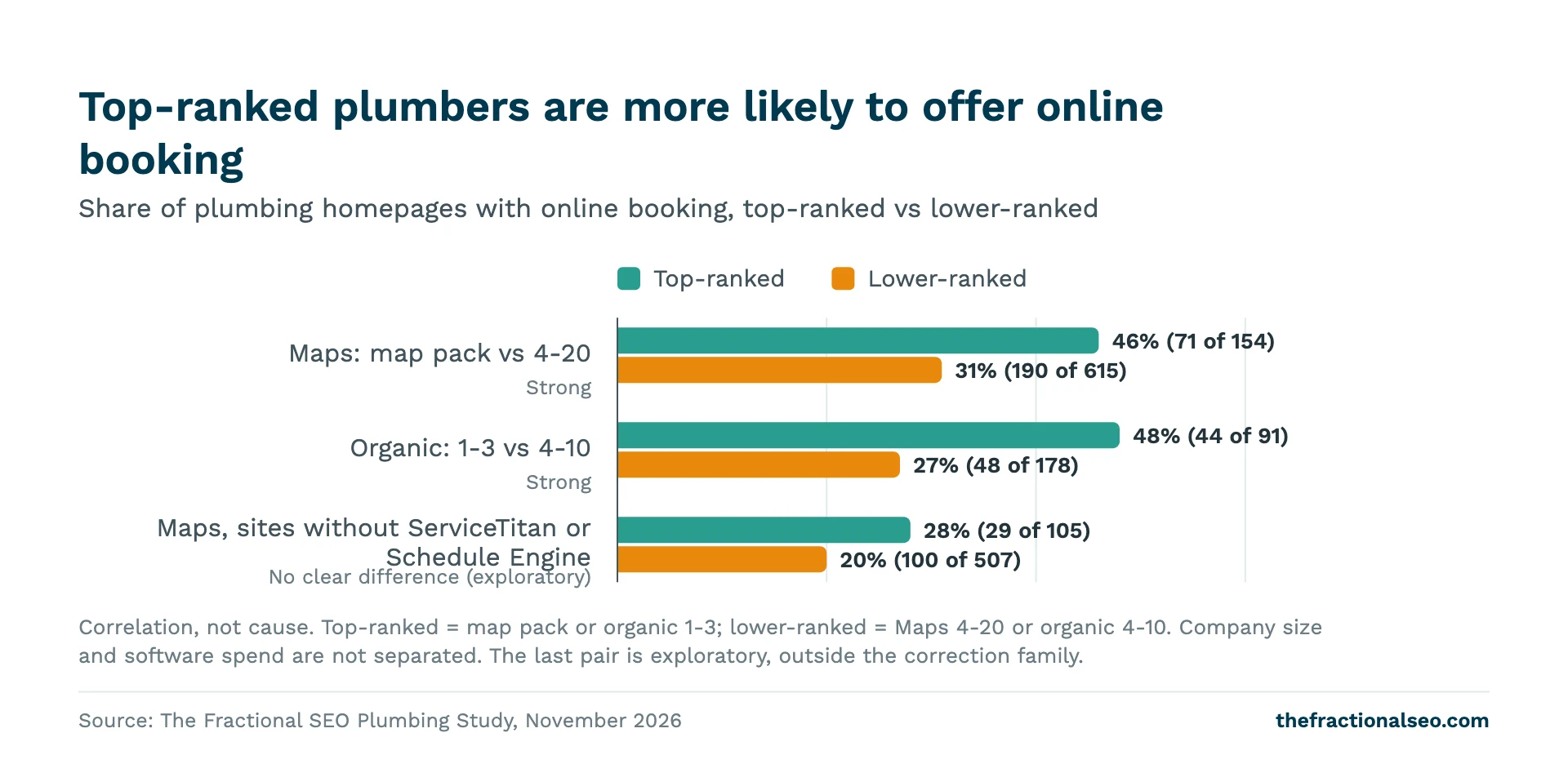
Online booking showed on 33% of the plumbing homepages we read. As in HVAC, top-ranked plumbers are more likely to offer online booking on the homepage: 46% of map-pack businesses vs 31% of those lower in Maps (positions 4-20), and 48% of organic top-3 sites vs 27% at positions 4-10. It is the only website feature with a clear difference in both comparisons.
Now the part most lead guides leave out. Much of the online-booking lean is ServiceTitan: 160 of the 303 homepages with online booking run ServiceTitan or its Schedule Engine, and ServiceTitan or Schedule Engine is itself more common in the map pack (32% vs 18%). Among sites with neither, booking shows no clear difference (28% vs 20%). That follow-up is exploratory, and the study can’t separate booking from company size or software spend.
So don’t add a booking button expecting to climb. Add it because some customers would rather pick a slot at night than wait on hold in the morning. Ways to offer it:
- The scheduler in your field-service software, embedded on the site, with a Book button in the header.
- A booking link on your Business Profile, so people can book from the map listing.
- Local Services Ads, if you run them: Google says customers can call, message or book through the ad.
Start narrow: drain cleaning, water heater checks and estimates are easier to promise online than a sewer job. Show arrival windows, say what the visit costs or that the estimate is free, and confirm by text. More detail is in online booking and the plumbing map pack and what top-ranked plumbing websites do differently.
Step 5: Put a short form on the homepage
45% of plumbing websites have a contact or quote form on the homepage itself. Between top-ranked and lower-ranked sites there’s no reliable difference: homepage form, map pack 56% vs 44% (weak, it fails the correction) and organic 39% vs 42% (no clear difference). A form catches people who won’t call and can’t book, like the landlord at work or the homeowner comparing quotes for a repipe.
- Keep it short: name, phone, ZIP code and what’s wrong.
- Say when you’ll reply, then reply that fast.
- Send people to a thank-you page after they submit, so the form can be tracked.
That advice is best practice, not study data. If you rank and still get few calls, start with Steps 3 to 5. If nobody finds you, start with the profile, reviews and pages.
Track every call, booking and form
If you can’t say where last month’s calls came from, you can’t tell which step paid off. Call tracking shows on 19% of plumbing homepages (CallRail 12%, WhatConverts 6%); Google Tag Manager on 49%, GA4 on 36%, a Google Ads tag on 17% and a Meta pixel on 11%. Tags loaded later by a tag manager may be missed, so these are floors.
- Calls: a call-tracking service can swap the number on your site by traffic source. Keep your main number on the Business Profile.
- Forms: send each form to a thank-you page or fire an event on submit, and count it in Google Analytics.
- Bookings: use the source report in your scheduler, and tag the booking link on your Business Profile so profile bookings show separately.
- Business Profile: check calls and website clicks from the listing each month.
Once a month, count calls, bookings and forms by source and match them to booked jobs. Rankings and traffic are signals; booked jobs are the result. We compare the call tracking and marketing tools plumbers use in a separate collection.
Questions, answered
How do plumbers get leads online?
On Google, through three doors: paid placements, the map pack and the organic results. Every search we checked showed a map pack, and half showed Local Services Ads. Plumbers found in both Maps and organic results had more estimated organic traffic (median 528 visits a month) than those found only in Maps (87).
Is SEO or Google Ads better for plumbing leads?
They do different jobs. Ads are fast and priced per click: a median of $38.22 for “plumber <city>” in planner estimates, and more for emergency and drain cleaning searches. Maps and organic results aren’t priced per click but take time to build. We have no data on cost per lead by channel.
Should I buy plumbing leads?
It can fill gaps, but you rent the result. Marketplaces sell leads or charge for placement, and the customer relationship starts on their platform. With Local Services Ads, Google says you pay only for leads related to your business. Calls from your own listing and site carry no fee per lead, but take time to earn.
Does online booking help a plumber rank?
We can’t say it does. Top-ranked plumbers are more likely to have it (46% vs 31% in the map pack), but 160 of the 303 booking sites run ServiceTitan or Schedule Engine, and without them the gap isn’t clear. Offer it for the customers who prefer it.
Want to know which of these your site is missing?
We check which of these steps matter in your market and which ones your site and profile are missing. Talk to us about plumbing SEO.
Sources
- The Fractional SEO plumbing study, November 2026: what top-ranked plumbing websites do differently
- Google Local Services Ads Help, Getting started with Local Services Ads
- Google Business Profile Help, Manage your local business links
- Google Business Profile Help, Tips to improve your local ranking on Google
More guides
The whole Plumbing library- SEO for Plumbers: A Beginner’s Guide What plumbing customers search for, which pages to build first and what 927 plumbing websites show,…
- How to Build Backlinks for a Plumbing Business How many links ranking plumbers actually have, where good plumbing links come from, and what Google…
- Technical SEO for Plumbing Websites Speed, page weight, schema and on-page benchmarks from plumbing websites, what to fix first, and whether…