
Templates & Resource Plumbing
Google Business Profile Guide for Plumbers
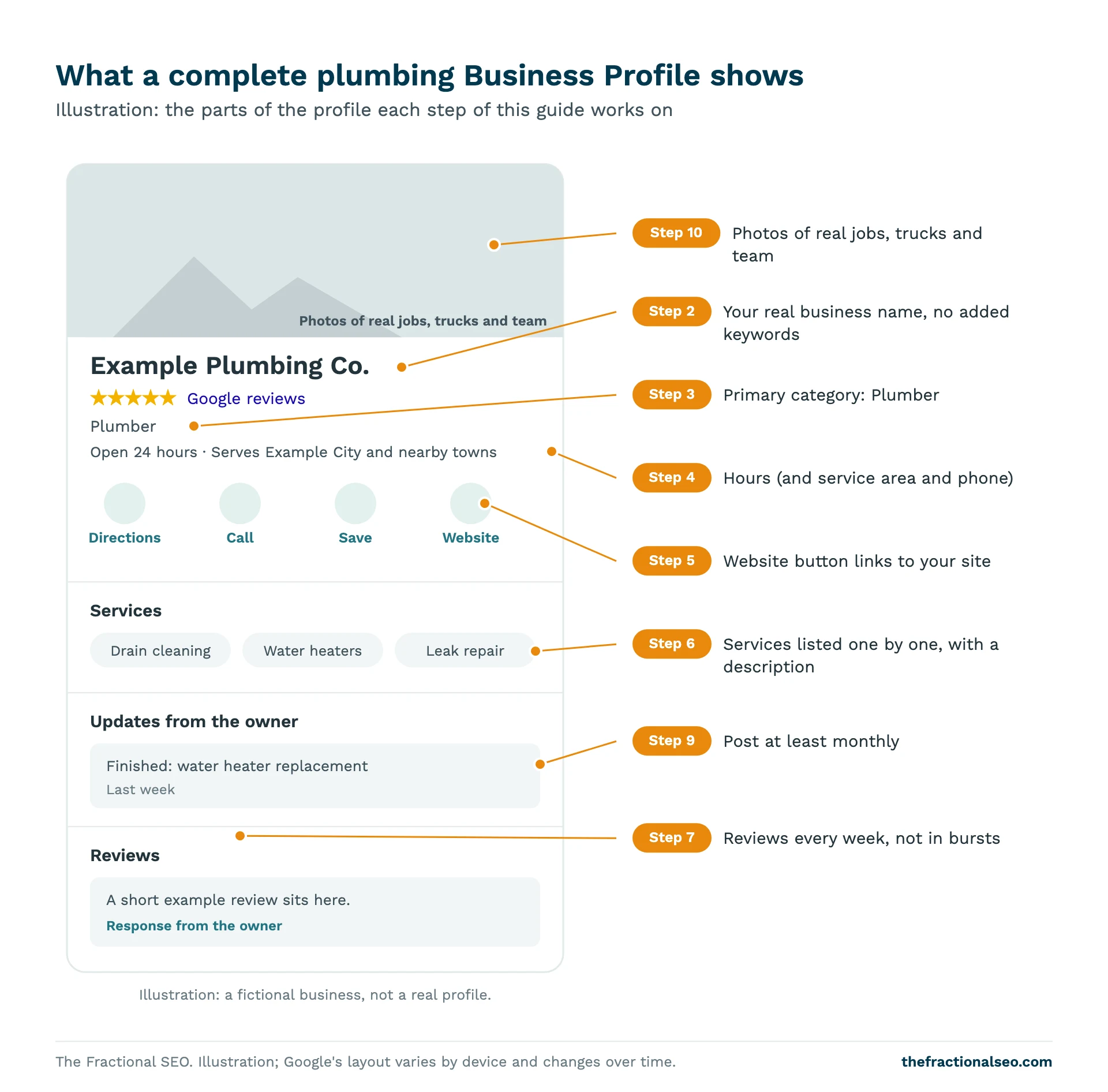
Every Google Business Profile guide gives plumbers the same list: claim it, pick categories, add photos, post, get reviews. What the top-ranking guides we read don't show is which of those things actually differ between the plumbers in the map pack and the ones below it. We looked at 1,029 plumbing profiles to find out. This guide walks through each step in order and ends with a checklist you can work through.

Get the template No email required
What's inside
Setup
Claim, name, primary category, service area, hours, phone, website and description.
Reviews
Your count against the map pack and a review request after every job.
Posts and photos
A monthly post routine and real photos of your work.
Benchmarks
Each data-backed item carries its figure from our study of 1,029 plumbing profiles.
How to use it
-
Download the checklist
Print the PDF or copy the Google Sheet.
-
Finish setup in one sitting
Most setup items take minutes once you're logged in.
-
Set the monthly routine
Review requests, replies, a post, photos and a performance check, every month.
We analyzed 100 local searches across 25 US metros and four plumbing search types, 1,048 plumbing company websites (927 crawled) and 1,029 Google Business Profiles, November 2026. We collected this data in mid-November 2026. Plumbing demand runs all year, but frozen-pipe and water-heater searches rise in winter, so review pace, Google posting and ad activity may look different in other months. Most comparisons in this guide set the profiles of businesses that reached a map pack in any study search against those that only appeared at Maps positions 4-20, counting each business once; where we compare single listings at positions 1-3 and 4-7, we say so. The website side of the same study is in our study of 927 plumbing websites.
The short version: the setup basics are near-universal and mostly don’t separate anyone. What differs are the things you keep doing every month.
What map-pack plumbing profiles have in common
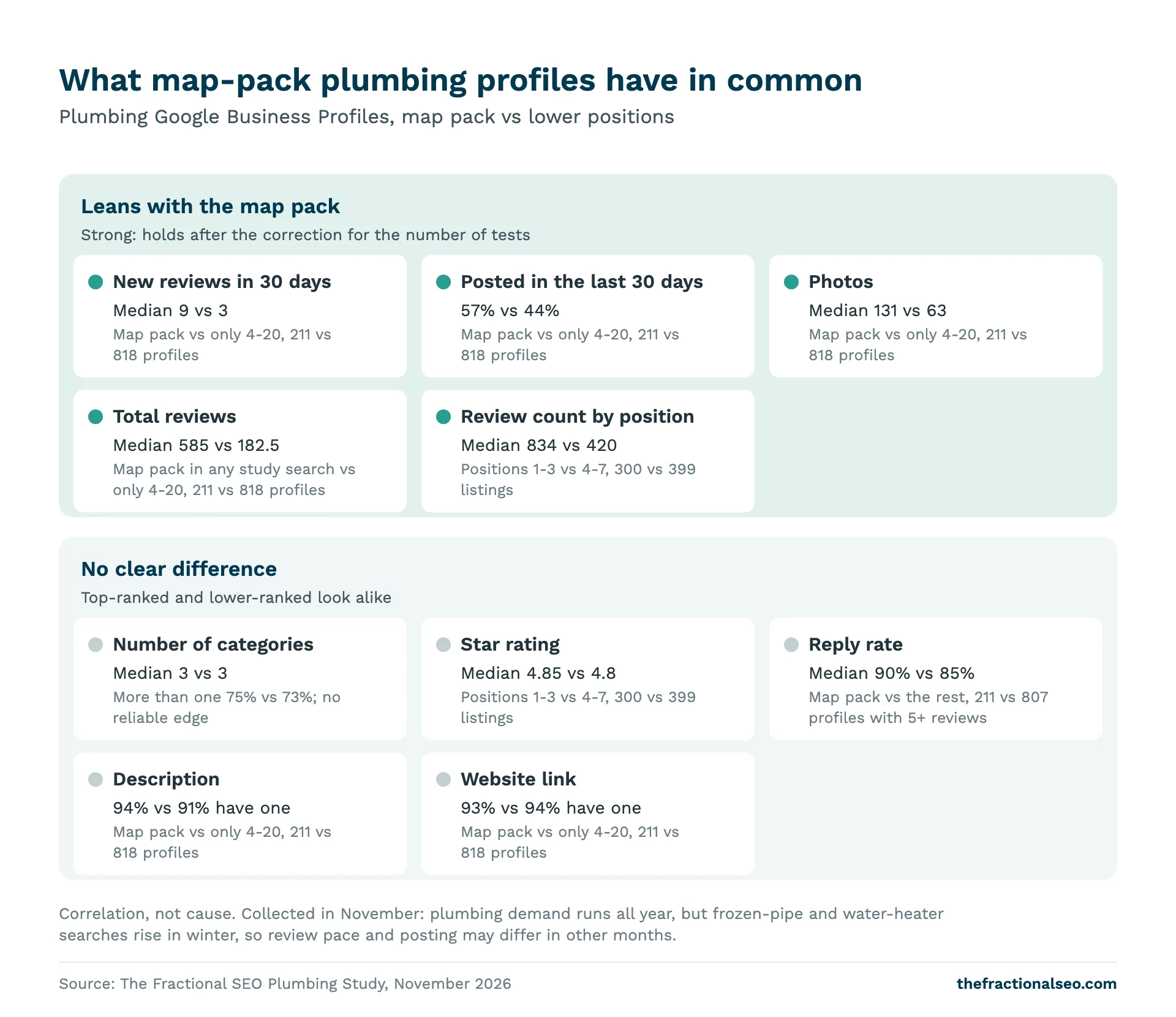
These lean with the map pack, and all were strong results statistically:
- New reviews: map-pack plumbers keep getting reviews, a median of 9 new Google reviews in the 30 days before collection vs 3 for the rest.
- Recent posts: 57% of map-pack plumbers posted on Google in the 30 days before collection vs 44% of the rest.
- Photos: map-pack plumbing profiles have about twice as many, median 131 vs 63.
- Total reviews: a median of 585 for businesses that reached a map pack vs 182.5 for the rest. Per search, listings at positions 1-3 have a median of 834 vs 420 at positions 4-7.
These showed no clear or reliable difference:
- Number of categories: the median plumbing profile lists 3 in and out of the map pack, and 75% vs 73% list more than one. Unlike HVAC, more categories shows no reliable edge.
- Star rating: the median is 4.85 in the map pack and 4.8 at positions 4-7.
- Replies: map-pack owners reply to a median of 90% of their newest 20 reviews vs 85% for the rest.
- Description and website link: near-universal, description 94% vs 91%, website 93% vs 94%.
One caution. This is a correlation. Map-pack plumbers in the study also have more links to their websites, and established companies tend to have other advantages, such as age and budget. Franchise locations are in these figures too: Roto-Rooter alone held 14 of 300 map-pack spots. The study shows what map-pack profiles have, not what put them there. For the review side in detail, see what 1,029 plumbing profiles show about reviews and rankings.
Download the checklist
The free checklist turns this guide into 20 items: setup, reviews, posts and photos, and a monthly check. Each data-backed item carries its figure from our study, on two printable pages or a Google Sheet you can copy. For your website and the rest of local SEO, use the local SEO checklist for plumbers.
Step 1: Claim and verify your profile
96% of plumbing profiles are claimed by the owner (985 of 1,029). Among plumbers that show up in local searches, a claimed profile is close to universal. If yours isn’t claimed, nothing else here is possible, so start here.
Search for your business on Google Maps. If a profile exists, claim it; if not, create one, then verify it with one of the methods Google offers you. Photos only show once the profile is verified, says Google’s photo help page. Then add a second owner or manager from your company so the profile isn’t tied to one person’s login. If an agency manages it, make them a manager, not the owner.
Step 2: Use your real business name
Use your business name exactly as it appears on your trucks, invoices and website. Google’s guidelines for representing your business say “Including unnecessary information in your business name isn’t permitted, and could result in the suspension of your Business Profile.” That rules out adding “Emergency Plumber Tampa” to the end.
You may see listings that look like they break the rule. Keyword-named Maps listings with few reviews (a listing named only “<city> plumbing”, for example) are few in plumbing: 18 listings, 28 Maps rows and 2 of 300 map-pack spots. Our flag is rule-based, not proof any listing is fake. Either way, the pattern held almost none of the map pack, and copying it would break Google’s guidelines.
Step 3: Choose your primary category, then stop
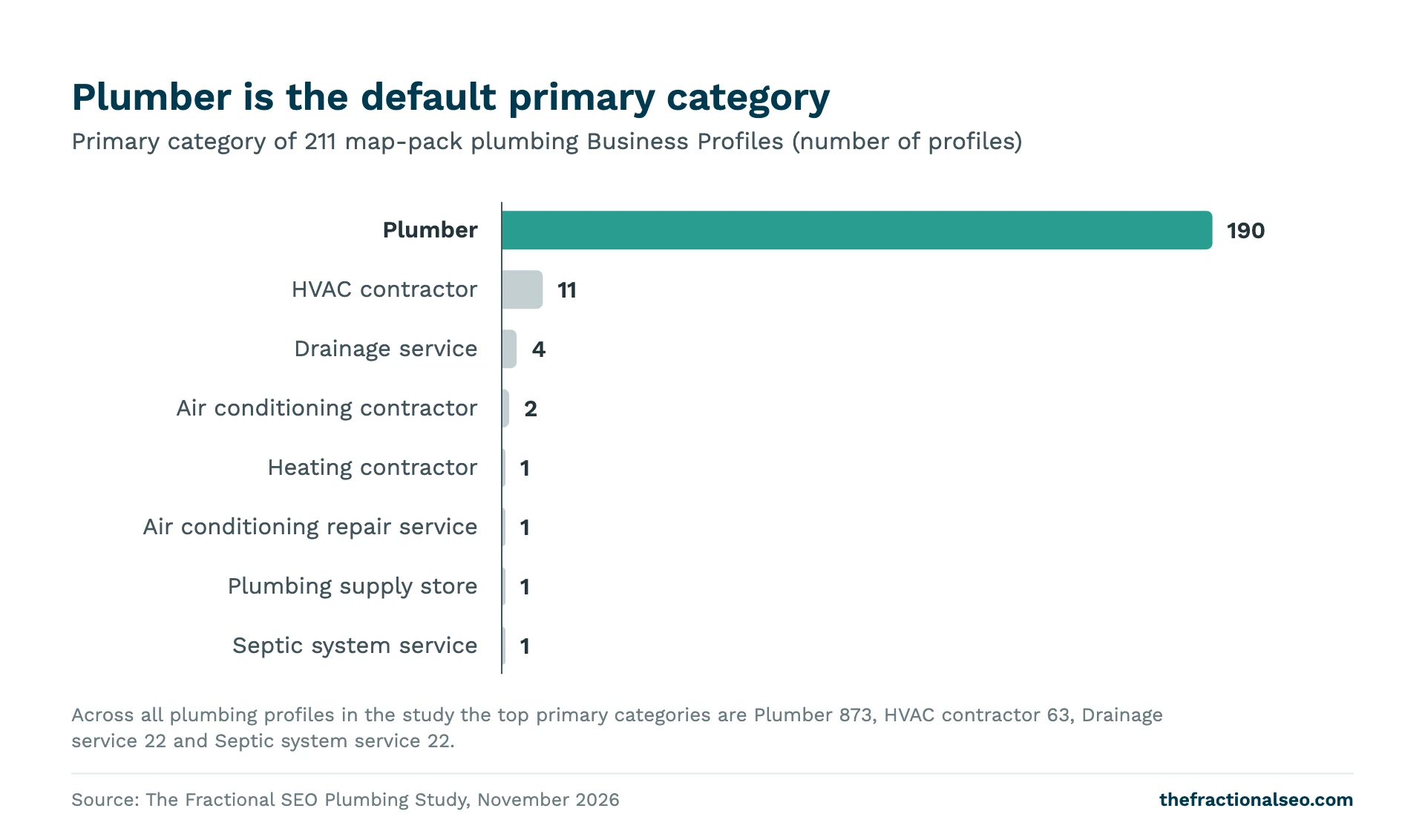
Your primary category tells Google what kind of business you are. “Plumber” is the primary category on 190 of 211 map-pack profiles; the next are HVAC contractor (11) and Drainage service (4). For almost every plumbing company, Plumber is the answer.
Additional categories are where plumbing parts ways with most profile advice. Every guide we read says to add them. In our data, listing more categories shows no reliable edge: the median plumbing profile lists 3 categories in and out of the map pack, and 75% vs 73% list more than one. (In HVAC, more categories did lean with the pack.) So categories are a basic to get right, not a lever.
Google’s help page on editing your profile says “You can select up to 9 more categories” and “Do not use categories solely as keywords or to describe features of your business.” Add one only for work you do and want calls for, such as drainage service or septic system service. A category you can’t staff sends calls you can’t take.
If you also do heating and cooling. Many plumbers do: 231 of 1,029 plumbing profiles (22%) list an HVAC, heating or air-conditioning category, and 88 (9%) use one as the primary category, 15 of them among the 211 that reached a map pack. Make the primary category the trade most of your calls come from, and add the other as an additional category.
Step 4: Set your service area, hours and phone
Service area. Google’s guidelines use a plumber as their example: “if you’re a plumber and run your business from your residential address, clear the address from your Business Profile.” Set the towns you serve instead. If customers visit an office or showroom, check those guidelines on showing the address.
Phone. The guidelines say to “Use a local phone number instead of a central call center helpline number whenever possible.” Use the same number that’s on your website.
Hours. Set real hours and add special hours before holidays. If you take emergency calls around the clock, make the profile, the website and whoever answers the phone say the same thing. A homeowner with water on the floor who calls during listed hours and gets voicemail may not call twice. Emergency searches are their own market; see emergency plumbing SEO.
Step 5: Link your website
Nearly every plumber in the map pack shows a website, but more go without one than in HVAC: 16 of 300 map-pack listings (5.3%) had no website link. On the profile side the link shows no edge: 93% vs 94% (map pack vs the rest).
So the link won’t set you apart, but without one a homeowner can’t reach your site from the profile. Point it at your homepage or, with several locations, the page for the location this profile represents. Add UTM tracking (for example source google, medium organic, campaign gbp) so you can see visits from the profile in your analytics.
Step 6: Write the description and services
A business description is near-universal and shows no edge: 94% of map-pack profiles have one vs 91% of the rest. So write it for the customer, then move on. Say what you do (repairs, drain cleaning, water heaters, repipes, sewer lines), who you serve, which towns and whether you take emergency calls. Skip the slogans and don’t stuff it with keywords.
Fill in the services list too, with the jobs you want: drain cleaning, water heater repair and replacement, leak detection, sewer line repair, fixture installs. It’s quick, and it tells a homeowner at a glance whether you do what they need.
Step 7: Get reviews every week, not in bursts
This is where map-pack profiles differ most clearly. Map-pack plumbers keep getting reviews: a median of 9 new Google reviews in the 30 days before collection vs 3 for the rest.
The totals differ too. Businesses that reached a map pack in any study search have a median of 585 reviews vs 182.5 for those only seen at positions 4-20. Per search, plumbers in the map pack have about twice the Google reviews of those just below: a median of 834 at positions 1-3 vs 420 at positions 4-7. Almost nobody reaches the plumbing map pack on a handful of reviews: 3 of 300 map-pack listings have fewer than 10, and three-quarters have 241 or more. The bar depends on the search: drain cleaning packs have the lowest median (391), water heater repair the highest (1,698). For benchmarks by search and metro size, see how many Google reviews a plumber needs to make the map pack.
The rating isn’t the gap. Star rating does not separate them: the median is 4.85 in the map pack and 4.8 at positions 4-7. Nearly everyone sits high.
All of these are correlations. A company in the pack may get more calls, so it has more customers to ask; the study didn’t measure that. But a steady flow of reviews is something you control. Make asking part of how every job ends:
- Get your review link or QR code. Google’s help page on reviews says you can ask customers “to visit a Google link or scan a QR code”.
- Have the tech ask at job completion, then text the link the same day. Print the QR code on invoices and leave-behinds.
- Ask every customer, not only the ones you expect to be happy. Google’s content policy says businesses may not “selectively solicit positive reviews from customers.”
- Never pay for reviews or offer a discount for one. Google says incentives are strictly prohibited.
A few reviews every week is easier to keep up than one push a year, and it keeps your newest reviews recent.
Step 8: Reply to reviews
Most plumbers already do this: half reply to 90% or more of their newest reviews, and 16% reply to none. Replying does not separate the map pack from the rest: map-pack owners reply to a median of 90% of their newest 20 reviews vs 85% for the rest, no clear difference.
Reply anyway, because the next homeowner reads your replies before calling. Google’s tips are plain: “Keep it short and simple”, and “Never share a reviewer’s private information”. Thank good reviews briefly and specifically. Answer bad ones calmly, once, and offer to sort it out by phone.
Step 9: Post at least monthly
Recent Google posts are more common in the map pack: 57% of map-pack plumbers posted in the 30 days before collection vs 44% of the rest. That’s a correlation, but a strong one in our data. Plumbers are active here: across all 1,029 profiles, 47% posted in the 30 days before collection and 18% have no posts at all.
Google’s help page on posts describes them as a way to share “announcements, offers, updates, and event details”. It doesn’t say posts affect ranking. Monthly is a sensible routine, and plumbing gives you topics: frozen-pipe tips before the first hard freeze, a water heater swap finished this week, a drain-cleaning offer, holiday hours. For timing by service, see seasonal SEO for plumbers.
Step 10: Add photos of real jobs, trucks and team
Map-pack plumbing profiles have about twice as many photos: median 131 vs 63. Photo counts include customer photos, and busier companies collect more of both, so the gap also tracks how busy a company is.
Add your own as you go: finished installs, a clean water heater closet, the team, your trucks with the logo showing. Real photos only, never stock. Ask techs for one good photo on suitable jobs, with the customer’s permission and nothing that shows their address.
Step 11: Check performance monthly
Once a month, open the profile’s performance view and note calls, website clicks and direction requests. Compare with the month before and the same month last year. If calls drop while reviews and posts are steady, look at what changed on the profile or in the map pack.
What the profile can’t do on its own
Google’s local ranking page says local results are mainly based on relevance, distance and popularity, with “Prominence” only as a sub-heading. No profile setting changes how far you are from the searcher, and Google says “There’s no way to request or pay for a better local ranking on Google.” The profile is one part of local SEO; the website and links are the rest. See the full local SEO guide for plumbers.
Work through the checklist, then talk to us about the rest of your local SEO: SEO for plumbing companies.
Questions, answered
What Google Business Profile category should a plumber use?
Plumber. It’s the primary category on 190 of 211 map-pack plumbing profiles; HVAC contractor (11) and Drainage service (4) are next. Choose something narrower only if it truly describes most of your work.
How many categories should a plumbing profile have?
There’s no number to hit. The median plumbing profile lists 3 in and out of the map pack, and listing more showed no reliable edge. Google allows up to 9 additional categories; add only ones for work you do.
How often should a plumber post on Google?
At least monthly. 57% of map-pack plumbers posted in the 30 days before collection vs 44% of the rest, and 47% of all the plumbing profiles we checked posted in that window.
How many photos should a plumbing profile have?
There’s no set number. Map-pack profiles had a median of 131 photos vs 63 for the rest, and those counts include customer photos. Add real job and team photos regularly.
Does replying to reviews help ranking?
Not in a way we could measure: 90% vs 85% median reply rate, no clear difference. Reply anyway, because customers read replies.