
Templates & Resource Water Damage
Google Business Profile Checklist for Water Damage Companies
Every Google Business Profile guide gives restoration owners the same list: claim it, pick a category, add photos, post, get reviews. What none of the guides we read show is which of those things differ between the water damage companies in the map pack and the ones below them. We checked 287 Google Business Profiles from these searches. Most of the list is done by almost everyone and shows no edge. One thing leans with the map pack: a steady flow of new reviews. This checklist puts that first, and keeps the rest short.
Get the template No email required
What's inside
Setup
Claim, name, category, service area, hours, website link and description.
Reviews
A review request after every job, and your count against the map pack.
Replies, posts and photos
Worth doing for customers; none showed an edge in our data.
Benchmarks
Each data-backed item carries its figure from our November 2026 study.
How to use it
-
Download the checklist
Print the PDF or copy the Google Sheet.
-
Finish setup in one sitting
Most setup items take minutes once you're logged in.
-
Set the monthly routine
Review requests, replies, a post and a performance check.
We analyzed 27 local searches across 9 US metros and three water damage search types, 254 restoration company websites (232 crawled) and 287 Google Business Profiles, November 2026. For this checklist we compared the profiles of businesses that reached a map pack in any study search with those only seen at Maps positions 4-20, counting each business once. The website side of the same study is in our study of 232 water damage websites.
The data was collected on November 16 and 17, 2026, inside frozen-pipe season in the northern study metros (New York, Chicago and Boise). It is one snapshot, and the map-pack sample is small, so “no clear difference” below means none showed up in this data, not that none exists.
The short answer
- The basics are near-universal. 99% of the profiles are claimed (284 of 287), and a description, a website link and extra categories are near-universal in and out of the map pack.
- The category is settled. “Water damage restoration service” is the primary category on 47 of 50 map-pack profiles.
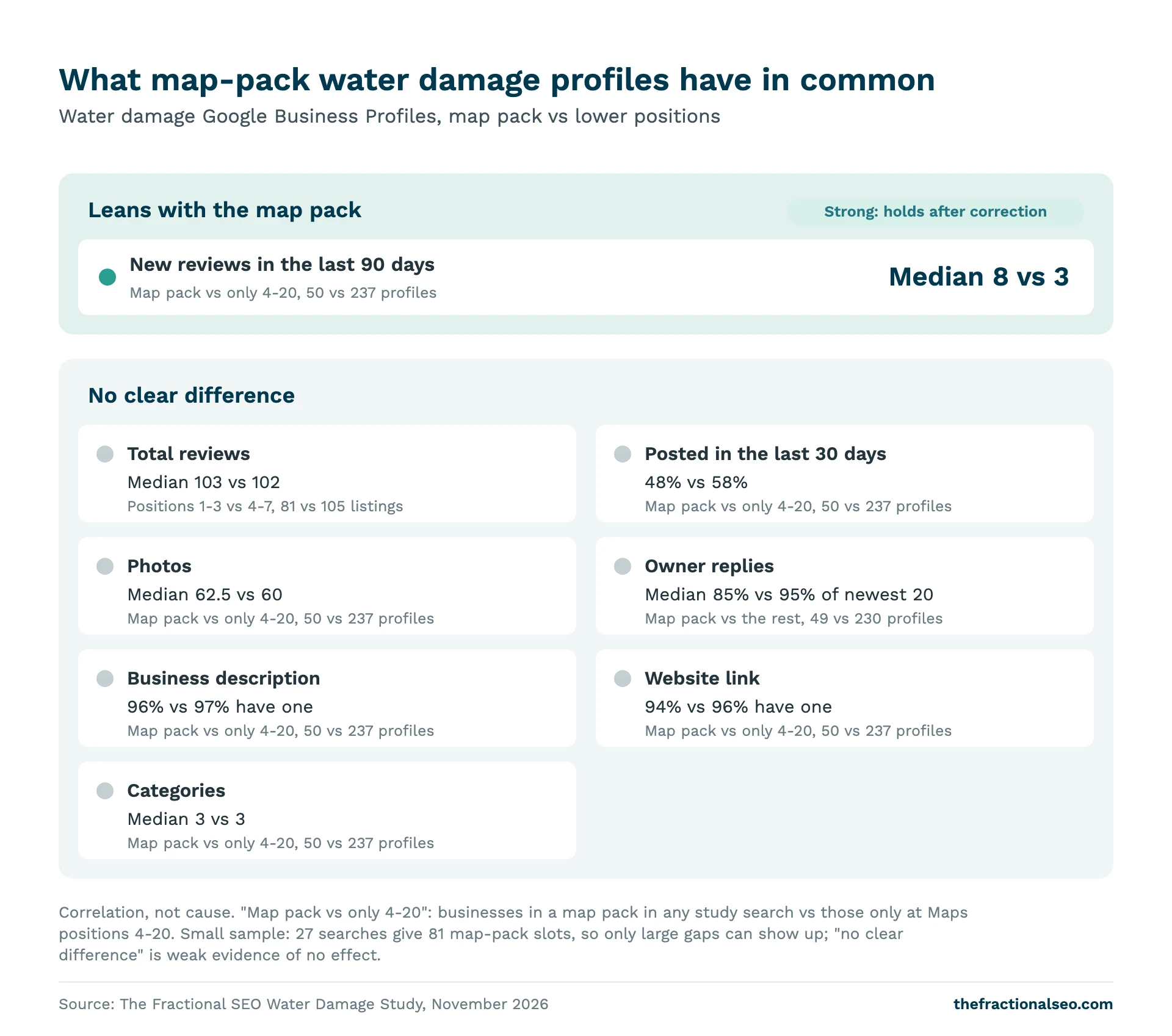
- Recent reviews lean with the map pack. Map-pack water damage businesses got a median of 8 new Google reviews in the 90 days before collection vs 3 for the rest.
- Posts, photos and replies show no edge. Do them for customers, not for rankings.
Download the checklist
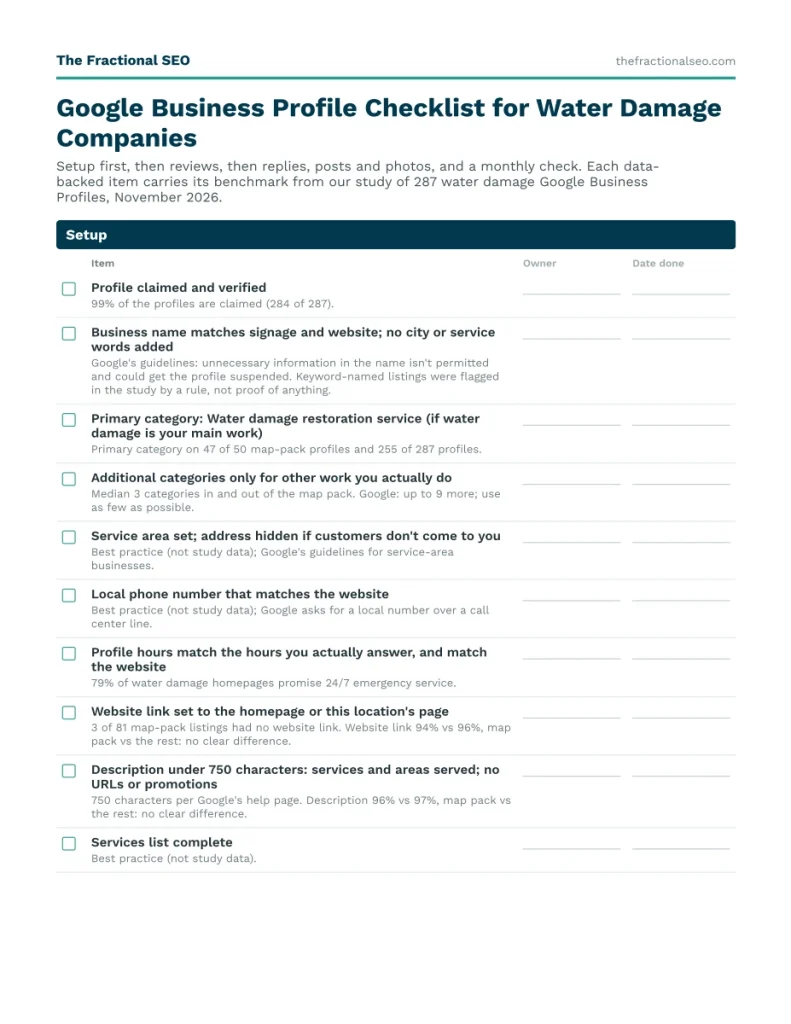
The free checklist turns this page into 20 items: setup, reviews, then replies, posts and photos, and a monthly check. Each data-backed item carries its figure from our study. For your website and the rest of local SEO, use the local SEO checklist for water damage restoration companies.
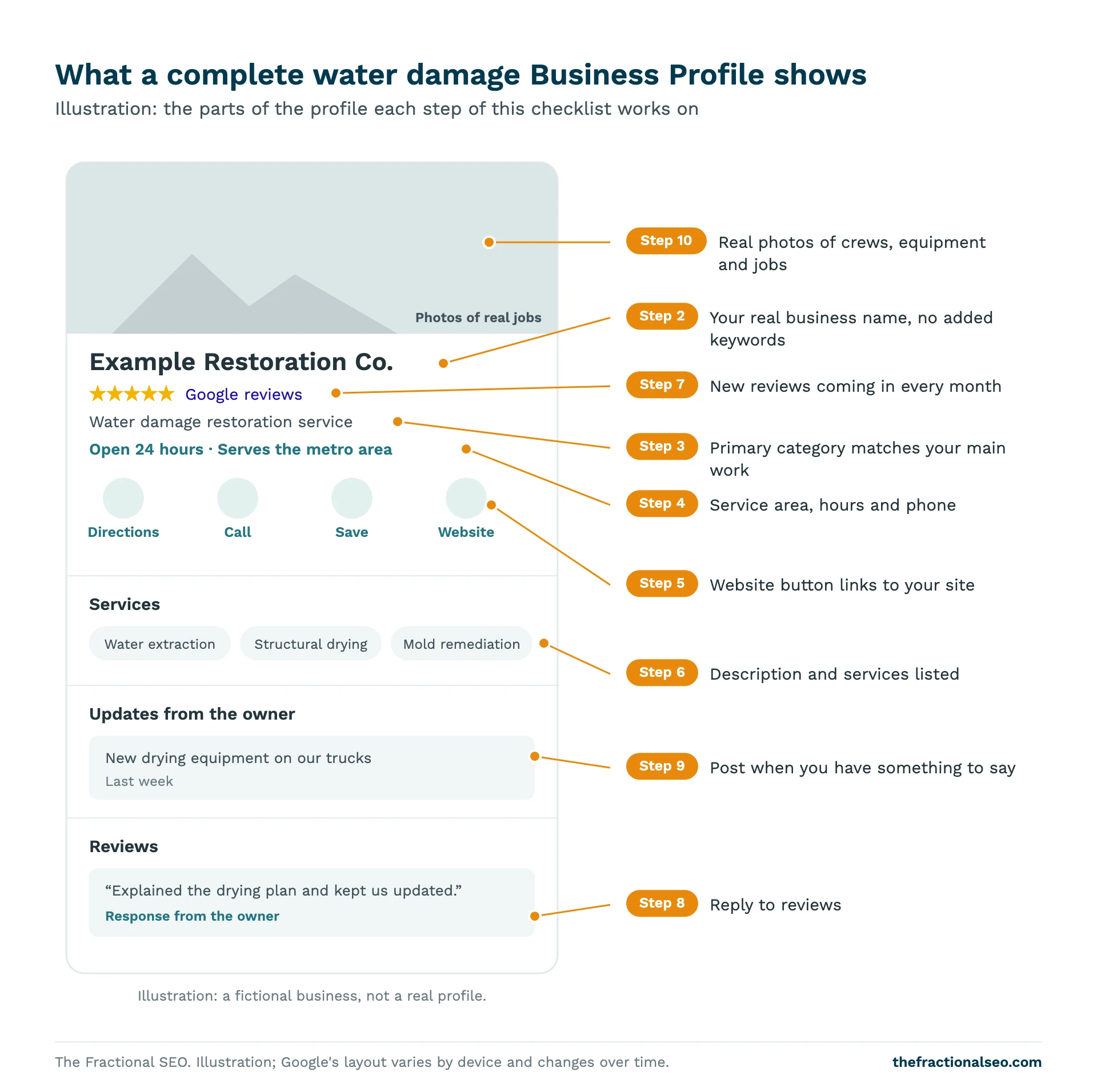
Step 1: Claim and verify your profile
99% of the profiles in our study are claimed (284 of 287). Among the businesses that show up in these searches, a claimed profile is close to universal. If yours isn’t, nothing else on this list is possible. Claim it, verify it with the method Google offers you, and add a second owner or manager from your company so the profile isn’t tied to one person’s login. If an agency manages it, make them a manager, not the owner.
Step 2: Use your real business name
Use the name on your trucks, your signs and your website. Google’s guidelines for representing your business say including unnecessary information in your business name isn’t permitted and could result in the suspension of your Business Profile. That rules out adding “Water Damage Restoration” and a city to the end.
You will see listings that seem to get away with it. Keyword-named Maps listings with few reviews, with a name made only of city and service words such as “<city> Water Damage Restoration”, showed up 28 times in the Maps results (18 listings, mostly in Austin, New York and Dallas) and held 4 of 81 map-pack spots. Our flag is a rule, not proof any listing is fake. But copying the pattern breaks Google’s guidelines and puts your profile at risk. Use your real name.
Step 3: Choose your categories
Here the data is close to uniform. “Water damage restoration service” is the primary category on 47 of 50 map-pack profiles and 255 of 287 profiles overall. The other 3 map-pack profiles used Building restoration service, Environmental consultant and Contractor, one each. If water damage is your main work, that is your primary category.
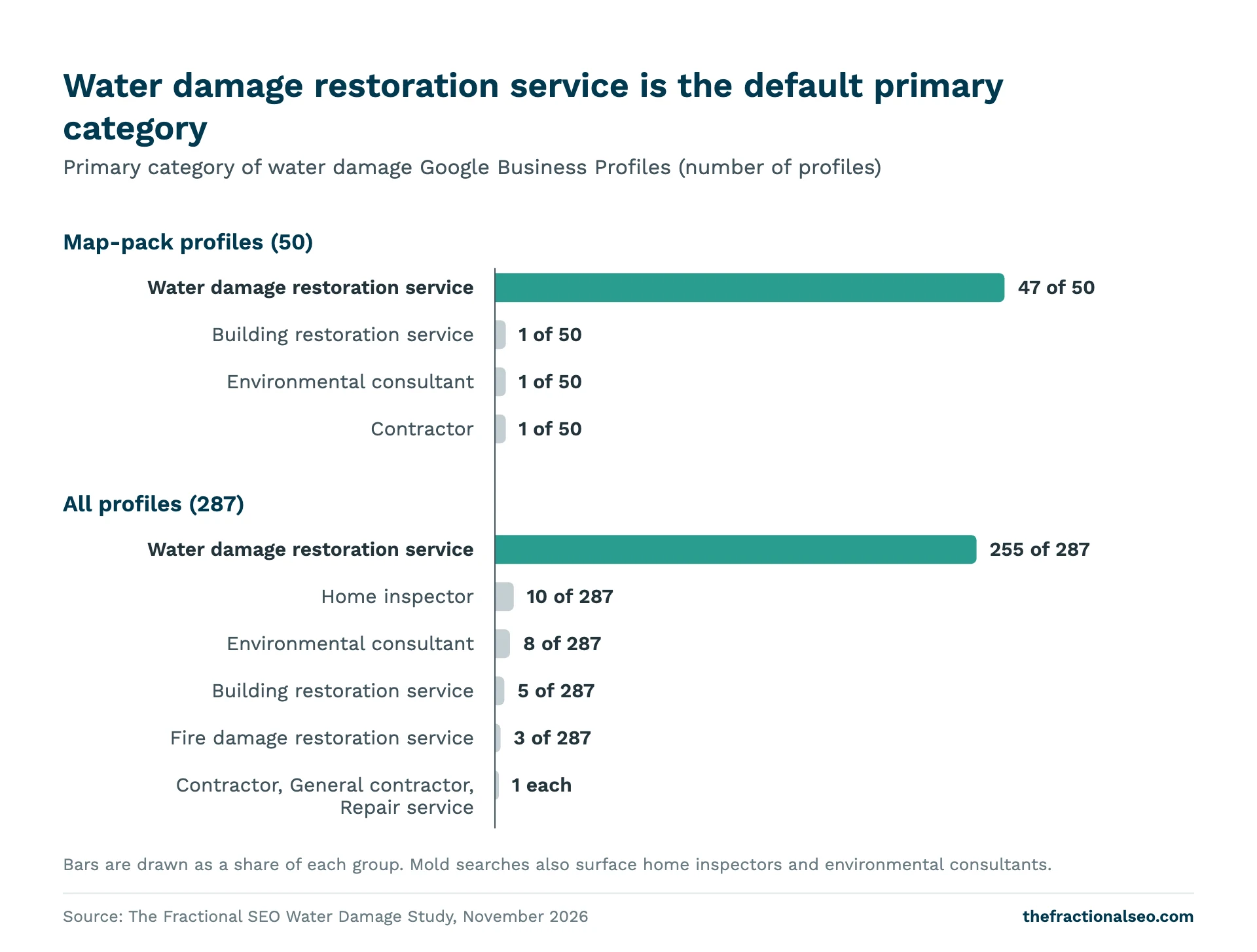
Mold work is the one place to think twice. Mold searches also surface home inspectors (10) and environmental consultants (8). Those are different businesses that test and inspect. Google’s guidelines say to choose categories that complete the statement “This business IS a”, not “this business HAS a”. So don’t switch your primary category to chase mold searches. If you also do mold remediation, say so in your services and on your website.
Then add additional categories for other work you actually do and want calls for, such as fire or storm restoration. Google’s help page on editing your profile says you can select up to 9 more categories, and its guidelines say to use as few as possible and to be as specific as possible. In our data the count showed no clear difference: a median of 3 in and out of the map pack.
Step 4: Set your service area, hours and phone
Service area. Most restoration companies go to the customer. Google’s guidelines say a service-area business should hide its address from customers and set the areas it serves. If customers do come to your office, read those guidelines on showing the address.
Phone. Google asks for a local phone number instead of a central call center helpline number whenever possible. Use the same number as your website.
Hours. 79% of water damage homepages promise 24/7 emergency service. If yours does, your profile hours should say the same, and someone should answer. A homeowner with water coming through the ceiling who gets voicemail calls the next listing.
Step 5: Link your website
Nearly every restoration business in the map pack shows a website: 3 of 81 map-pack listings had no website link. On the profile side the link is near-universal: 94% vs 96%, map pack vs the rest. It won’t set you apart, but without it a caller has no way to check you out first. Point it at your homepage, or at the location page this profile stands for. Add UTM tracking (for example source google, medium organic, campaign gbp) so your analytics show the visits it sends.
Step 6: Write the description and services
Google’s help page says not to exceed 750 characters in the description field, not to include URLs, and to focus on details about your business instead of promotions, prices or sales. A description is near-universal in our data (96% vs 97%), so write it for the customer and move on. Say what you do (water extraction, structural drying, mold remediation, sewage cleanup, rebuild), whether you work with insurance, and which towns you cover.
Fill in the services list too, with the jobs you want calls for. It tells a homeowner at a glance whether you handle their problem.
Step 7: Keep new reviews coming
This is where map-pack profiles differ. Map-pack water damage businesses got a median of 8 new Google reviews in the 90 days before collection vs 3 for the rest. That held up after correcting for the number of tests. Over 30 days the medians were 2 vs 1, a gap that fails the correction. We collected each profile’s newest 40 reviews; 13 profiles hit that cap, so their counts are floors.
Total counts are a different story. Map-pack listings have a median of 103 Google reviews vs 102 at positions 4-7, no clear difference. Totals showed no clear difference in this small sample; the flow of new reviews is what leaned with the map pack. For benchmarks by metro and search, see what 287 profiles show about reviews and rankings.
Both figures are correlations. A company in the map pack may get more jobs and so more customers to ask. But the flow is something you control. Make asking part of how every job ends:
- Get your review link or QR code from the profile. Google’s help page on reviews says you can share either.
- Ask when the drying is signed off or the final walkthrough is done, and text the link the same day.
- Ask every customer, not only the happy ones. Google’s content policy says businesses may not “selectively solicit positive reviews from customers.”
- Never pay for a review or offer a discount, free work or anything else for one. The same policy bans incentives.
Step 8: Reply to reviews
Most restoration owners already reply: 59% reply to 90% or more of their newest reviews, and 14% reply to none. Map-pack owners replied to a median 85% of their newest 20 reviews vs 95% for the rest, no clear difference.
Reply anyway. Google says replying shows customers you value their feedback. Thank good reviews briefly. Answer a bad one once, calmly, and take it offline. Never mention a customer’s address, claim or insurer.
Step 9: Post when you have something to say
Water damage companies are active here: 56% posted on Google in the 30 days before collection and 15% have no posts. Posting shows no edge for the map pack (48% vs 58%). Google’s help page on posts lists updates, offers and events, and says posts older than 6 months are archived unless a date range is set.
A monthly post keeps the profile current for the people reading it: a finished job, new equipment, a crew certification. Don’t expect it to move rankings.
Step 10: Add real photos
Photo counts show no clear difference either: a median of 62.5 in the map pack vs 60 for the rest. Add real photos anyway: your trucks, your crew, your drying equipment set up on a job. Get the customer’s permission and keep addresses out of the frame. Never use stock photos.
Step 11: Check performance monthly
Once a month, note calls, website clicks and direction requests from the profile’s performance view. Compare with the month before and the same month last year. If calls drop while new reviews keep coming, look at what changed in your local map pack.
What the profile can’t do on its own
Google’s local ranking help page says local results are mainly based on relevance, distance and popularity, and that there’s no way to request or pay for a better local ranking. No profile setting changes how far you are from the person searching. The profile is one part of local SEO; your website and the rest are covered in local SEO for water damage restoration companies.
Work through the checklist, then talk to us about the rest: SEO for water damage restoration companies.
Questions, answered
What Google Business Profile category should a water damage company use?
“Water damage restoration service”, if water damage is your main work. It is the primary category on 47 of 50 map-pack profiles and 255 of 287 profiles in our study.
Should a restoration company add more categories?
Only for other work you actually do. Google allows up to 9 more and says to use as few as possible. In our data the median was 3 in and out of the map pack.
How often should a water damage company post on Google?
When you have something useful to say; monthly is a sensible habit. 56% of the profiles we checked posted in the last 30 days, and posting showed no edge for the map pack (48% vs 58%).
Do photos help a restoration profile rank?
Not in a way we could measure: a median of 62.5 photos in the map pack vs 60 for the rest. Add real photos for customers.
Should a service-area restoration business show its address?
Google’s guidelines say a service-area business should hide its address and set a service area instead, unless customers come to that address.