
Guide Construction
How to Generate Construction Leads with SEO
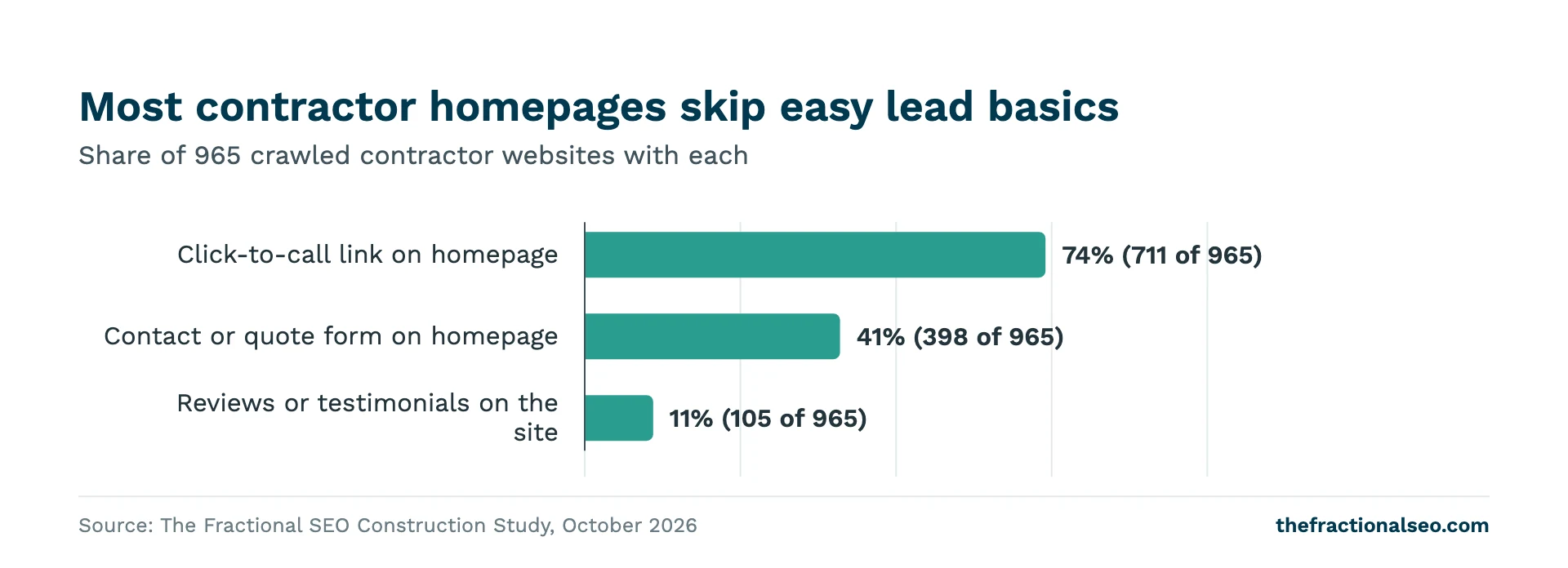
Most contractors lose leads after the click, not before it. In our crawl, only 41% of contractor websites had a contact or quote form on the homepage, and just 11% had reviews or testimonials embedded on the site. Those are fixes you can make this week. This guide covers both halves of the job: getting found when someone searches for a contractor, and turning that visit into a call or a quote request.
One note on scope. Some people searching for construction leads want to buy project lists or sign up for a lead service. This guide is about the other kind: owners and project managers who find you on Google and contact you directly.
The short answer
- Two places to be found: the map pack and the organic results. They reward different work.
- The map pack leans on reviews: a median of 49.5 reviews in positions 1-3 vs 36 in positions 4-7.
- Pages for each service and area: map-pack sites are more likely to have location pages (27% vs 17%).
- Conversion basics most sites skip: 74% have click-to-call, 41% a homepage form, 11% reviews on the site.
- Track every call and form, or you won’t know which of this is working.
About the data: We analyzed 100 local searches across 25 US metros and four contractor types, 1,034 contractor websites (965 crawled) and 457 Google Business Profiles, October 2026. The study compares what higher- and lower-ranked contractors have, so it shows what tends to go together, not what causes a ranking. Full results: We Analyzed 965 Construction Websites.
Where construction leads search
A local construction search on Google shows two sets of results. The map pack is the block of three businesses with a map, pulled from Google Business Profiles. Below it are the organic results: ten web pages.
Contractors don’t own the organic half. Only 57% of page-one organic results for local construction searches went to contractor websites. The other 43% went to directories, social sites, news, government pages, trade associations and chambers of commerce. Houzz and Yelp turned up more than any other directory.
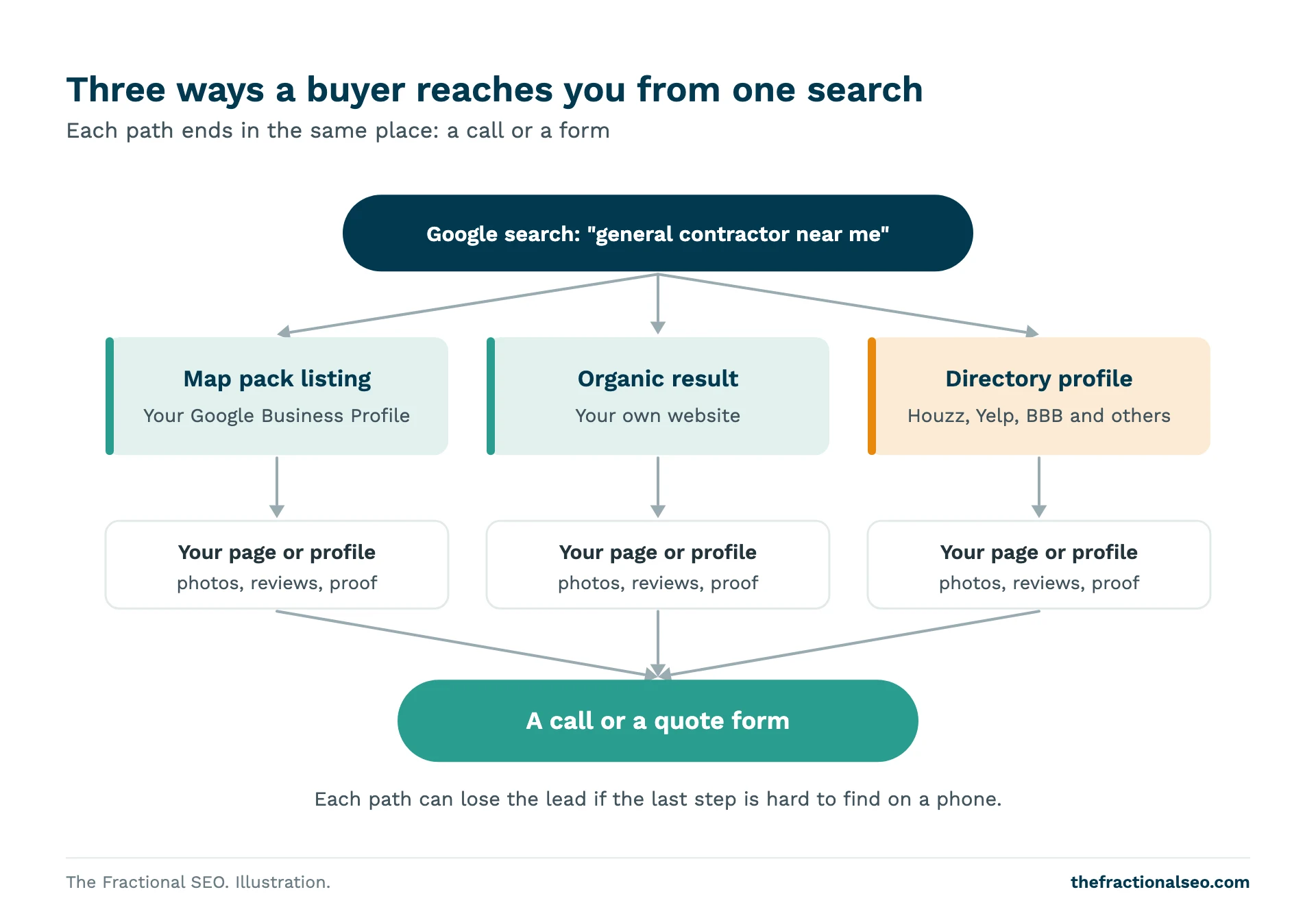
So a buyer has three ways to reach you from one search: your map listing, your website in the organic results, or your profile on a directory that ranks above you. Each path ends in the same place, a call or a form, and each one leaks if that last step is hard. For the directories, see Houzz, Yelp and BBB: Why Directories Outrank Contractors.
Why organic leads are worth the effort
The fastest way to show up on Google is to pay for it. For some construction searches, that gets expensive. These were the costliest construction clicks on Google Ads in our keyword research:
| Search | Average cost per click |
|---|---|
| commercial roofing contractors near me | $31.65 |
| commercial roofing contractors | $29.00 |
| shower remodel contractors | $26.09 |
| roof contractor near me | $26.01 |
| commercial painting contractors near me | $24.43 |
That’s up to $31.65 for one click, before anyone calls. Most construction terms cost less, and paid search still has a place for a new company or a slow month. The difference is what happens when you stop paying. Ads stop the same day. A service page that ranks keeps bringing in calls while you build the next one.
SEO isn’t free either: it costs time or a monthly fee, and it takes months to show up. Whether it pays back depends on your job values and your market. We wrote about that honestly in Is SEO worth it?
Step 1: Get found in the map pack
Google says local results depend mainly on relevance, distance and how well-known a business is, and that more reviews and positive ratings can help. You can’t change where a searcher is standing. You can work on the rest.
Complete your Google Business Profile
Pick the primary category that matches what you do most. In our sample, the most common primary categories in the map pack were general contractor, construction company, home builder and custom home builder. Google’s guidelines say to use as few categories as possible and keep them specific. Use your real business name with no keywords added; the same guidelines prohibit extra information in the name. If you don’t meet customers at your office, hide the address and set a service area. Fill in services, hours, a description and real project photos, and link the website field to your site.
Build your review count
Reviews were the clearest map-pack signal in our data. Businesses in positions 1-3 had a median of 49.5 reviews, against 36 for positions 4-7. That’s a correlation: established firms tend to have more reviews and other advantages too. But it’s the one lever most contractors can pull every week.
Ask at the moments clients are happiest: at the walkthrough, at handover, when a punch list closes. Google suggests sending a review link or a QR code. Don’t offer discounts or gifts for reviews, and don’t ask only the clients you expect to be happy: Google’s content policy prohibits both. For how many you need, see How Many Google Reviews Does a Contractor Need?
Back the profile with location pages
Contractors in the map pack were more likely to have location or service-area pages on their website: 27% of map-pack sites against 17% of sites at local positions 4 and below. It was the strongest website-side difference we found. It’s still a minority even in the pack, which is an opening for anyone willing to build them properly. The full profile setup is in the Google Business Profile Optimization Guide for Contractors.
Step 2: Build pages for each service and area
A homepage can rank for your company name and one broad term. It can’t rank for every job you do in every town. Searches are specific: “commercial roofing contractor”, “basement finishing”, “design-build firm” plus a city. Each needs a page that answers it.
Start with service pages. Give each core service its own page: what you do, who it’s for, where you work, how you price, how the project runs, two or three linked projects, and a call or form at the bottom and the top.
Then add pages for the areas you really serve. A good location page shows projects you finished there, local permitting or code detail, and reviews from local clients. A bad one is your homepage with the town name swapped. Google’s spam policies call pages targeted at specific cities that funnel users to one page doorway abuse. Build fewer, better pages.
What we found on location pages, and how many contractors have them, is in Do Contractors Need Location Pages?
Step 3: Make it easy to call
Plenty of buyers would rather call than type. In our crawl, 74% of contractor websites had a click-to-call phone link on the homepage. That leaves about a quarter where a visitor on a phone has to copy the number by hand, or can’t, because it’s inside an image.
- Put the phone number in the header of every page, as a tap-to-call link.
- Repeat it next to every quote form and at the end of each service page.
- Show the hours the phone is answered, and send after-hours calls to a voicemail that someone checks.
- Use the same main number on your site, your Business Profile and your directory listings.
- Know who answers. A lead that reaches a voicemail box that’s full is a lost lead.
Step 4: Make it easy to ask for a quote
Only 41% of contractor websites had a contact or quote form on the homepage. Many of the rest had a form, but only on a Contact page a visitor has to find. Some buyers will never call. They’re comparing three firms on a lunch break, or it’s 10 p.m. A form catches them.
Put a short form on the homepage and on every service page. Ask only for what you need to call back with a useful answer:
- Name, phone and email.
- Project address or town, so you can rule out jobs outside your area.
- Project type, as a dropdown that matches your services.
- Rough timing: within three months, three to twelve months, just planning.
- An optional box for details and an optional photo upload.
Budget is worth asking for if your sales team needs it to qualify, but make it a range and make it optional. Every extra required field costs you some submissions.
Then answer quickly. Tell people on the form when they’ll hear back, and keep the promise. Send the form to someone who checks it during the day, not a shared inbox no one owns. A form submission that waits until Monday has often already called someone else.
Step 5: Show proof on the page
Buyers hiring a contractor are about to spend a lot of money with a stranger. Proof closes that gap. Yet only 11% of contractor websites had reviews or testimonials embedded on the site. Most firms have dozens of good reviews on Google that their own site never shows.
- Reviews: put one relevant review on each service page, near the form. Use the client’s real words, with permission.
- Portfolio: link each service page to projects of that type, with the town and scope.
- Credentials: license numbers, insurance, bonding, warranties and memberships you actually hold.
- People: a photo of the owner or project manager who will answer the call does more than a stock photo of a hard hat.
For examples of sites that put this together well, see 10 Examples of High-Converting Construction Websites.
Rankings vs conversions: know which lever you’re pulling
This is the part most guides get wrong. In our comparison, click-to-call links, homepage forms, review widgets, portfolios, LocalBusiness schema and a city in the title tag showed no measurable ranking edge. Top-ranked contractors had them at about the same rate as lower-ranked ones.
That doesn’t make them unimportant. It tells you what they’re for. Steps 3 to 5 don’t move you up the page. They decide how many of the people who already reached your page become leads. Steps 1 and 2 are the ranking work, and they take months. The conversion fixes take days and pay off on the traffic you already have.
If you have decent rankings and few leads, start with the conversion basics. If nobody finds you, the conversion basics have nothing to work on, so start with the profile, reviews and pages.
Track every lead
If you can’t say where last month’s leads came from, you can’t tell which of these steps paid off. Set up three things:
- Form tracking: send each form to a thank-you page or fire an event on submit, and mark it as a key event in Google Analytics 4. Google’s instructions show how.
- Call tracking: a call-tracking service can swap the number on your website by traffic source while your Business Profile keeps your main number. Calls from the site then show up by source.
- Business Profile performance: the Performance report shows calls, website clicks and direction requests from your listing.
Once a month, count leads by source and match them to jobs won. Rankings and traffic are useful signals, but the number that matters is signed work. Ask your SEO provider to report on that.
Want to know where your site is losing leads? Ask us for a lead-capture review. We’ll look at how people reach you and what stops them calling.
Questions, answered
How do construction companies get leads online?
Mostly from Google: the map pack and the organic results. Map-pack businesses had a median of 49.5 reviews against 36 just below them. In the organic results, only 57% of page-one spots went to contractor sites, so your directory profiles matter too.
Is SEO or paid ads better for construction leads?
They do different jobs. Ads are fast and stop when you stop paying; the priciest construction clicks cost up to $31.65 each. SEO is slower but keeps working. A common approach is to run ads while SEO builds, then lean on organic once pages rank.
Should my contractor website have a quote form?
Yes. Only 41% of contractor websites had one on the homepage. A form won’t help you rank, but it catches buyers who won’t call. Keep it short and answer quickly.
Do reviews on my website help get leads?
They help visitors decide to contact you. Only 11% of contractor websites showed reviews or testimonials. Review widgets showed no ranking edge in our data, so treat them as a conversion fix.
Sources
- TFS Construction Study, October 2026: We Analyzed 965 Construction Websites
- Google Business Profile Help, Tips to improve your local ranking on Google
- Google Business Profile Help, Guidelines for representing your business on Google
- Google Business Profile Help, Tips to get more reviews
- Google Maps user contributed content policy, Prohibited and restricted content
- Google Search Central, Spam policies for Google web search
- Google Analytics Help, Mark events as key events
- Google Business Profile Help, Understand your Business Profile performance
More guides
The whole Construction library- Technical SEO Basics for Construction Benchmarks from 965 contractor websites for speed, page weight, on-page gaps and schema, and the order…
- Houzz, Yelp and BBB: Why Directories Outrank Contractors, and How to Use Them Houzz and Yelp appeared on page one 66 and 65 times across 100 construction searches. Which…
- Mastering On-Page SEO for Home Builders and Remodelers A page-by-page on-page SEO guide for home builders and remodelers: titles, headings, service, community and portfolio…