
Guide Construction
Technical SEO Basics for Construction
Technical SEO is the plumbing of your website: whether Google can crawl it, whether pages load fast enough on a phone, and whether each page tells Google what it is. Most contractor sites have gaps here, and most of them are fixable in an afternoon. We analyzed 100 local searches across 25 US metros and four contractor types, 1,034 contractor websites (965 crawled) and 457 Google Business Profiles, October 2026.
This guide gives you construction-specific benchmarks for each check, so you know what normal looks like, and puts the fixes in order. The short version: contractor homepages are slow and heavy, but the bigger, easier wins are the on-page gaps that 41% of sites have.
The benchmarks at a glance
| Check | What we found across contractor sites |
|---|---|
| HTTPS | 963 of 965 sites use HTTPS |
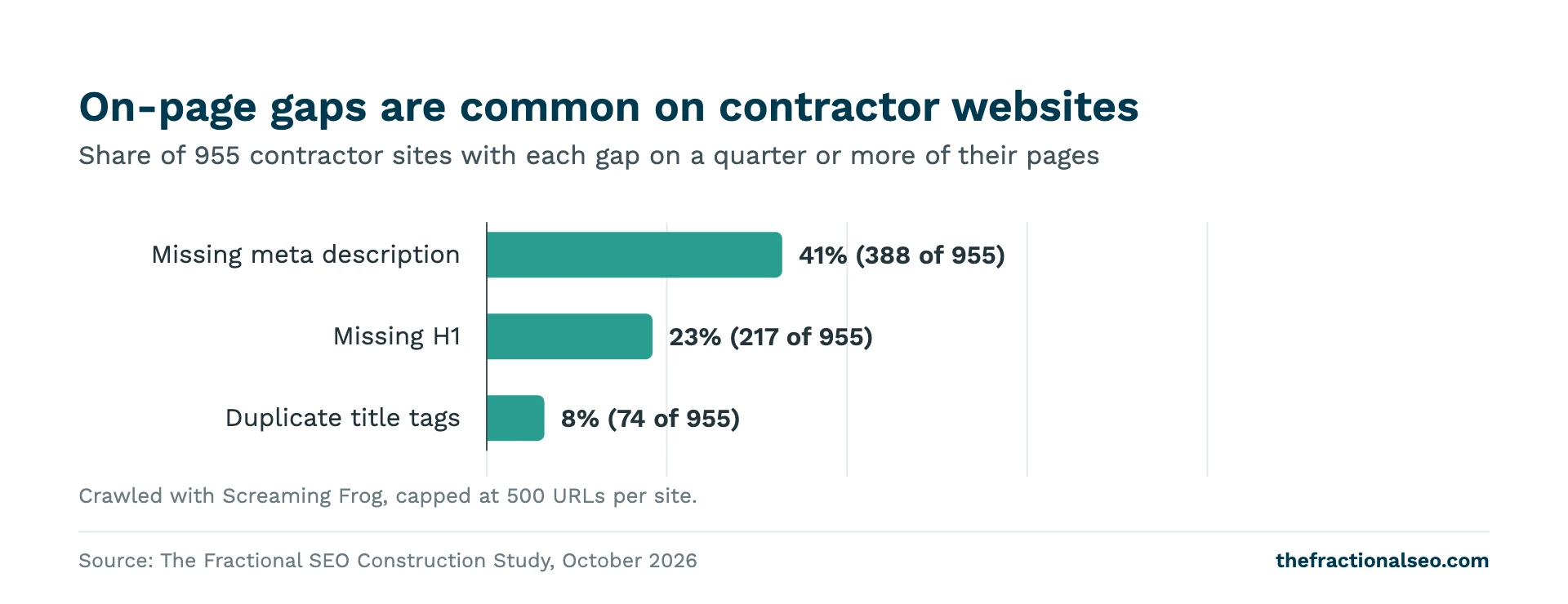
| Missing meta descriptions | 41% lack one on a quarter or more of their pages |
| Missing H1 | 23% lack one on a quarter or more of their pages |
| Duplicate titles | 8% duplicate titles on a quarter or more of their pages |
| Mobile performance score | Median 55/100 (Lighthouse); only 4% score 90+ |
| Largest Contentful Paint (lab) | Median 10.9s on simulated slow mobile |
| Real-user speed data | Only 16% have Core Web Vitals data; 53% of those pass |
| Homepage weight | Median 4.1 MB; 41% are over 5 MB |
| LocalBusiness schema | 46% of sites have it |
Use the table as a reference. If your site is better than the median on each line, you’re ahead of most contractors on the technical side, and your time is better spent on local SEO and content.
Run a crawl and fix on-page gaps first
Start here, not with speed. Missing titles, headings and descriptions are quick to fix, and they’re common. In our crawl, 41% of sites lacked a meta description on a quarter or more of their pages, 23% lacked an H1 on a quarter or more, and 8% duplicated titles on a quarter or more.
How to find your gaps
- Download a crawler. Screaming Frog SEO Spider‘s free version crawls up to 500 URLs, which covers most contractor sites.
- Enter your homepage URL and run the crawl.
- Check the Page Titles, Meta Description and H1 tabs. Filter for missing and duplicate.
- Export the list and fix the pages that matter most first: homepage, service pages, location pages.
What good looks like
- Title: every page has one, and each is different. Google asks for descriptive, concise titles unique to each page. “Basement Finishing in Columbus | Company Name” beats “Services”.
- H1: one per page, saying what the page is about.
- Meta description: a short summary of that page. Google builds snippets mainly from page content but may show your description when it fits better.
Project gallery pages are the usual culprits. A site with 80 project pages all titled “Project” and no description will show up as a wall of duplicates. Give each one a short, specific title: the project type and the town.
For a fuller page-by-page guide, see on-page SEO for home builders and remodelers.
Mobile speed: how fast should a construction website be?
Contractor homepages are slow on mobile. The median Lighthouse performance score in our study was 55 out of 100, the median lab Largest Contentful Paint was 10.9 seconds on a simulated slow mobile connection, and only 4% scored 90 or above.
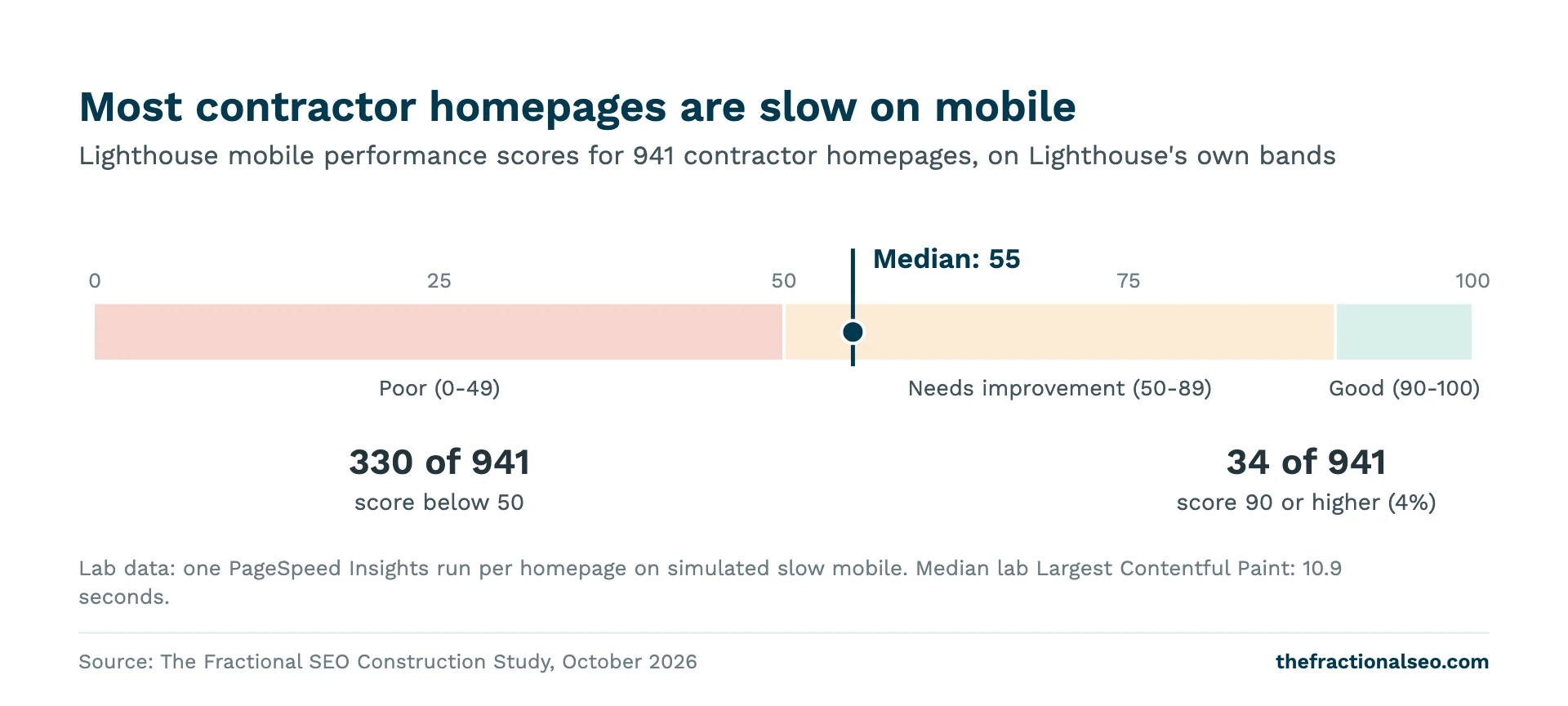
Lighthouse puts 0 to 49 in the poor band, 50 to 89 in needs improvement and 90 to 100 in good. So the typical contractor homepage sits at the bottom of needs improvement.
Lab data and field data
There are two kinds of speed numbers, and they answer different questions.
- Lab data is a single simulated test, like the Lighthouse score in PageSpeed Insights. It’s repeatable and good for finding problems. Scores move from run to run, and Google’s docs suggest thinking of performance as a distribution of scores rather than a single number.
- Field data comes from real Chrome users, through the Chrome UX Report. This is what the Core Web Vitals pass or fail is based on. Google’s thresholds for a good experience are LCP within 2.5 seconds, INP of 200 milliseconds or less and CLS of 0.1 or less, measured at the 75th percentile of page loads.
Most contractor sites don’t have field data at all. Only 16% of the sites in our study had Core Web Vitals data, and 53% of those passed. Chrome only reports field data for pages and sites that are sufficiently popular, and most contractor sites don’t get enough visits. If PageSpeed Insights shows no field data for your site, that’s normal. Use the lab score to find problems.
Does website speed affect contractor rankings?
Our study didn’t compare speed with rankings, so we can’t tell you how much it matters for contractors. Google says Core Web Vitals are used by its ranking systems, and also that it always tries to show the most relevant content, even if the page experience is sub-par. Read that as: speed won’t rescue a page that doesn’t answer the search, but a slow site loses impatient visitors either way.
What slows contractor sites down
- Hero sliders. Five full-width project photos rotating at the top of the homepage. The first slide is often your Largest Contentful Paint, and the others load with it.
- Video backgrounds. A drone clip of a job site behind the headline is heavy on a phone connection.
- Project galleries. Dozens of full-size photos straight off a camera or phone.
- Page builder and plugin bloat. Scripts for sliders, forms, chat widgets and tracking that load on every page.
The fix for most of these is the same: one strong, compressed hero image instead of a slider, no autoplay video on mobile, and galleries that load images as people scroll.
Page weight and project photos
Contractor homepages are heavy. The median homepage in our study weighed 4.1 MB, and 41% were over 5 MB. Most of that is images.
Photos are your best sales tool, so don’t cut them. Make them lighter:
- Resize before you upload. A photo shown 1,200 pixels wide doesn’t need to be uploaded at 6,000.
- Use WebP. Google Search supports WebP along with JPEG, PNG and AVIF. Export photos as WebP where your tools allow it.
- Lazy-load below the fold. The loading=”lazy” attribute delays images until someone scrolls near them. Don’t lazy-load the main image at the top of the page, especially your LCP image; it should load straight away.
- Name and describe your photos. Google recommends short, descriptive filenames and useful alt text. “kitchen-remodel-westerville.webp” with alt text describing the job, not “IMG_4402.jpg”.
LocalBusiness schema
Structured data is code that tells Google your business details in a format it reads directly: name, address, phone, hours. 46% of contractor websites in our study had LocalBusiness structured data.
Treat it as a basic, not a lever. In our comparison, LocalBusiness schema showed no measurable ranking edge: top-ranked contractors had it at about the same rate as lower-ranked ones. No difference found isn’t proof of no effect, but it means schema won’t jump you up the results. Add it because it’s cheap, accurate and helps Google read your details correctly.
Google’s LocalBusiness documentation lists the properties:
- Required: name and address.
- Recommended: telephone, url, geo coordinates, opening hours and price range.
- Skip review markup on your own business. Google says aggregateRating and review are only for sites that collect reviews of other local businesses.
Match every value to your Google Business Profile. If you use a WordPress SEO plugin, check whether it already outputs this markup before adding more, so you don’t end up with two conflicting versions.
HTTPS, sitemaps, indexing and redirects
HTTPS: nearly every contractor site already has it (963 of 965 in our study). If yours doesn’t, fix it before anything else in this guide.
Sitemaps: Google says most content management systems generate sitemaps automatically, including WordPress and Wix. Find yours, then submit it in Search Console’s Sitemaps report.
Indexing: Search Console’s Page indexing report shows which pages Google has indexed and why others aren’t: noindex tags, redirects, 404s, duplicates. Check that your service and location pages are indexed. A noindex tag left on from a site rebuild is a common reason a page never ranks.
Redirects for old project URLs: contractors rebuild sites often, and old project and service URLs break each time. When a URL changes, Google recommends server-side permanent redirects (301 or 308) from old to new, kept for as long as possible and generally at least a year. Redirect each old page to its closest new page, not everything to the homepage.
Platform tips: WordPress and Wix
WordPress runs 80% of contractor sites where we could identify the platform. Next were Wix at 9%, GoDaddy 3%, Webflow 2%, HubSpot 1% and Homefiniti 1%.
WordPress
- Since version 5.5, WordPress includes core XML sitemaps. SEO plugins such as Yoast replace it with their own. Use one, not both.
- Use one SEO plugin for titles, descriptions and schema, and check its settings after any theme change.
- Page builders and heavy multipurpose themes are a common cause of slow pages. See what other contractors run in our roundup of WordPress themes for construction companies.
- Under Settings, Reading, make sure “Discourage search engines” is unticked after a rebuild.
Wix
- Wix generates a sitemap for you, per Google’s sitemap docs. Submit it in Search Console.
- Set a title and description on every page, including project pages.
- Watch image sizes and animations. The same weight problems apply on any platform.
A quarterly technical check
Once the fixes are in, this takes about an hour every three months:
- Crawl the site and check for new missing titles, H1s and descriptions.
- Run PageSpeed Insights on your homepage and your top service page. Compare with last quarter.
- Check Search Console’s Page indexing report for new errors.
- Check that new project and service pages are indexed and in the sitemap.
- Test your LocalBusiness markup after any change to your address, phone or hours.
For the local side of the same routine, use our local SEO checklist for construction companies.
FAQs
How fast should a construction website be?
Aim for a mobile Lighthouse score in the 90s and real-user LCP within 2.5 seconds. Few contractors get there: the median homepage scored 55 in our study and only 4% scored 90 or above, so even moving into the 70s puts you ahead of most.
Does website speed affect contractor rankings?
Our study didn’t test it. Google says Core Web Vitals are used by its ranking systems but that relevance comes first. Fix speed for your visitors; don’t expect it alone to move rankings.
What schema should a contractor website use?
LocalBusiness markup with your name, address, phone, website and hours, matching your Google Business Profile. 46% of contractor sites in our study had it, and it showed no measurable ranking edge, so treat it as a basic.
Is WordPress good for construction websites?
It’s the most common choice by far: 80% of contractor sites where we could identify the platform. It’s flexible and SEO plugins cover the basics. The risk is weight from page builders and plugins, so keep it lean.
Want your site checked against these benchmarks?
We’ll crawl your site, test your mobile speed and list the fixes in order. Get a technical audit of your contractor site.
Related: a beginner’s guide to SEO for general contractors, high-converting construction websites, and the full study, We Analyzed 965 Construction Websites.
Sources
- Chrome for Developers, Lighthouse performance scoring
- web.dev, Web Vitals
- Chrome for Developers, CrUX methodology
- Google Search Central, Understanding page experience
- Screaming Frog SEO Spider
- Google Search Central, Influencing title links
- Google Search Central, Control your snippets in search results
- Google Search Central, Image SEO best practices
- web.dev, Browser-level image lazy loading
- Google Search Central, Local business structured data
- Google Search Central, Build and submit a sitemap
- Search Console Help, Page indexing report
- Google Search Central, Site moves with URL changes
- Make WordPress Core, New XML sitemaps functionality in WordPress 5.5
More guides
The whole Construction library- Houzz, Yelp and BBB: Why Directories Outrank Contractors, and How to Use Them Houzz and Yelp appeared on page one 66 and 65 times across 100 construction searches. Which…
- Mastering On-Page SEO for Home Builders and Remodelers A page-by-page on-page SEO guide for home builders and remodelers: titles, headings, service, community and portfolio…
- A Beginner’s Guide to SEO for General Contractors How general contractor searches actually work, and the order to fix things in, based on 100…