
Guide Construction
Mastering On-Page SEO for Home Builders and Remodelers
Home builders have more room on page one than most contractors. In our study, 60% of page-one results for home builder searches went to contractor websites, against 50% for general contractor searches. Fewer directories in the way means the work you do on your own pages has a better chance of being seen. This guide goes page by page: titles, headings, service pages, community pages and project pages, and what we found builder and remodeler sites actually doing.
The short answer
- Start with a keyword map: one search intent per page. Cost questions get a guide, not a sales page.
- Name the place in the title: only 51% of contractor sites have their city in the homepage title tag.
- Fix the basics: 41% of sites lack a meta description on a quarter or more of their pages.
- Build community or service-area pages: map-pack sites are more likely to have them (27% vs 17%).
- Turn the gallery into project pages: location, scope and captioned photos on each one.
About the data: We analyzed 100 local searches across 25 US metros and four contractor types, 1,034 contractor websites (965 crawled) and 457 Google Business Profiles, October 2026. Most of the website figures below cover all four contractor types, not builders alone; where we have a home builder or remodeler figure, we say so. The study compares what higher- and lower-ranked contractors have. It shows what tends to go together, not what causes a ranking. The full results are in We Analyzed 965 Construction Websites.
| Search type | Share of page-one results that are contractor sites |
|---|---|
| General contractor | 50% |
| Remodeler | 56% |
| Home builder | 60% |
| Commercial contractor | 62% |
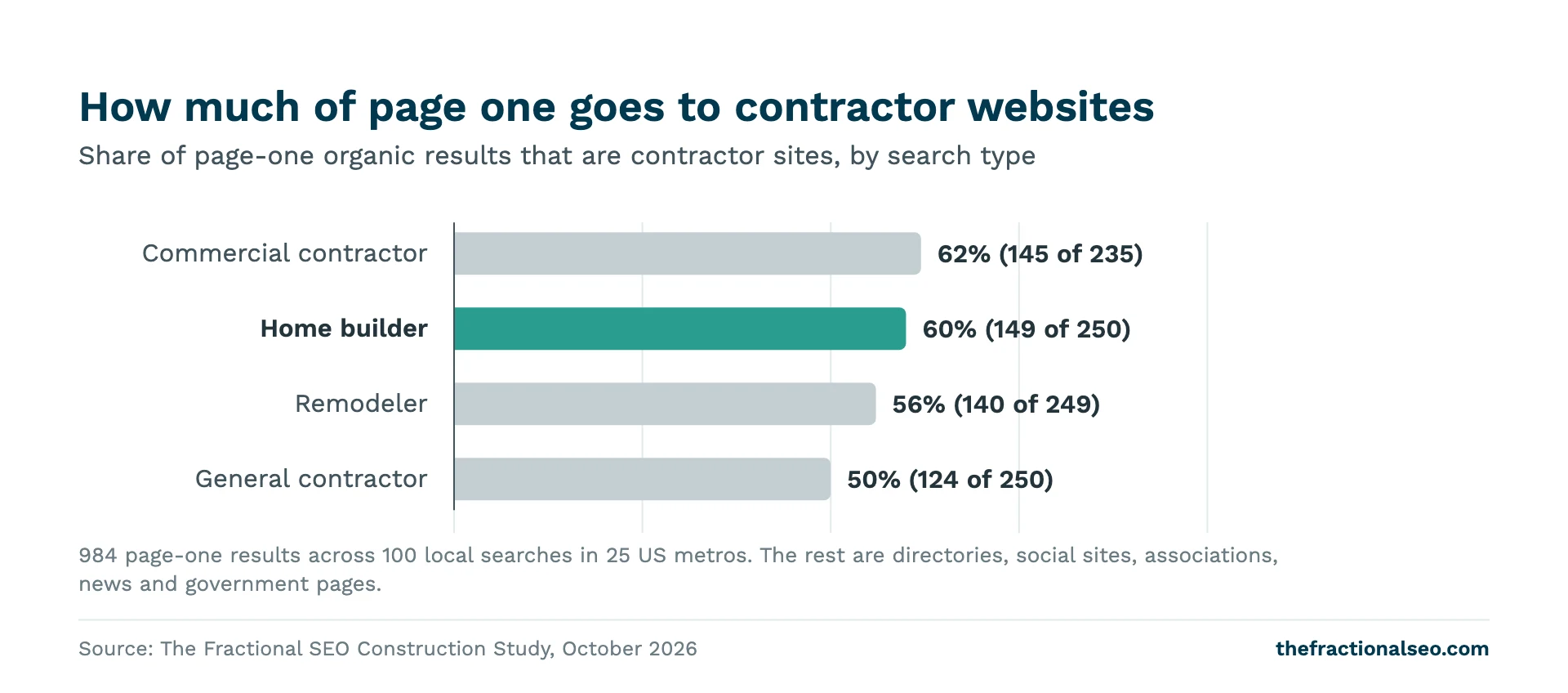
Builder sites also start from a stronger position. The median home builder website in our sample gets an estimated 833 organic visits a month, against 531 for remodelers, 461 for commercial contractors and 438 for general contractors. Those are Semrush estimates, so read them as a comparison rather than a count. The point is that search already sends builders real traffic. On-page work decides how much of it lands on the right page and turns into a call.
Map keywords to pages first
Most builder sites are organized the way the company thinks: About, Services, Gallery, Contact. Buyers search in a different shape. Before you touch a title tag, list the searches you want and give each one a page.
These are the highest-volume home builder searches in the US from our keyword research, with the page type we’d point each one at:
| Search | Monthly US searches | Page to build or improve |
|---|---|---|
| new construction homes near me | 27,100 | Communities or available homes page, plus your Google Business Profile |
| new construction homes | 22,200 | Communities or available homes page |
| custom home builder | 18,100 | Homepage or a custom homes service page |
| how much does it cost to build a house | 18,100 | A cost guide written from your own jobs |
| home builders near me | 18,100 | Homepage, plus your Google Business Profile |
| home builder | 14,800 | Homepage |
Three rules make the map work.
- One intent per page. “Custom home builder” and “new construction homes” are different buyers. One wants to build on their own lot; the other wants to buy a finished or nearly finished house. A page that tries to serve both serves neither well.
- “Near me” searches are local searches. Google answers them mostly with the map pack and with pages that clearly say where you build. You can’t put “near me” in a title and expect it to work. You can make the place obvious everywhere.
- Cost questions get guides. Someone asking what it costs to build a house isn’t ready for a contact form. Write an honest guide with the ranges you actually see on your own jobs, what moves the price and what’s included. Don’t publish ranges you can’t stand behind.
Once the map exists, every other section of this guide is about making each page match the search it was built for.
Title tags that name the place
The title tag is the line Google is most likely to show as the blue link. It’s also the cheapest fix on this list. In our crawl, 51% of contractor websites had their city in the homepage title tag. That check matched the metro name only, not suburbs, so the true share is somewhat higher. Even so, a lot of builder homepages are titled “Home” or carry the company name and nothing else.
Google’s title link guidance asks for titles that are descriptive and concise, unique to each page, free of keyword stuffing, with the brand at the start or end after a separator. Google may rewrite a title it thinks doesn’t describe the page, and it looks at the main heading and other prominent text when it does.
Formulas that work for builders and remodelers:
- Homepage: Custom Home Builder in Raleigh, NC | [Company]
- Service page: Kitchen Remodeling in Plano, TX | [Company]
- Community page: New Homes in [Community], [City] | [Company]
- Project page: Modern Farmhouse Build in [Suburb], [State] | [Company]
- Cost guide: Cost to Build a House in [City]: What Our Jobs Show | [Company]
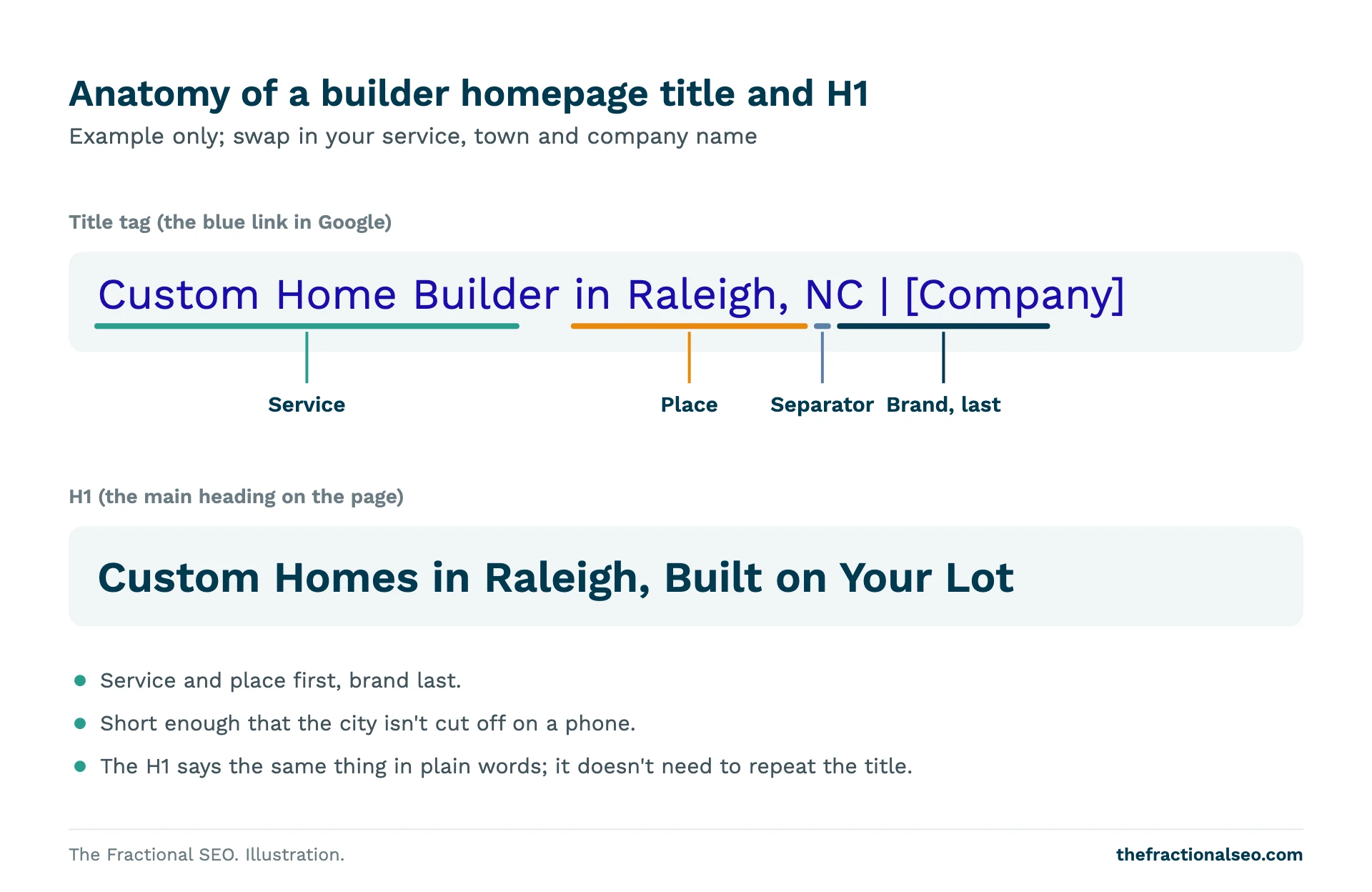
Keep each title short enough that the city doesn’t get cut off on a phone. Put the service and place first and the company name last, unless your name is what people search for.
One honest caveat. In our ranking comparison, a city in the homepage title showed no measurable ranking edge: top-ranked contractors had one at about the same rate as lower-ranked ones. Treat it as table stakes. A clear title helps the searcher pick your result and helps Google understand the page. It won’t carry a weak site on its own.
Meta descriptions and H1s
These two are where builder sites drift the most. In our crawl, 41% of sites lacked a meta description on a quarter or more of their pages, 23% lacked an H1 on a quarter or more, and 8% had duplicate titles on a quarter or more.
The meta description is the short summary under your link. Google says it builds snippets mostly from page content, but it may use your description when that describes the page better. Write one for every page that matters. Make each one unique, say what the page offers and where, and give a reason to click: a price approach, a warranty, a design-build process, a community’s available homes.
The H1 is the main heading on the page. Each page needs exactly one, and it should say what the page is. “Welcome” or a slogan over a hero photo wastes it. “Custom Homes in Raleigh, Built on Your Lot” does the job. The H1 and the title don’t have to match word for word, but they should describe the same thing.
Page builders and theme templates are the usual cause of missing H1s. The big heading in the hero image is often styled text, not an H1 at all. Run your site through a crawler such as Screaming Frog, filter for missing meta descriptions, missing H1s and duplicate titles, and work through the list. For the rest of the technical checks, see Technical SEO Basics for Construction.
Service pages
Most contractors have the idea. In our crawl, 77% of contractor websites had dedicated service pages, and among those that did, the median was 8. The problem is usually depth, not existence: a heading, two sentences and a stock photo don’t tell a buyer or Google much.
In the map-pack comparison, contractors in the top three were a little more likely to have dedicated service pages (81% vs 72%). That gap is weak once you account for the number of comparisons we ran, so don’t read much into it. Build service pages because buyers need them, not because the data promises a ranking.
For a builder, the core service pages are usually custom homes, building on your lot, design-build, additions and whole-home renovations. Each one should cover:
- What you build, in plain terms, and who it’s for.
- Where you build it: the towns and counties you actually serve.
- How you price it: fixed price, cost-plus, allowances. You don’t need numbers to explain the model.
- Your process from first meeting to move-in, with rough timelines you can defend.
- Two or three linked project examples of that service.
- Answers to the questions your sales team hears every week.
- A clear next step: call, quote form or a design consultation.
Community and location pages
This is the section with the clearest signal in our data. Only 28% of contractor websites had location or service-area pages (median 5 among those that did). But contractors in the map pack were more likely to have them: 27% of map-pack sites against 17% of sites at local positions 4 and below. That difference held up after correcting for the number of tests we ran.
It is still a correlation. Established firms with more pages may also have more reviews and more links. And even in the map pack, most sites had no location pages at all. But it’s the strongest website-side signal we found. The detail is in Do Contractors Need Location Pages?
Production builders: one page per community
A community page should be the best page on the internet about building or buying in that community. That means floor plans offered there, available homes and lots, price ranges if you publish them, HOA and amenity details, model home hours, the school district and a map. Title it with the community and city. Update it when inventory changes, and retire or redirect it when the community sells out.
Remodelers and custom builders: one page per real service area
If you work across a metro, build a page for each town where you actually take jobs. The page has to earn its place: projects you completed there, the permit office you deal with, the housing stock you see (1960s ranches, historic districts, new subdivisions) and reviews from local clients.
What it can’t be is the same page with the town name swapped. Google’s spam policies name pages targeted at specific regions or cities that funnel users to one page as doorway abuse. Five real pages beat fifty thin ones.
Portfolio and project pages that rank
In our crawl, 70% of contractor websites had a project portfolio or gallery. For builders and remodelers it’s the page buyers most want to see, and often the least useful to Google: a grid of photos with no text, no location and file names like IMG_4471.jpg.
Turn the strongest projects into their own pages. Each project page should include:
- A title with the project type and location: “Lakefront Custom Home in Lake Norman, NC”.
- A short write-up: what the client wanted, the scope, square footage, timeline and any hard parts you solved.
- Captioned photos with descriptive alt text and file names.
- Links to the matching service page and community or area page, and back again.
- A client review from that job, if the client agrees to it.
Google’s image guidance says it uses alt text along with computer vision to understand images, and warns against filling alt attributes with keywords. Describe what’s in the photo: “Kitchen island with quartz top and pendant lights in a Plano remodel” helps a person using a screen reader and helps Google. “Best home builder Plano custom homes” helps nobody. The same page recommends short, descriptive file names over camera defaults.
Ten project pages with real detail will do more than a gallery of two hundred photos.
Reviews and proof on the page
The review bar differs by trade. The median number of Google reviews in the map pack was 77 for remodeler searches, 51 for home builder searches, 45 for general contractor searches and 25 for commercial contractor searches. Remodelers compete in the most review-heavy results of the four.
Those reviews live on Google, but buyers also want proof on your site, next to the decision. Put a relevant review on each service and project page, close to the call or form. Use the client’s real words with their permission, and never edit a review into something it didn’t say. Add the proof a builder is judged on: license numbers, warranty terms, insurance, association memberships you actually hold, and awards with the year. For what the review numbers mean for rankings, see The Impact of Local Reviews on Construction Company Rankings.
Remodeler-specific tips
Remodelers sell many smaller jobs, so the site needs more, narrower pages than a builder’s.
- Room-level service pages. Kitchen remodeling, bathroom remodeling, basement finishing, additions and whole-home renovations each get their own page. People search for the room, not for “remodeling services”.
- Before and after, with captions. Pair the photos and say what changed: layout moved, wall removed, plumbing relocated. The captions are text Google can read.
- Cost and timeline pages. “How long does a kitchen remodel take” is a question your sales team answers daily. Answer it once on the site, from your own jobs.
- Design-build explained. If you handle design and construction, give it a page. Many buyers don’t know the option exists.
- Old-house expertise. If you work in historic districts or on a common local housing style, say so on the area pages. It’s specific, and competitors rarely write it.
On-page checklist
Work through this for every page that should bring in work:
- The page targets one search intent from your keyword map.
- The title names the service and the place, with the brand last, and is unique.
- There is exactly one H1, and it says what the page is.
- The meta description is unique and gives a reason to click.
- Each core service has its own page with process, pricing approach and linked projects.
- Each community or real service area has a page with local detail, not a swapped town name.
- Your best projects have their own pages with location, scope and captioned photos.
- Images have descriptive alt text and file names.
- A real client review and your credentials sit near the call or form.
- Service, area and project pages link to each other.
The full local version, including Google Business Profile and citations, is in the Local SEO Checklist for Construction Companies. For the bigger picture on local rankings, see The Ultimate Guide to Local SEO for Construction Companies.
If you’d like someone to go through your builder site page by page, ask us for an on-page review. We’ll tell you what to fix first and what can wait.
Questions, answered
How do home builders rank on Google?
Two ways: the map pack, driven by your Google Business Profile, reviews and location, and the organic results, driven by your website. Home builder searches leave more room for builders than most: 60% of page-one results went to contractor sites in our study. Map-pack builders were also more likely to have location pages (27% vs 17%).
What should a home builder title tag include?
The service, the place and your company name, in that order: “Custom Home Builder in Raleigh, NC | [Company]”. Only 51% of contractor sites had their city in the homepage title. Keep it unique to the page and short enough to read on a phone.
Should builders create a page for each community?
Yes, if each page has real content: plans, available homes, amenities, schools and a map. Only 28% of contractor sites had location or service-area pages, and map-pack sites were more likely to have them. Thin pages with the name swapped can count as doorway pages, so don’t build those.
What keywords do home buyers search?
The biggest are “new construction homes near me” (27,100 a month), “new construction homes” (22,200), and “custom home builder”, “how much does it cost to build a house” and “home builders near me” (18,100 each). Map each one to its own page type.
Sources
- TFS Construction Study, October 2026: We Analyzed 965 Construction Websites
- Google Search Central, Influencing your title links in search results
- Google Search Central, Control your snippets in search results
- Google Search Central, Image SEO best practices
- Google Search Central, Spam policies for Google web search
More guides
The whole Construction library- Technical SEO Basics for Construction Benchmarks from 965 contractor websites for speed, page weight, on-page gaps and schema, and the order…
- Houzz, Yelp and BBB: Why Directories Outrank Contractors, and How to Use Them Houzz and Yelp appeared on page one 66 and 65 times across 100 construction searches. Which…
- A Beginner’s Guide to SEO for General Contractors How general contractor searches actually work, and the order to fix things in, based on 100…